
🐳 Dockerizing a Three-Tier Java Spring Boot Application with Docker Compose & MySQL
If you are learning Docker, DevOps, Java, Spring Boot, or CI/CD, building a real multi-container application is one of the best ways to understand how containerization works in a practical environment.
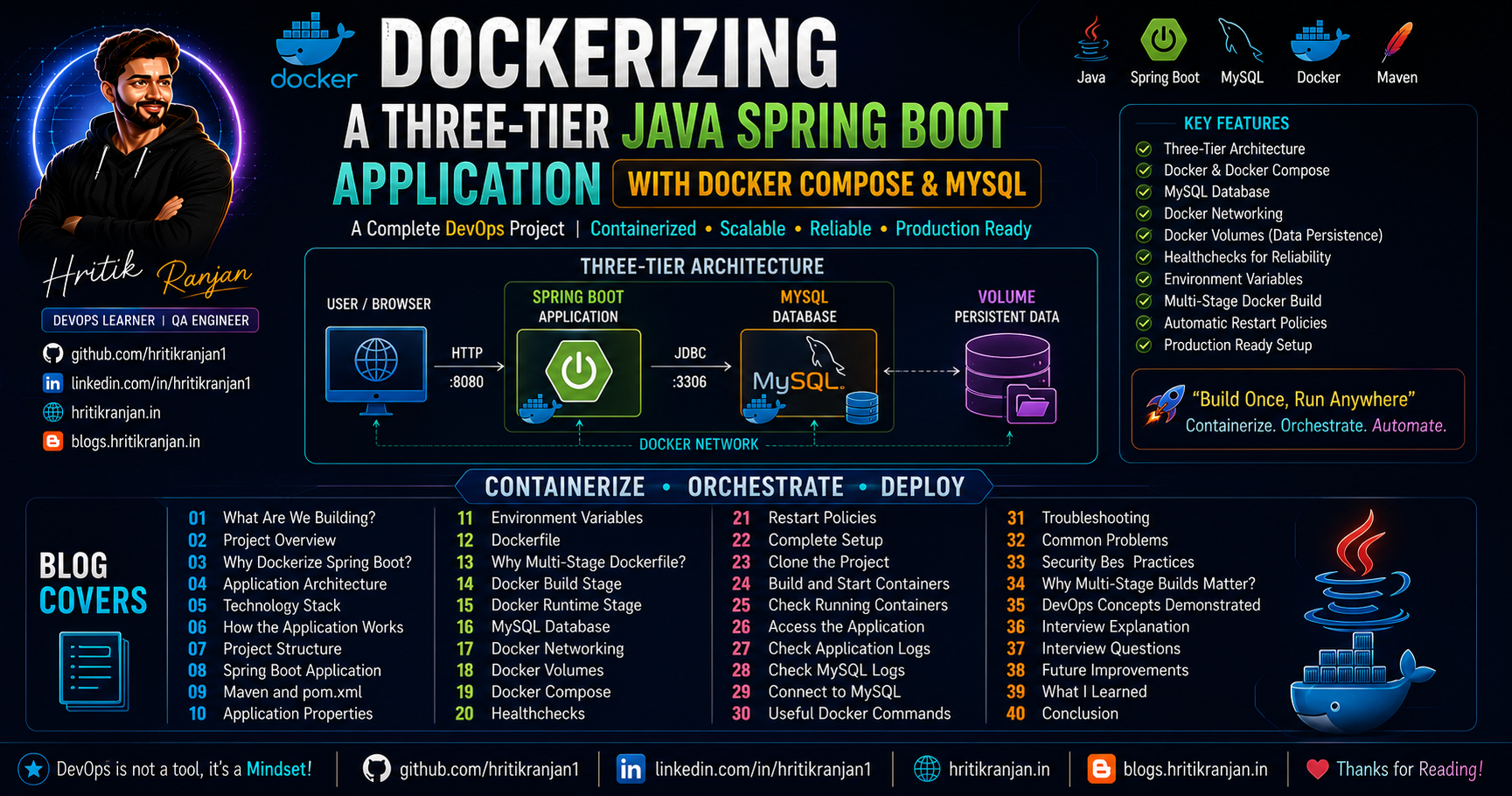
In this project, I deployed a three-tier Java Spring Boot application using Docker and Docker Compose.
The application contains:
☕ Java Spring Boot backend
🗄️ MySQL database
🐳 Docker containers
⚙️ Docker Compose
📦 Maven
🔗 Docker networking
💾 Docker volumes
❤️ Healthchecks
🔐 Environment variables
🏗️ Multi-stage Docker build
🔄 Automatic restart policies
The goal was not simply to run a Java application inside Docker.
The goal was to understand how a Java application, database, networking, configuration, persistence, and container orchestration work together.
📌 Table of Contents
🚀 What Are We Building?
We are taking a Java Spring Boot application and converting it into a containerized application.
The final architecture contains two main Docker services:
                    USER
                     |
                     ↓
              Spring Boot App
                     |
                     ↓
                  MySQL
                     |
                     ↓
              Docker Volume
Docker Compose manages these services.
Instead of installing Java, Maven and MySQL directly on the host machine, we package the application and database into containers.
The result is a reproducible environment that can be started with a single command.
📋 Project Overview
This project demonstrates how to deploy a Spring Boot application using Docker Compose.
The architecture contains:
☕ Application
A Java Spring Boot application built using Maven.
🗄️ Database
A MySQL database responsible for storing application data.
🐳 Docker
Docker packages the application and its environment into containers.
⚙️ Docker Compose
Docker Compose manages the complete multi-container environment.
💾 Volume
A Docker volume keeps MySQL data persistent.
❤️ Healthcheck
A healthcheck verifies whether MySQL is actually ready.
🤔 Why Dockerize a Spring Boot Application?
Normally, deploying a Spring Boot application requires:
Java
Maven
Application dependencies
MySQL
Database configuration
Environment configuration
Different machines can have different versions of these components.
For example:
Developer Machine
Java 17
Maven version A
MySQL version X

        ↓

Production Machine
Java 21
Maven version B
MySQL version Y
This can create compatibility problems.
Docker allows us to package the application environment into reproducible containers.
The deployment becomes:
Source Code
     ↓
Docker Image
     ↓
Container
     ↓
Application
The same image can then be used in:
Development
     ↓
Testing
     ↓
Staging
     ↓
Production
🏗️ Application Architecture
The project follows a simple three-tier architecture:
┌─────────────────────────┐
│          USER           │
│       Web Browser       │
└────────────┬────────────┘
             │
             │ HTTP
             ↓
┌─────────────────────────┐
│     SPRING BOOT APP     │
│                         │
│        Java             │
│        Spring Boot      │
│        Thymeleaf        │
└────────────┬────────────┘
             │
             │ MySQL :3306
             ↓
┌─────────────────────────┐
│          MYSQL          │
│                         │
│       Database          │
└────────────┬────────────┘
             │
             ↓
┌─────────────────────────┐
│     DOCKER VOLUME       │
│   Persistent Database   │
│          Data           │
└─────────────────────────┘
Docker Compose manages the application and database services.
🧰 Technology Stack
| Technology | Purpose |
|---|---|
| Java | Programming language |
| Spring Boot | Application framework |
| Maven | Build and dependency management |
| Thymeleaf | Server-side UI templating |
| MySQL | Relational database |
| Docker | Containerization |
| Docker Compose | Container orchestration |
| Docker Network | Service communication |
| Docker Volume | Persistent storage |
| Healthcheck | Service readiness |
| Environment Variables | Configuration management |
🔄 How the Application Works
When the user opens the application:
Browser
   |
   ↓
Spring Boot Container
   |
   ↓
Spring Boot processes request
   |
   ↓
Application communicates with MySQL
   |
   ↓
MySQL returns data
   |
   ↓
Spring Boot processes data
   |
   ↓
Thymeleaf generates response
   |
   ↓
Browser
The important part is that the Java application and MySQL database are running in separate containers.
📁 Project Structure
A typical structure can look like:
java-docker-project/
│
├── src/
│   ├── main/
│   │   ├── java/
│   │   └── resources/
│   │       ├── templates/
│   │       └── application.properties
│   │
│   └── test/
│
├── pom.xml
├── Dockerfile
├── docker-compose.yml
└── README.md
The most important files are:
pom.xml
Dockerfile
docker-compose.yml
application.properties
Each file has a different responsibility.
☕ Spring Boot Application
Spring Boot provides the main application framework.
It handles:
HTTP requests
Business logic
Database communication
Application configuration
Dependency management
Web interface
The application can use Thymeleaf for server-side HTML rendering.
The architecture is therefore:
Browser
   ↓
Spring Boot
   ↓
Thymeleaf
   ↓
MySQL
📦 Maven and pom.xml
Maven is the build and dependency management tool used by the Java application.
The main configuration file is:
pom.xml
The POM defines project information and dependencies.
For example:
<?xml version="1.0" encoding="UTF-8"?>
<project xmlns="http://maven.apache.org/POM/4.0.0" xmlns:xsi="http://www.w3.org/2001/XMLSchema-instance"
	xsi:schemaLocation="http://maven.apache.org/POM/4.0.0 https://maven.apache.org/xsd/maven-4.0.0.xsd">
	<modelVersion>4.0.0</modelVersion>
	<parent>
		<groupId>org.springframework.boot</groupId>
		<artifactId>spring-boot-starter-parent</artifactId>
		<version>3.2.2</version>
		<relativePath/> <!-- lookup parent from repository -->
	</parent>
	<groupId>com.Spring-Boot-MVC</groupId>
	<artifactId>ExpensesTracker</artifactId>
	<version>0.0.1-SNAPSHOT</version>
	<name>ExpensesTracker</name>
	<description>Demo project for Spring Boot</description>
	<properties>
		<java.version>17</java.version>
	</properties>
	<dependencies>
		<dependency>
			<groupId>org.springframework.boot</groupId>
			<artifactId>spring-boot-starter-data-jpa</artifactId>
		</dependency>
		<dependency>
			<groupId>org.springframework.boot</groupId>
			<artifactId>spring-boot-starter-security</artifactId>
		</dependency>
		<dependency>
			<groupId>org.springframework.boot</groupId>
			<artifactId>spring-boot-starter-thymeleaf</artifactId>
		</dependency>
		<dependency>
			<groupId>org.springframework.boot</groupId>
			<artifactId>spring-boot-starter-validation</artifactId>
		</dependency>
		<dependency>
			<groupId>org.springframework.boot</groupId>
			<artifactId>spring-boot-starter-web</artifactId>
		</dependency>
		<dependency>
			<groupId>org.thymeleaf.extras</groupId>
			<artifactId>thymeleaf-extras-springsecurity6</artifactId>
		</dependency>

		<dependency>
			<groupId>com.mysql</groupId>
			<artifactId>mysql-connector-j</artifactId>
			<scope>runtime</scope>
		</dependency>
		<dependency>
			<groupId>org.springframework.boot</groupId>
			<artifactId>spring-boot-starter-test</artifactId>
			<scope>test</scope>
		</dependency>
		<dependency>
			<groupId>org.springframework.security</groupId>
			<artifactId>spring-security-test</artifactId>
			<scope>test</scope>
		</dependency>
	</dependencies>

	<build>
		<plugins>
			<plugin>
				<groupId>org.springframework.boot</groupId>
				<artifactId>spring-boot-maven-plugin</artifactId>
			</plugin>
		</plugins>
	</build>

</project>
The exact dependencies depend on the application.
🔨 Maven Build
Maven can compile and package the application.
A common command is:
mvn clean install
Let's understand it.
clean
Removes previously generated build files.
install
Compiles, tests and packages the application and installs the generated artifact into the local Maven repository.
The final output is generally a JAR file:
target/
    application.jar
This JAR file is what we ultimately need in the runtime Docker container.
⚙️ Application Properties
Spring Boot commonly stores configuration in:
application.properties
For example:
spring.datasource.url=jdbc:mysql://db:3306/testdb
spring.datasource.username=root
spring.datasource.password=root

spring.jpa.hibernate.ddl-auto=update
Here:
db
is the MySQL service name.
This is important.
Inside Docker Compose:
Spring Boot Container
        |
        ↓
      db:3306
        |
        ↓
MySQL Container
We don't normally use:
localhost
for the database hostname when the database is in another container.
🔐 Environment Variables
Hardcoding database credentials inside source code is not recommended.
Instead, Spring Boot properties can be overridden using environment variables.
For example:
spring.datasource.url
can be mapped to:
SPRING_DATASOURCE_URL
Similarly:
spring.datasource.username
becomes:
SPRING_DATASOURCE_USERNAME
and:
spring.datasource.password
becomes:
SPRING_DATASOURCE_PASSWORD
The naming convention is:
spring.datasource.url
        ↓
SPRING_DATASOURCE_URL
spring.datasource.username
        ↓
SPRING_DATASOURCE_USERNAME
spring.datasource.password
        ↓
SPRING_DATASOURCE_PASSWORD
This is a very useful Spring Boot + Docker concept.
🐳 Dockerfile
The Dockerfile describes how the Java application image is built.
Instead of creating a single huge image, this project uses a multi-stage Docker build.
The architecture is:
Stage 1
Maven Builder
      ↓
Compile Application
      ↓
Create JAR
      ↓
Stage 2
Runtime Image
      ↓
Run JAR
This is an important Docker optimization technique.
🏗️ Why Use a Multi-Stage Dockerfile?
Suppose we use one image for everything:
Java
+
Maven
+
Source Code
+
Build Tools
+
Dependencies
+
JAR
The final image may become unnecessarily large.
But the production container only needs:
Java Runtime
+
Application JAR
Therefore, multi-stage builds separate:
BUILD ENVIRONMENT
from:
RUNTIME ENVIRONMENT
🔨 Docker Build Stage
The first stage uses a Maven image.
Conceptually:
# Stage 1: Build JAR
FROM maven:3.9-eclipse-temurin-17-alpine AS builder
WORKDIR /app

COPY . .

# Build the executable jar (skipping unit tests)
RUN mvn clean package -DskipTests

# Stage 2: Run Application
FROM eclipse-temurin:17-jre-alpine
WORKDIR /app

COPY --from=builder /app/target/*.jar /app/expenseapp.jar

EXPOSE 8080

CMD ["java", "-jar", "expenseapp.jar"]
The builder stage:
Starts with Maven
Sets working directory
Copies project files
Downloads dependencies
Compiles the application
Runs the Maven build
Produces the JAR file
The result may look like:
target/
   └── application.jar
🚀 Docker Runtime Stage
The second stage uses a smaller Java runtime image.
Conceptually:
FROM eclipse-temurin:...-jre

WORKDIR /app

COPY --from=builder /app/target/*.jar app.jar

EXPOSE 8080

ENTRYPOINT ["java", "-jar", "app.jar"]
The important line is:
COPY --from=builder
This means:
Copy the required application artifact from the builder stage into the runtime stage.
The final image doesn't need:
Maven
Source Code
Build Tools
It only needs the application runtime and JAR.
📦 Multi-Stage Build Flow
The complete process is:
pom.xml
   |
   ↓
Maven Builder Container
   |
   ↓
mvn clean install
   |
   ↓
application.jar
   |
   ↓
Runtime Java Image
   |
   ↓
Java + application.jar
This produces a cleaner and more efficient final image.
🗄️ MySQL Database
MySQL runs in its own container.
For example:
MySQL Container
      |
      ↓
Database
The Spring Boot application communicates with MySQL through the Docker network.
Example:
Spring Boot
     |
     ↓
db:3306
     |
     ↓
MySQL
The default MySQL port is:
3306
🔗 Docker Networking
Docker Compose creates a network for the services.
For example:
┌───────────────────────────────────┐
│          Docker Network           │
│                                   │
│  ┌─────────────┐   ┌───────────┐ │
│  │ Spring Boot │──→│   MySQL   │ │
│  │    app      │   │    db     │ │
│  └─────────────┘   └───────────┘ │
│                                   │
└───────────────────────────────────┘
The application can connect using:
db:3306
instead of using a hardcoded container IP.
Docker's internal DNS resolves the service name.
This is one of the biggest advantages of Compose networking.
💾 Docker Volumes
Database persistence is extremely important.
Without a volume:
MySQL Container
       ↓
Database Data
If the container is removed, database data can be lost.
With a volume:
MySQL Container
       ↓
Docker Volume
       ↓
Persistent Data
For example:
volumes:
  mysql_data:
Then:
services:

  db:
    volumes:
      - mysql_data:/var/lib/mysql
Now the lifecycle becomes:
Container Deleted
       ↓
Volume Remains
       ↓
Database Data Remains
This is why Docker volumes are critical for stateful services such as databases.
⚙️ Docker Compose
Docker Compose is the central orchestration file.
Usually:
docker-compose.yml
contains:
services:

version: "3.8"

services:
  mysql_db:
    image: mysql:8.0
    container_name: mysql
    restart: always
    environment:
      MYSQL_ROOT_PASSWORD: "Test@123"
      MYSQL_DATABASE: expenses_tracker
    ports:
      - "3306:3306"
    networks:
      - expense-app-nw
    healthcheck:
      test: ["CMD-SHELL", "mysqladmin ping -pTest@123 --silent"]
      interval: 5s
      timeout: 5s
      retries: 10
      start_period: 30s
    volumes:
      - mysql_data:/var/lib/mysql

  java_app:
    build:
      context: .
    container_name: expenseapp
    restart: always
    ports:
      - "8081:8080"
    environment:
      SPRING_DATASOURCE_URL: "jdbc:mysql://mysql_db:3306/expenses_tracker?allowPublicKeyRetrieval=true&useSSL=false"
      SPRING_DATASOURCE_USERNAME: root
      SPRING_DATASOURCE_PASSWORD: "Test@123"
    depends_on:
      mysql_db:
        condition: service_healthy
    networks:
      - expense-app-nw

networks:
  expense-app-nw:
    driver: bridge

volumes:
  mysql_data:
Compose can define:
Services
Images
Builds
Ports
Environment variables
Networks
Volumes
Healthchecks
Dependencies
Restart policies
Instead of manually running multiple Docker commands, Compose lets us define the entire application architecture as code.
🧩 Example Docker Compose Structure
A simplified example:
services:

  app:
    build: .
    container_name: java_app
    ports:
      - "8080:8080"

    environment:
      SPRING_DATASOURCE_URL: jdbc:mysql://db:3306/testdb
      SPRING_DATASOURCE_USERNAME: root
      SPRING_DATASOURCE_PASSWORD: root

    depends_on:
      db:
        condition: service_healthy

    restart: always

  db:
    image: mysql:8
    container_name: mysql_db

    environment:
      MYSQL_ROOT_PASSWORD: root
      MYSQL_DATABASE: testdb

    volumes:
      - mysql_data:/var/lib/mysql

    healthcheck:
      test: ["CMD", "mysqladmin", "ping", "-h", "localhost"]
      interval: 10s
      timeout: 5s
      retries: 5

    restart: always

volumes:
  mysql_data:
This is a simplified example. Adjust image versions, credentials, database names and application configuration according to your actual project.
❤️ Healthchecks
One of the most important parts of this project is the MySQL healthcheck.
Simply checking:
Container = Running
does not necessarily mean:
MySQL = Ready
MySQL may take some time to initialize.
Without a healthcheck:
MySQL Container Starts
        ↓
Spring Boot Starts
        ↓
Spring Boot Connects
        ↓
MySQL Not Ready
        ↓
Connection Failure
With a healthcheck:
MySQL Starts
    ↓
Healthcheck
    ↓
MySQL Ready?
    ↓
YES
    ↓
Spring Boot Starts
🩺 MySQL Healthcheck
A common healthcheck is:
healthcheck:
  test: ["CMD", "mysqladmin", "ping", "-h", "localhost"]
  interval: 10s
  timeout: 5s
  retries: 5
The command:
mysqladmin ping
checks whether MySQL is responding.
🔄 depends_on with Healthcheck
Docker Compose can use the health status:
depends_on:
  db:
    condition: service_healthy
This tells Compose:
Start the application after the database service reports a healthy status.
This is better than relying only on container startup order.
🔁 Restart Policies
A container may stop because of:
Application crash
Temporary failure
Server issue
Unexpected error
A restart policy can automatically restart it.
For example:
restart: always
This means Docker should restart the container when appropriate.
Restart policies improve application resilience.
However, restart policies are not a replacement for proper monitoring and troubleshooting.
💻 Complete Setup
Let's now deploy the application.
1️⃣ Install Docker
First install Docker Desktop or Docker Engine depending on your operating system.
Verify:
docker --version
Then:
docker compose version
2️⃣ Clone the Repository
Clone the project:
git clone https://github.com/hritikranjan1/Expenses-Tracker-WebApp.git
Move into the project:
cd Expenses-Tracker-WebApp
3️⃣ Check Project Files
Verify:
pom.xml
Dockerfile
docker-compose.yml
src/
For example:
ls
On Windows:
dir
4️⃣ Configure Database Properties
Configure Spring Boot to use the MySQL service.
For example:
spring.datasource.url=jdbc:mysql://db:3306/testdb
spring.datasource.username=root
spring.datasource.password=root
Or provide these through environment variables.
5️⃣ Build and Start Containers
Run:
docker compose up -d --build
This command:
Reads docker-compose.yml
        ↓
Builds Spring Boot image
        ↓
Pulls MySQL image
        ↓
Creates network
        ↓
Creates volume
        ↓
Creates containers
        ↓
Starts MySQL
        ↓
Runs healthcheck
        ↓
Starts Spring Boot
🔍 Check Running Containers
Run:
docker compose ps
or:
docker ps
You should see something similar to:
NAME        STATUS
java_app    Up
mysql_db    Up (healthy)
The important thing is that MySQL should eventually show:
healthy
🌍 Access the Application
If Spring Boot exposes port 8080:
http://localhost:8080
Open it in your browser.
The request flow becomes:
Browser
   ↓
localhost:8080
   ↓
Spring Boot Container
   ↓
MySQL Container
📜 Check Application Logs
To see Spring Boot logs:
docker logs java_app
Follow logs:
docker logs -f java_app
You may see Spring Boot startup information.
Look for messages indicating that the application has successfully started.
🗄️ Check MySQL Logs
Run:
docker logs mysql_db
Follow:
docker logs -f mysql_db
Look for messages indicating MySQL is ready to accept connections.
🔌 Connect to MySQL
You can enter the MySQL container:
docker exec -it mysql_db mysql -uroot -p
Enter the configured password.
Then:
SHOW DATABASES;
Select the application database:
USE testdb;
Check tables:
SHOW TABLES;
Exit:
exit;
🧪 Test the Application
Testing should happen at multiple levels.
Test 1 — Container
docker ps
Test 2 — MySQL
docker exec -it mysql_db mysqladmin ping -uroot -p
Test 3 — Spring Boot
Open:
http://localhost:8080
Test 4 — Logs
docker logs java_app
This gives a structured way to verify the deployment.
🧰 Useful Docker Commands
Build image
docker compose build
Start containers
docker compose up -d
Build and start
docker compose up -d --build
Stop containers
docker compose stop
Stop and remove containers
docker compose down
Remove containers and volumes
docker compose down -v
⚠️ Be careful with:
docker compose down -v
because it can remove the MySQL volume and therefore the persistent database data.
📦 Image Commands
List Docker images:
docker images
Remove an image:
docker rmi <image-name>
Build manually:
docker build -t springboot-app .
Run manually:
docker run -p 8080:8080 springboot-app
For this project, Docker Compose is preferred because we have multiple services.
🔎 Container Inspection
Inspect the application container:
docker inspect java_app
Inspect MySQL:
docker inspect mysql_db
This can help investigate:
Network
Volumes
Environment
Container configuration
IP addresses
Mounts
🌐 Check Docker Network
List networks:
docker network ls
Inspect a network:
docker network inspect <network-name>
This can show which containers are connected.
For example:
java_app
   |
   +------ Docker Network ------+
                              |
                              ↓
                           mysql_db
💾 Check Docker Volumes
List volumes:
docker volume ls
Inspect a volume:
docker volume inspect <volume-name>
The volume is responsible for keeping MySQL data persistent.
🐞 Troubleshooting
Troubleshooting is an important DevOps skill.
When the application doesn't work, don't immediately rebuild everything.
Follow a structured process.
❌ Problem 1: Spring Boot Cannot Connect to MySQL
Possible error:
Communications link failure
or:
Connection refused
Check MySQL:
docker compose ps
Then:
docker logs mysql_db
Make sure MySQL is healthy.
Also verify:
Database hostname
Database port
Database name
Username
Password
❌ Problem 2: Using localhost for MySQL
A common mistake is:
spring.datasource.url=jdbc:mysql://localhost:3306/testdb
If MySQL is in another container, this may not work as expected.
Instead use the Compose service name:
spring.datasource.url=jdbc:mysql://db:3306/testdb
The concept is:
Spring Boot Container
       |
       ↓
       db:3306
       |
       ↓
MySQL Container
❌ Problem 3: MySQL Is Running But Application Still Fails
Check:
docker compose ps
A running container does not always mean the service is ready.
Check health:
docker inspect mysql_db
Check logs:
docker logs mysql_db
This is where healthchecks become useful.
❌ Problem 4: Port 8080 Already in Use
You may see:
Bind for 0.0.0.0:8080 failed
This means another application is using port 8080.
You can change:
ports:
  - "8081:8080"
Now access:
http://localhost:8081
The important distinction is:
Host Port : Container Port
So:
8081:8080
means:
Host → 8081
Container → 8080
❌ Problem 5: Docker Build Fails
Check:
docker compose build
Look carefully at the error.
Common causes:
Incorrect Maven dependency
Network issue while downloading dependencies
Incorrect Java version
Invalid Dockerfile
Incorrect source path
Build failure in Maven
You can test Maven locally:
mvn clean install
If the Maven build fails outside Docker, fix the application first.
❌ Problem 6: Container Keeps Restarting
Check:
docker ps -a
Then:
docker logs java_app
The logs usually provide the actual reason.
Possible causes:
Application crash
Database connection failure
Configuration error
Missing environment variable
Incorrect Java version
Incorrect JAR path
❌ Problem 7: Database Data Disappears
Check whether a volume is configured:
docker volume ls
If MySQL is running without persistent storage, removing the container may remove the database data.
Use:
volumes:
  - mysql_data:/var/lib/mysql
and define:
volumes:
  mysql_data:
🔐 Security Best Practices
For learning, you may see configurations such as:
root
root
But this should not be used in production.
Production systems should follow stronger security practices.
1. Don't use root for the application
Create a dedicated MySQL user.
2. Use strong passwords
Never use simple credentials in production.
3. Don't commit secrets
Never push:
.env
or credentials into GitHub.
4. Use secrets management
Use a proper secret-management system in production.
5. Keep database private
Don't expose MySQL publicly unless there is a specific requirement.
6. Use HTTPS
Production web applications should use TLS.
7. Scan Docker images
Use image scanning tools to identify vulnerabilities.
8. Keep dependencies updated
Regularly update:
Java
Spring Boot
Maven dependencies
MySQL
Docker base images
9. Use non-root containers
Where practical, run applications using a non-root user.
🏭 Why Multi-Stage Builds Matter
Multi-stage builds are one of the most useful Docker optimization techniques for compiled applications such as Java applications.
Without multi-stage builds:
Final Image
|
+-- Maven
+-- JDK
+-- Source Code
+-- Build Dependencies
+-- JAR
With multi-stage builds:
Builder Image
|
+-- Maven
+-- JDK
+-- Source
+-- Dependencies
|
↓
JAR
|
↓
Runtime Image
|
+-- JRE
+-- JAR
Benefits:
Smaller final image
Faster deployment
Less unnecessary software
Reduced attack surface
Cleaner production containers
This is one of the major reasons to use multi-stage Docker builds for Java applications.
🎯 DevOps Concepts Demonstrated
This project demonstrates several important DevOps concepts.
🐳 Containerization
Java Application
      ↓
Docker Image
      ↓
Container
⚙️ Orchestration
Docker Compose
      ↓
Spring Boot + MySQL
🔗 Networking
Spring Boot
      ↓
Docker Network
      ↓
MySQL
💾 Persistent Storage
MySQL
  ↓
Docker Volume
  ↓
Persistent Data
❤️ Healthchecks
MySQL
  ↓
Healthcheck
  ↓
Healthy
  ↓
Spring Boot
🔐 Configuration Management
Environment Variables
        ↓
Docker Compose
        ↓
Spring Boot
🏗️ Build Optimization
Maven Builder
      ↓
JAR
      ↓
Lightweight Runtime Image
🧠 Complete Deployment Flow
The entire project can be represented as:
                Developer
                    |
                    ↓
               Source Code
                    |
                    ↓
             Dockerfile
                    |
                    ↓
          Multi-Stage Build
                    |
           ┌────────┴────────┐
           ↓                 ↓
      Maven Builder      Runtime Image
           |                 |
           ↓                 ↓
      application.jar    Java Runtime
                             |
                             ↓
                     Spring Boot App
                             |
                             ↓
                       Docker Network
                             |
                             ↓
                          MySQL
                             |
                             ↓
                      Docker Volume
Docker Compose manages the runtime architecture.
💼 How to Explain This Project in an Interview
If an interviewer asks:
"Explain your Docker project."
You can answer:
"I deployed a three-tier Java Spring Boot application using Docker and Docker Compose. The application uses Spring Boot for the backend, Maven for dependency management and building the application, and MySQL for persistent data storage. I created a multi-stage Dockerfile where the first stage uses Maven to build the application and generate the JAR file, while the second stage uses a lightweight Java runtime image to run only the required JAR. Docker Compose manages the application and database services, networking, environment variables, healthchecks, restart policies, and persistent volumes. The Spring Boot application connects to MySQL through the Docker network using the database service name rather than localhost. I also configured a MySQL healthcheck so the application doesn't attempt to connect before the database is ready."
This answer demonstrates that you understand both Docker commands and the underlying architecture.
❓ Interview Questions
1. Why did you use Docker Compose?
Because the project contains multiple services.
Docker Compose provides a simple way to define and manage those services together.
2. Why did you use a multi-stage Dockerfile?
To separate the build environment from the runtime environment and keep the final image smaller and cleaner.
3. What is the purpose of the Maven stage?
The Maven stage compiles the Java source code, downloads dependencies, runs the build and generates the JAR file.
4. Why don't you copy the complete source code into the runtime image?
The runtime container only needs the generated application artifact and Java runtime.
Keeping build tools and source code out of the runtime image reduces image size and attack surface.
5. Why does Spring Boot connect to db instead of localhost?
Because MySQL is running in a separate container.
Docker Compose provides service-name-based DNS, so the application can connect to:
db:3306
6. Why is a healthcheck needed?
Because MySQL may take time to become ready after its container starts.
The healthcheck lets Compose determine whether the database is actually ready.
7. Why use a Docker volume?
Because MySQL is stateful.
The volume keeps database data persistent even if the MySQL container is recreated.
8. What does restart: always do?
It tells Docker to restart the container when it stops according to the restart policy.
9. What is the purpose of pom.xml?
It defines the Maven project configuration, dependencies, plugins and build information.
10. How can Spring Boot properties be passed through Docker?
Using environment variables.
For example:
spring.datasource.url
can be represented as:
SPRING_DATASOURCE_URL
🚀 Future Improvements
This project can be extended into a complete production-style DevOps project.
1. Add Nginx
Architecture:
User
 ↓
Nginx
 ↓
Spring Boot
 ↓
MySQL
2. Add HTTPS
Configure SSL/TLS for secure communication.
3. Add CI/CD
For example:
GitHub
   ↓
GitHub Actions
   ↓
Maven Tests
   ↓
Docker Build
   ↓
Security Scan
   ↓
Docker Registry
   ↓
Deployment
4. Push Image to Docker Hub
Build:
docker build -t username/springboot-app .
Login:
docker login
Push:
docker push username/springboot-app
5. Deploy on AWS
The application can be deployed using:
AWS EC2
or container services such as:
Amazon ECS
6. Add Monitoring
Use:
Prometheus
+
Grafana
to monitor:
CPU
Memory
Application metrics
Request count
Response time
7. Add Centralized Logging
Production environments can use centralized logging solutions to collect logs from containers.
8. Move to Kubernetes
The Docker Compose architecture can be converted into Kubernetes resources:
Docker Compose
      ↓
Kubernetes
      ↓
Deployment
      ↓
Service
      ↓
ConfigMap
      ↓
Secret
      ↓
PersistentVolume
This would be the next step toward a more advanced cloud-native deployment.
📚 What I Learned From This Project
This project helped me understand that Docker is not simply:
docker build
docker run
A real application requires:
Application
    +
Database
    +
Networking
    +
Storage
    +
Configuration
    +
Healthchecks
    +
Security
    +
Build Optimization
The most important concepts I practiced were:
Docker containerization
Docker images
Docker Compose
Spring Boot containerization
Maven builds
Multi-stage Dockerfiles
Docker networking
MySQL containers
Docker volumes
Healthchecks
Environment variables
Restart policies
Container logs
Container troubleshooting
Database persistence
🏆 Why This Is a Good DevOps Portfolio Project
A basic Docker project might only demonstrate:
docker build
docker run
But this project demonstrates much more:
☕ Spring Boot
       +
📦 Maven
       +
🐳 Docker
       +
⚙️ Docker Compose
       +
🗄️ MySQL
       +
🔗 Networking
       +
💾 Volumes
       +
❤️ Healthchecks
       +
🔐 Environment Variables
       +
🏗️ Multi-Stage Builds
This makes it a strong beginner-to-intermediate DevOps portfolio project.
Instead of telling an interviewer:
"I know Docker."
you can explain a complete architecture and the problems you solved.
📋 Final Architecture
                         USER
                           |
                           ↓
                  ┌─────────────────┐
                  │  Spring Boot    │
                  │     App         │
                  │                 │
                  │ Java + Maven    │
                  └────────┬────────┘
                           |
                           | Docker Network
                           |
                           ↓
                  ┌─────────────────┐
                  │      MySQL      │
                  │    Database     │
                  └────────┬────────┘
                           |
                           ↓
                  ┌─────────────────┐
                  │ Docker Volume   │
                  │ Persistent Data │
                  └─────────────────┘
Docker Compose manages the complete stack.
🎯 Final Checklist
Before considering the project complete:
[✓] Java application created
[✓] Maven dependencies configured
[✓] pom.xml configured
[✓] Spring Boot properties configured
[✓] Dockerfile created
[✓] Multi-stage Docker build configured
[✓] MySQL service configured
[✓] Docker network configured
[✓] Environment variables configured
[✓] Docker volume configured
[✓] MySQL healthcheck configured
[✓] Restart policy configured
[✓] Docker Compose configured
[✓] Application image built
[✓] Containers started
[✓] MySQL verified
[✓] Application tested
[✓] Logs checked
🎥 Reference Tutorial
This project was learned and implemented as part of a Docker/DevOps learning series.
The relevant section starts around:
03:51:00
YouTube:
https://youtu.be/9bSbNNH4Nqw?t=13860
📝 Conclusion
This project gave me practical experience with deploying a Java Spring Boot application using Docker and Docker Compose.
The final environment contains:
Spring Boot
     ↓
Docker Container
     ↓
Docker Network
     ↓
MySQL Container
     ↓
Docker Volume
The most valuable part was understanding how all these components work together.
I learned that containerization is not just about packaging an application.
A production-oriented containerized application also needs:
Reliable networking
Persistent storage
Proper configuration
Database readiness
Healthchecks
Restart policies
Optimized images
Security practices
Troubleshooting strategies
The multi-stage Docker build was particularly useful because it separates the Maven build environment from the runtime environment and helps keep the final image lightweight.
The next logical steps for this project are:
Docker
   ↓
CI/CD
   ↓
AWS
   ↓
Monitoring
   ↓
Kubernetes
For anyone learning DevOps, I highly recommend building projects like this.
Don't just learn Docker commands.
Build something. Break it. Troubleshoot it. Automate it. Deploy it.
That's where real DevOps learning begins. 🚀
🔗 Connect With Me
💼 LinkedIn: https://www.linkedin.com/in/hritikranjan1/
🌐 Website: https://hritikranjan.in
📝 DevOps Blogs: https://blogs.hritikranjan.in
💻 GitHub: https://github.com/hritikranjan1
⭐ If you found this project useful, consider giving the repository a Star!
🚀 Built with Java • Spring Boot • Maven • Docker • Docker Compose • MySQL
Happy Dockering!

🚀 Complete Learning & Career Resources | 2027–2028
A curated collection of learning resources for AI, Data Analytics, Python, Data Engineering, Cybersecurity, Cloud, Networking, Finance, Digital Marketing, Project Management, DevOps and Generative AI.
📚 Learn → 🧪 Practice → 🛠️ Build → 🐙 Share → 🚀 Grow









🌟 About This Repository
Welcome to the Complete Learning & Career Resources Repository! 🚀
This repository is designed as a centralized learning hub for students, developers, QA engineers, DevOps engineers, cloud learners, cybersecurity enthusiasts, data professionals, project managers, business professionals and anyone interested in continuous learning.
The goal is simple:
Learn → Practice → Build → Document → Share → Grow
Instead of searching for useful resources again and again, this repository brings them together in one place.
🎯 What You Will Find Here
🤖 Artificial Intelligence
🧠 Generative AI
📊 Data Analytics
🐍 Python
⚙️ Data Engineering
☁️ Cloud Computing
🌐 Computer Networking
🔐 Cybersecurity
⚙️ DevOps
📋 Project Management
💰 Finance
📈 Digital Marketing
🧩 Business Analysis
🚀 Career Development
🎓 Professional Learning
🛠️ Project Ideas
📚 Learning Roadmaps
📊 Repository Overview
| Category | Resources |
|---|---|
| 🤖 AI Courses | 15 |
| 🔵 Google Courses | 15 |
| 🟣 IBM Courses | 10 |
| 🔥 Best Courses 2027–2028 | 21 |
| 🌟 Learning & Career Resources | 14 |
| 📖 Personal Resources | 4+ |
📚 Table of Contents
🤖 AI Courses
🚀 Explore AI fundamentals, Python, AI infrastructure, Generative AI, AI governance and specialized AI applications.
| # | Course | Link |
|---|---|---|
| 1 | AI For Everyone | Start Course ↗ |
| 2 | AI Python for Beginners | Start Course ↗ |
| 3 | AI Infrastructure and Operations Fundamentals | Start Course ↗ |
| 4 | Generative AI for Human Resources (HR) Professionals | Start Course ↗ |
| 5 | AI Fundamentals | Start Course ↗ |
| 6 | AI for Healthcare | Start Course ↗ |
| 7 | AI Applications in Accounting and Finance | Start Course ↗ |
| 8 | AI Governance and Privacy Professional Certification (AIGP) | Start Course ↗ |
| 9 | Ethics and Governance in the Age of Generative AI | Start Course ↗ |
| 10 | Hands-on quantum error correction with Google Quantum AI | Start Course ↗ |
| 11 | AI-Powered Higher Education | Start Course ↗ |
| 12 | Modern Project Leadership: Agile, AI, and Beyond | Start Course ↗ |
| 13 | AI-Powered Business Analysis: Excel, KPIs & GenAI | Start Course ↗ |
| 14 | AI in Law: Research, Risk, and Legal Drafting | Start Course ↗ |
| 15 | Generative AI for Project Managers | Start Course ↗ |
🔵 Google Courses
🌐 Explore Data Analytics, AI, Cybersecurity, Networking, Cloud, Digital Marketing and Project Management.
| # | Course | Link |
|---|---|---|
| 1 | Foundations: Data, Data, Everywhere | Start Course ↗ |
| 2 | Ask Questions to Make Data-Driven Decisions | Start Course ↗ |
| 3 | Prepare Data for Exploration | Start Course ↗ |
| 4 | Agile Project Management | Start Course ↗ |
| 5 | Project Initiation: Starting a Successful Project | Start Course ↗ |
| 6 | AI Fundamentals | Start Course ↗ |
| 7 | Foundations of Digital Marketing and E-commerce | Start Course ↗ |
| 8 | Play It Safe: Manage Security Risks | Start Course ↗ |
| 9 | The Bits and Bytes of Computer Networking | Start Course ↗ |
| 10 | Analyze Data to Answer Questions | Start Course ↗ |
| 11 | Automate Cybersecurity Tasks with Python | Start Course ↗ |
| 12 | Architecting with Google Compute Engine | Start Course ↗ |
| 13 | AI for Writing and Communicating | Start Course ↗ |
| 14 | From Likes to Leads: Interact with Customers Online | Start Course ↗ |
| 15 | AI for Data Analysis | Start Course ↗ |
🟣 IBM Courses
💙 Explore SQL, Python, Data Analytics, Deep Learning, RAG and Generative AI resources.
| # | Course | Link |
|---|---|---|
| 1 | Databases and SQL for Data Science with Python | Start Course ↗ |
| 2 | RAG and Agentic AI Capstone Project | Start Course ↗ |
| 3 | Excel Basics for Data Analysis | Start Course ↗ |
| 4 | Introduction to Data Analytics | Start Course ↗ |
| 5 | Data Visualization and Dashboards with Excel and Cognos | Start Course ↗ |
| 6 | IBM AI Foundations for Business | Start Course ↗ |
| 7 | AI Capstone Project with Deep Learning | Start Course ↗ |
| 8 | Python Project for Data Engineering | Start Course ↗ |
| 9 | Building Generative AI-Powered Applications with Python | Start Course ↗ |
| 10 | Vector Databases for RAG: An Introduction | Start Course ↗ |
🔥 Best Courses 2027–2028
🎯 A broader collection covering AI, Data, Python, Finance, Cybersecurity, Marketing, Networking, Management and Data Engineering.
| # | Course | Link |
|---|---|---|
| 1 | AI For Everyone | Start Course ↗ |
| 2 | Foundations: Data, Data, Everywhere | Start Course ↗ |
| 3 | Ask Questions to Make Data-Driven Decisions | Start Course ↗ |
| 4 | Prepare Data for Exploration | Start Course ↗ |
| 5 | Financial Markets | Start Course ↗ |
| 6 | Agile Project Management | Start Course ↗ |
| 7 | Play It Safe: Manage Security Risks | Start Course ↗ |
| 8 | Project Initiation: Starting a Successful Project | Start Course ↗ |
| 9 | AI Fundamentals | Start Course ↗ |
| 10 | Analyze Data to Answer Questions | Start Course ↗ |
| 11 | Foundations of Digital Marketing and E-commerce | Start Course ↗ |
| 12 | The Bits and Bytes of Computer Networking | Start Course ↗ |
| 13 | Sequence Models | Start Course ↗ |
| 14 | Federal Taxation I: Individuals, Employees, and Sole Proprietors | Start Course ↗ |
| 15 | Designing the Organization | Start Course ↗ |
| 16 | Game Theory | Start Course ↗ |
| 17 | Using Python to Access Web Data | Start Course ↗ |
| 18 | Viral Marketing and How to Craft Contagious Content | Start Course ↗ |
| 19 | Python Project for Data Engineering | Start Course ↗ |
| 20 | Value Chain Management | Start Course ↗ |
| 21 | Applying Data Analytics in Finance | Start Course ↗ |
🌟 Learning & Career Resources
💡 Additional resources for learning, career development, language learning, hosting, education and professional growth.
🗺️ Recommended Learning Roadmaps
Choose one roadmap according to your career goal. You don't need to learn everything at once.
🤖 AI Roadmap
AI Fundamentals
      ↓
Python Basics
      ↓
Mathematics & Statistics
      ↓
Data Fundamentals
      ↓
Machine Learning
      ↓
Deep Learning
      ↓
Generative AI
      ↓
Prompt Engineering
      ↓
RAG
      ↓
Vector Databases
      ↓
Agentic AI
      ↓
AI Applications
      ↓
Real-World Projects
      ↓
GitHub Portfolio

About the author
- 👋 Hi, I’m Hritik Ranjan — a B.Tech CSE student and a passionate tech enthusiast focused on Quality Engineering, AI/ML, Cybersecurity, and DevOps. 💡 I enjoy building and testing scalable, secure, and intelligent systems that solve real-world problems. My expertise and interests include: 🔹 Quality Assurance & Testing Hands-on experience in manual and automation testing using Selenium & Java, ensuring high-quality and reliable applications. 🔹 Artificial Intelligence & Machine Learning Exploring advanced algorithms and developing intelligent systems for practical use cases. 🔹 Cybersecurity Focused on vulnerability assessment, security testing, and system hardening. 🔹 Web Development Building responsive and user-friendly applications using modern technologies. 🔹 Data Science Analyzing complex data to extract actionable insights. 💼 Key Projects: 🚀 Blindness Detection System Applied computer vision techniques to detect blindness-related conditions. 🚀 AI-Powered Rail Madad Enhancement Developed an intelligent complaint management system to improve railway customer service. 🚀 Interactive Applications Built multiple projects like quiz apps, calculators, and productivity tools. 🌱 I’m continuously learning and improving my skills in DevOps, Cloud, and Automation to become a well-rounded engineer. 🤝 Open to collaborations, internships, and opportunities in QA, DevOps, AI/ML, and Cybersecurity. 📫 Let’s connect: hritikranjan1408@gmail.com
Comments
Join the discussionNo comments yet. Be the first to comment.