
🚀 Deploy a Static Portfolio Website to AWS S3 Using GitHub Actions | Complete CI/CD Project for Beginners
If you are learning DevOps, AWS, GitHub, CI/CD, Cloud, or Automation, you don't need to start with a very complicated project.
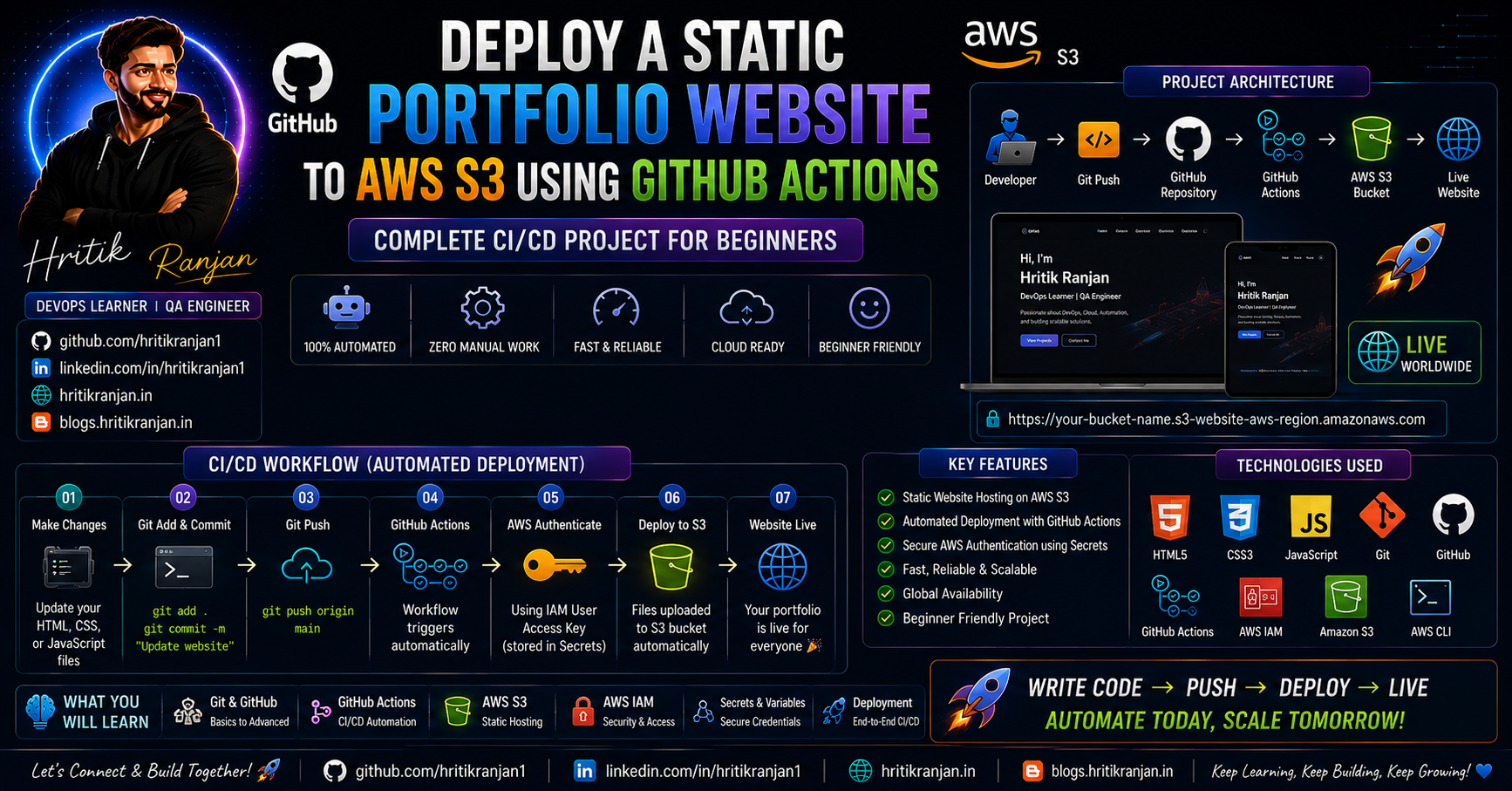
A simple static website can teach you some of the most important DevOps concepts:
Git and GitHub
AWS IAM
Amazon S3
AWS CLI
GitHub Actions
GitHub Secrets
CI/CD
Static Website Hosting
Automated Deployment
In this project, I built a personal portfolio website using HTML, CSS, and JavaScript, stored the source code on GitHub, created an Amazon S3 bucket for hosting, and configured GitHub Actions to automatically deploy the website to S3 whenever I push new changes.
The final workflow looks like this:
Developer
    |
    | git push
    ↓
GitHub Repository
    |
    ↓
GitHub Actions
    |
    ↓
Ubuntu Runner
    |
    ↓
AWS Authentication
    |
    ↓
AWS S3
    |
    ↓
Live Portfolio Website
The main idea is simple:
Write code → Push to GitHub → GitHub Actions runs automatically → Website is updated on AWS S3.
This project is based on the Git & GitHub for DevOps workshop, starting from approximately 02:54:02.
🎥 Workshop Reference:
https://www.youtube.com/live/DyqAdz96mok?si=yTWM7TqpWvtRsDTU&t=10442
📌 Project Overview
The goal of this project is to deploy a static portfolio website to an Amazon S3 bucket and automate the deployment using GitHub Actions.
The portfolio is built with:
HTML
CSS
JavaScript
The source code is stored in GitHub.
AWS S3 is used to host the static website.
GitHub Actions is used to automate deployment.
🎯 What We Are Building
Our final architecture looks like this:
                 GitHub Repository
                        |
                        |
                    git push
                        |
                        ↓
                GitHub Actions
                        |
                        ↓
                Ubuntu Runner
                        |
                AWS Authentication
                        |
                        ↓
                  AWS S3 Bucket
                        |
                        ↓
              Static Website Hosting
                        |
                        ↓
              🌐 Live Portfolio
Whenever we make a change to the website:
Change Code
    ↓
git add .
    ↓
git commit
    ↓
git push
    ↓
GitHub Actions
    ↓
AWS S3
    ↓
Website Updated
This eliminates the need to manually upload website files to S3 every time.
🛠️ Technologies Used
This project uses:
| Technology | Purpose |
|---|---|
| HTML5 | Website structure |
| CSS3 | Website styling |
| JavaScript | Website functionality |
| Git | Version control |
| GitHub | Source code hosting |
| GitHub Actions | CI/CD automation |
| AWS IAM | Authentication and permissions |
| Amazon S3 | Static website hosting |
| AWS CLI | Uploading files to S3 |
📂 My GitHub Repository
The complete project source code is available here:
https://github.com/hritikranjan1/hritik-portfolio1
The repository contains the main website files along with the GitHub Actions workflow.
The current repository structure includes:
hritik-portfolio1/
│
├── .github/
│   └── workflows/
│
├── css/
│   └── style.css
│
├── js/
│   └── script.js
│
├── index.html
│
└── README.md
The GitHub repository confirms the presence of the .github/workflows, css, js, index.html, and README.md structure.
🌐 Final Live Website
The final portfolio is hosted on Amazon S3.
You can access it here:
http://hritik-portfolio1.s3-website-us-east-1.amazonaws.com
The website is a static portfolio built using:
HTML
CSS
JavaScript
🤔 Why Use Amazon S3 for a Static Website?
Amazon S3 is an object storage service provided by AWS.
Although S3 is commonly used to store files, it can also serve static website content.
Static websites generally contain files such as:
index.html
style.css
script.js
images
fonts
For a simple portfolio website, we don't need a traditional backend server.
Instead:
Browser
   |
   ↓
S3
   |
   ├── index.html
   ├── CSS
   ├── JavaScript
   └── Images
S3 can serve these files to users.
🧠 What is Static Website Hosting?
A static website does not require server-side application processing.
For example:
HTML
CSS
JavaScript
Images
are delivered directly to the browser.
Examples of static websites:
Portfolio
Resume website
Documentation
Landing page
Product information page
Simple business website
For this project, our portfolio is a static website.
☁️ Why S3 Instead of a Traditional Server?
For a simple static website, using a full EC2 server can be unnecessary.
With S3:
No EC2 server
No operating system management
No web server installation
No manual server deployment
Instead:
Website Files
      ↓
AWS S3
      ↓
Website
This makes S3 a simple option for static content hosting.
🔐 Step 1 — Create an IAM User
Before GitHub Actions can upload files to S3, it needs permission to access AWS.
For this project, we create an IAM user for programmatic access.
IAM stands for:
Identity and Access Management
AWS IAM allows us to control:
Who can access AWS
What resources they can access
What actions they can perform
👤 Why Do We Need IAM?
GitHub Actions needs to communicate with AWS.
The workflow needs AWS credentials so it can perform actions such as uploading website files.
The basic flow is:
GitHub Actions
      |
      | AWS Credentials
      ↓
     IAM
      |
      ↓
    S3 Bucket
⚠️ Important Security Rule
Never write AWS credentials directly inside your GitHub workflow.
❌ Don't do this:
aws_access_key_id: AKIAxxxxxxxx
aws_secret_access_key: xxxxxxxxx
If your repository is public, this can expose your credentials.
Instead, use:
GitHub Secrets
We will configure this later.
📸 Screenshot 1 — IAM User
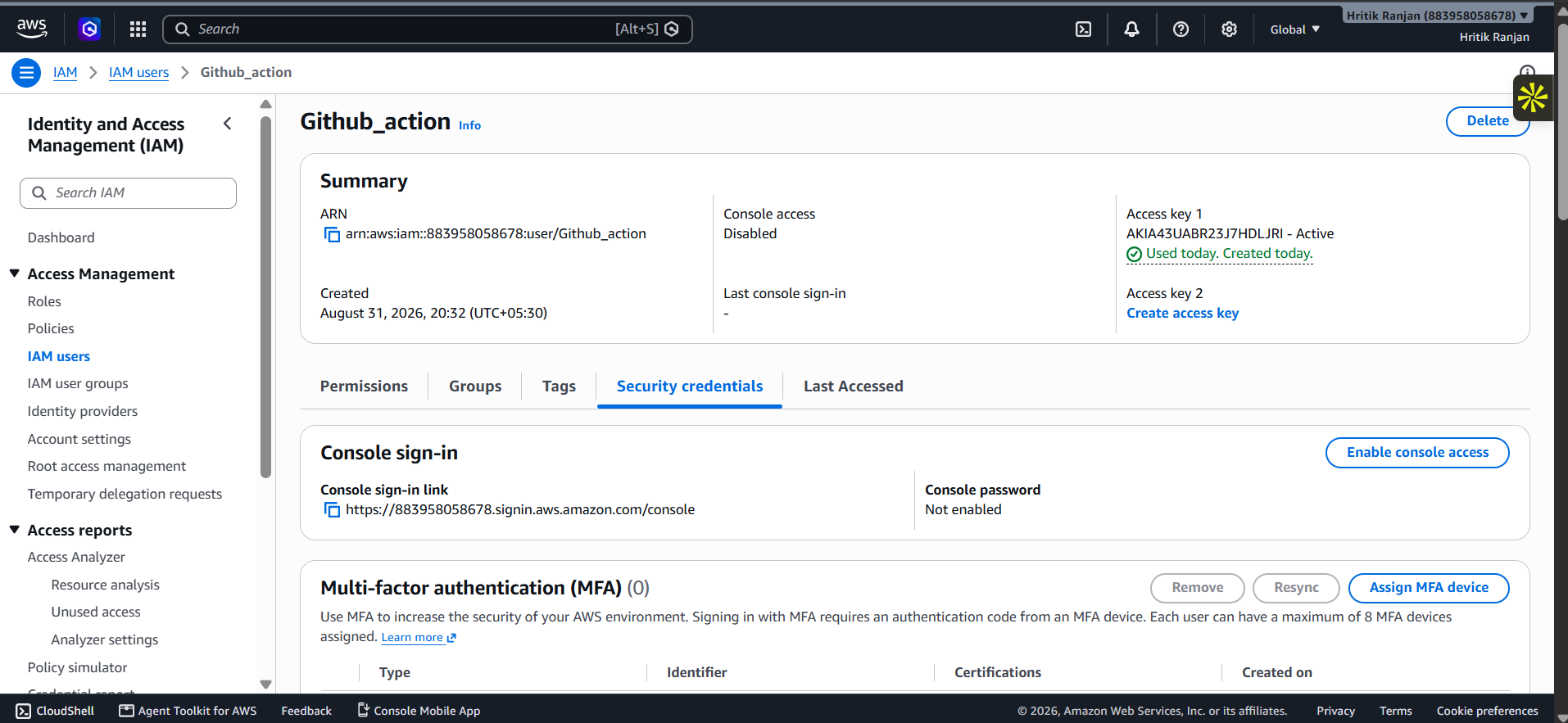
Screenshot: IAM User Creation
This screenshot shows the IAM user created for the project.
The IAM user is used to provide controlled AWS access for the deployment workflow.
🪣 Step 2 — Create an S3 Bucket
Now we create an S3 bucket.
The bucket name used for this project is:
hritik-portfolio1
The bucket will store the files of our portfolio.
For example:
hritik-portfolio1
│
├── index.html
├── css/
├── js/
└── other assets
🏷️ Why Is the Bucket Name Important?
S3 bucket names must follow AWS naming requirements and are globally unique within the S3 namespace.
For this project, our bucket is:
hritik-portfolio1
📸 Screenshot 2 — S3 Bucket Creation
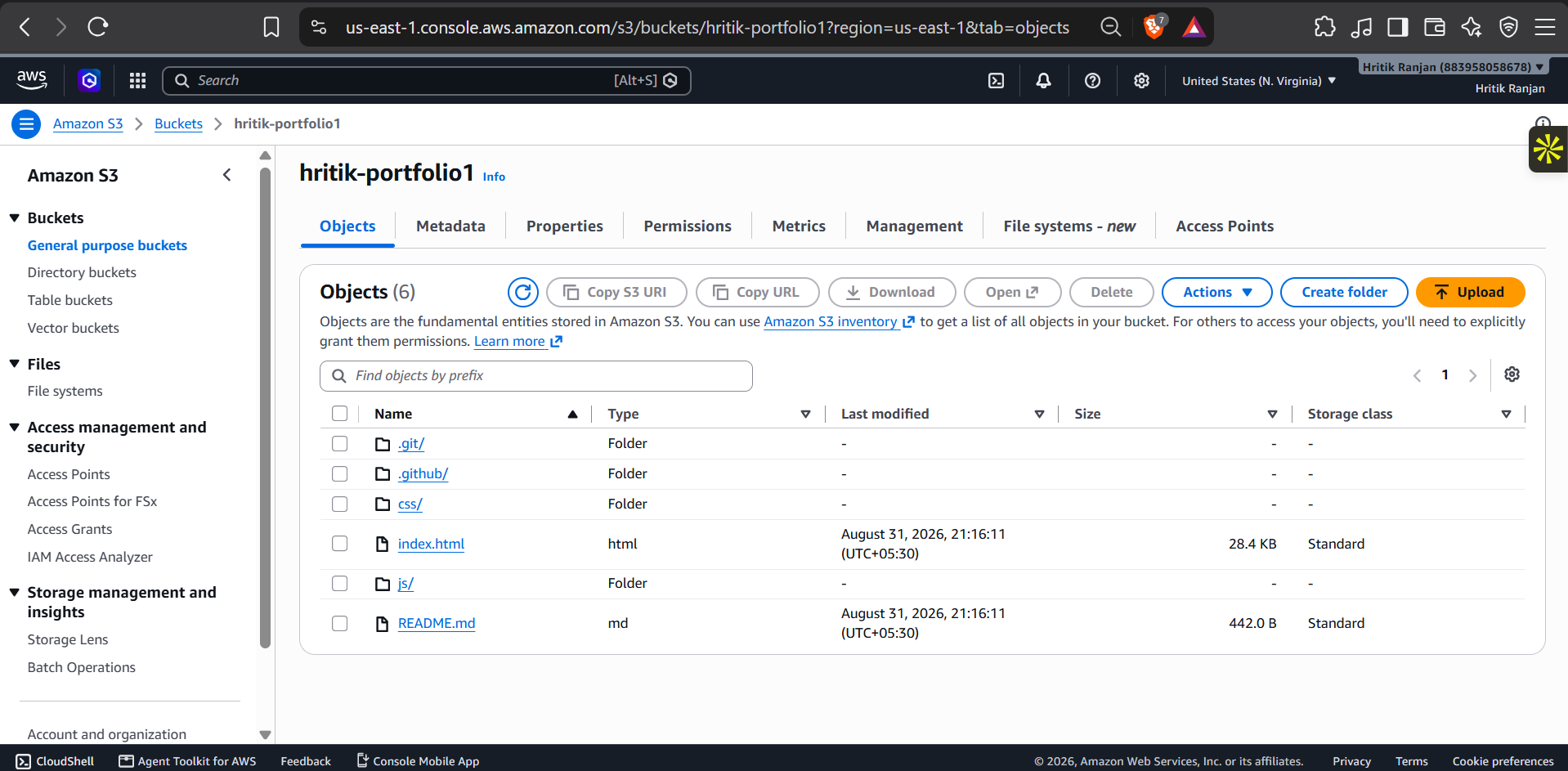
Screenshot: S3 Bucket
This screenshot shows the S3 bucket created for hosting the portfolio website.
The bucket acts as the storage location for our static website files.
⚙️ Step 3 — Configure Static Website Hosting
Creating the bucket is not enough.
We also need to configure it to serve our website as a static website.
The important file is:
index.html
This is the entry point of our portfolio.
The basic structure becomes:
S3 Bucket
    |
    └── index.html
            |
            ├── CSS
            ├── JavaScript
            └── Other Assets
When a visitor opens the website, the index.html page is served as the main page.
🌐 Step 4 — Configure Website Access
For an S3 static website endpoint to serve content publicly, the required bucket/object access configuration must allow the intended website access.
This is an important AWS security concept.
You should avoid making more permissions public than necessary.
For a simple learning project, you may configure public website access as required by S3 static website hosting.
For a production website, consider a more secure architecture such as:
CloudFront
    ↓
S3
instead of directly exposing the S3 website endpoint.
🧑💻 Step 5 — Prepare the Portfolio Website
Our portfolio is built using:
HTML
CSS
JavaScript
The main file is:
index.html
CSS:
css/style.css
JavaScript:
js/script.js
The project repository currently follows this basic structure.
📁 Project Structure
hritik-portfolio1/
│
├── .github/
│   └── workflows/
│       └── deploy.yml
│
├── css/
│   └── style.css
│
├── js/
│   └── script.js
│
├── index.html
│
└── README.md
Let's understand it.
.github/workflows/
This directory contains GitHub Actions workflow files.
Example:
.github/workflows/deploy.yml
GitHub automatically detects workflow files stored in this directory.
index.html
This is the main page of the portfolio.
css/style.css
Contains the styling of the website.
js/script.js
Contains JavaScript functionality.
README.md
Contains project documentation.
🔄 Step 6 — Git Workflow
Before creating the CI/CD pipeline, our website source code needs to be available on GitHub.
The basic Git workflow is:
git status
Check the project status.
Then:
git add .
Stage all changes.
Then:
git commit -m "Add portfolio website"
Create a commit.
Finally:
git push
Push the changes to GitHub.
🤖 Step 7 — Create GitHub Actions Workflow
Now we create the CI/CD pipeline.
Inside the project:
.github/
└── workflows/
    └── deploy.yml
The workflow file uses YAML.
GitHub Actions reads this file and executes the instructions automatically.
📝 GitHub Actions Workflow
A basic workflow for this project can look like this:
name: Deploy Portfolio to AWS S3

on:
  push:
    branches:
      - main

jobs:

  deploy:

    runs-on: ubuntu-latest

    steps:

      - name: Checkout repository
        uses: actions/checkout@v4

      - name: Configure AWS credentials
        uses: aws-actions/configure-aws-credentials@v4
        with:
          aws-access-key-id: ${{ secrets.AWS_ACCESS_KEY_ID }}
          aws-secret-access-key: ${{ secrets.AWS_SECRET_ACCESS_KEY }}
          aws-region: us-east-1

      - name: Deploy website to S3
        run: |
          aws s3 sync . s3://hritik-portfolio1 --delete
Let's understand this workflow step by step.
🧩 Understanding the Workflow
1. Workflow Name
name: Deploy Portfolio to AWS S3
This gives the workflow a readable name.
On GitHub, you can see this name in the Actions section.
2. Trigger
on:
  push:
    branches:
      - main
This means:
Run the workflow whenever code is pushed to the
mainbranch.
For example:
Developer
    ↓
Modify index.html
    ↓
git add .
    ↓
git commit
    ↓
git push
    ↓
GitHub Actions starts
3. Runner
runs-on: ubuntu-latest
GitHub Actions creates a temporary Ubuntu environment to execute the workflow.
You can think of it as:
GitHub
   ↓
Temporary Ubuntu Machine
   ↓
Execute Commands
   ↓
Finish
4. Checkout Repository
- name: Checkout repository
  uses: actions/checkout@v4
This action downloads the repository files into the GitHub Actions runner.
Without checking out the repository, the runner would not have the website files available for deployment.
5. Configure AWS Credentials
- name: Configure AWS credentials
  uses: aws-actions/configure-aws-credentials@v4
This allows the GitHub Actions runner to authenticate with AWS.
The credentials are retrieved from GitHub Secrets.
🔐 Step 8 — GitHub Secrets
This is one of the most important parts of the project.
We don't put AWS credentials directly in our code.
Instead, GitHub provides:
Repository
   ↓
Settings
   ↓
Secrets and variables
   ↓
Actions
We can create secrets such as:
AWS_ACCESS_KEY_ID
AWS_SECRET_ACCESS_KEY
The workflow then references:
${{ secrets.AWS_ACCESS_KEY_ID }}
and:
${{ secrets.AWS_SECRET_ACCESS_KEY }}
🔒 Why GitHub Secrets?
Imagine writing:
aws-access-key-id: AKIAxxxxxxxx
in a public repository.
Anyone could potentially see it.
Instead:
GitHub Secret
     ↓
Encrypted/managed by GitHub
     ↓
GitHub Actions
     ↓
AWS
The actual secret value is not written into the workflow file.
⚠️ Very Important AWS Security Note
For a real production setup, avoid using a long-lived AWS access key when possible.
A stronger approach is GitHub Actions OIDC with an AWS IAM role.
The architecture becomes:
GitHub Actions
      |
      | OIDC Identity
      ↓
AWS IAM Role
      |
      ↓
S3
This avoids storing long-lived AWS access keys in GitHub.
However, for a beginner learning project, understanding GitHub Secrets first is useful because it clearly demonstrates the basic authentication flow.
📤 Step 9 — Upload Website to S3
The most important deployment command is:
aws s3 sync . s3://hritik-portfolio1 --delete
Let's understand it.
🔄 What is aws s3 sync?
aws s3 sync synchronizes files between a local directory and an S3 bucket.
In our project:
GitHub Actions Runner
        |
        | aws s3 sync
        ↓
S3 Bucket
The command:
aws s3 sync . s3://hritik-portfolio1
means:
Upload/synchronize the files from the current directory to the S3 bucket.
🗑️ What Does --delete Do?
The workflow uses:
--delete
This makes the S3 bucket reflect the current contents of the source directory by deleting destination files that no longer exist in the source.
For example:
Initial version:
index.html
old-page.html
style.css
Later you delete:
old-page.html
After running:
aws s3 sync . s3://hritik-portfolio1 --delete
the old file can also be removed from the bucket.
This helps keep the deployed website synchronized with the repository.
🔁 Complete CI/CD Flow
Now let's connect everything.
                 Developer
                     |
                     ↓
               Edit Website
                     |
                     ↓
                  Git
                     |
                git commit
                     |
                git push
                     |
                     ↓
              GitHub Repository
                     |
                     ↓
             GitHub Actions
                     |
                     ↓
             Ubuntu Runner
                     |
                     ↓
             Checkout Code
                     |
                     ↓
          Configure AWS Credentials
                     |
                     ↓
               AWS CLI
                     |
                     ↓
             aws s3 sync
                     |
                     ↓
              S3 Bucket
                     |
                     ↓
         Static Website Hosting
                     |
                     ↓
             🌐 Live Website
This is our CI/CD pipeline.
🚀 Step 10 — Push the Workflow to GitHub
Once deploy.yml is created:
git add .
Then:
git commit -m "Add S3 deployment workflow"
Then:
git push origin main
GitHub detects the workflow.
Because our workflow has:
on:
  push:
    branches:
      - main
the pipeline starts automatically.
👀 Step 11 — Check GitHub Actions
Open your GitHub repository.
Go to:
Actions
You should see:
Deploy Portfolio to AWS S3
Click the workflow run.
You can see steps such as:
✓ Checkout repository
✓ Configure AWS credentials
✓ Deploy website to S3
If every step succeeds:
✓ Workflow completed successfully
🧪 Step 12 — Test Automatic Deployment
Now comes the most important part of the project.
Modify your portfolio.
For example:
Change:
"DevOps Learner"

to:

"DevOps & Cloud Engineer"
Save the file.
Then:
git add .
git commit -m "Update portfolio content"
git push
Now:
git push
    ↓
GitHub
    ↓
GitHub Actions
    ↓
AWS S3
    ↓
Updated Website
You don't manually upload anything.
That's the power of CI/CD.
🔥 Before Automation vs After Automation
❌ Traditional Manual Deployment
Without GitHub Actions:
Change Website
     ↓
Build/Prepare Files
     ↓
Open AWS Console
     ↓
Open S3
     ↓
Upload Files
     ↓
Replace Old Files
     ↓
Check Website
Every update requires manual work.
✅ Automated Deployment
With GitHub Actions:
Change Website
     ↓
git push
     ↓
GitHub Actions
     ↓
AWS S3
     ↓
Live Website Updated
Much simpler.
📊 Manual vs Automated Deployment
| Manual Deployment | CI/CD Deployment |
|---|---|
| Upload files manually | Automatic |
| More repetitive | Less repetitive |
| Easy to forget files | Automated synchronization |
| Takes more time | Faster |
| More human involvement | Pipeline-driven |
| Difficult to repeat consistently | Consistent workflow |
📸 Screenshot 3 — Final Live Portfolio
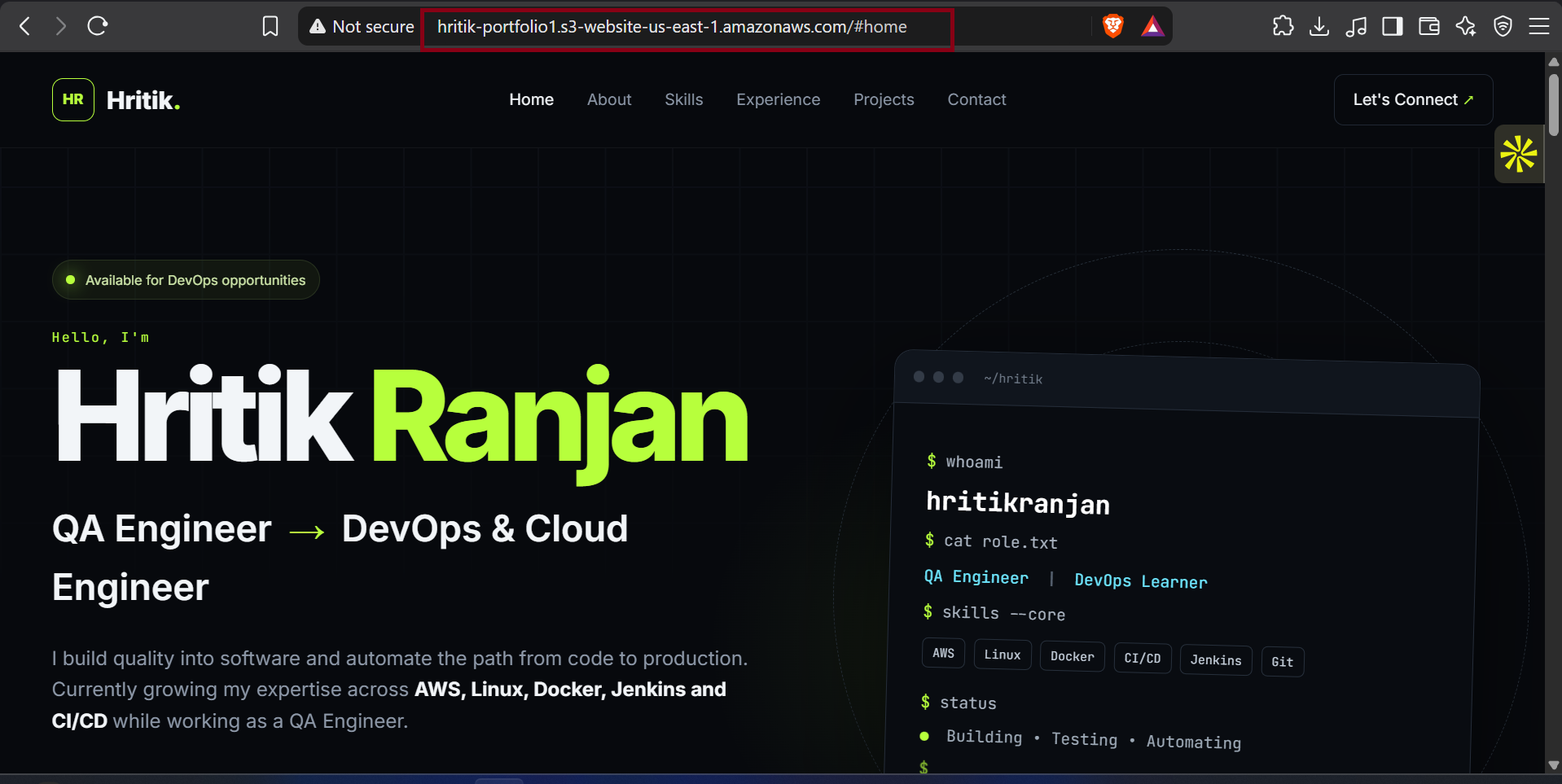
Screenshot: Final AWS S3 Hosted Portfolio
This screenshot shows the final portfolio website successfully running after deployment.
The website is accessible through the S3 static website endpoint:
http://hritik-portfolio1.s3-website-us-east-1.amazonaws.com
🎯 What Happens When I Push New Code?
Let's say I modify:
index.html
Then:
git add .
git commit -m "Update portfolio"
git push
GitHub receives the code.
Because the workflow listens for pushes to main:
on:
  push:
    branches:
      - main
GitHub Actions starts automatically.
Then:
Checkout
   ↓
AWS Authentication
   ↓
AWS CLI
   ↓
S3 Sync
   ↓
Deployment Complete
The updated website is now available from S3.
🧠 Important DevOps Concepts Learned
This small project teaches several important concepts.
1️⃣ Version Control
Git tracks changes to the website.
Code
 ↓
Git
 ↓
GitHub
2️⃣ CI/CD
GitHub Actions automates deployment.
Push
 ↓
Pipeline
 ↓
Deploy
3️⃣ Cloud Storage
S3 stores the website files.
S3
 ↓
index.html
CSS
JavaScript
Assets
4️⃣ IAM
IAM controls AWS access.
Identity
 +
Permissions
 =
Controlled AWS Access
5️⃣ Secrets Management
GitHub Secrets protect sensitive credentials from being hardcoded into the repository.
6️⃣ AWS CLI
AWS CLI allows us to interact with AWS from commands and automation.
Example:
aws s3 sync
7️⃣ Infrastructure + Automation
AWS provides the infrastructure.
GitHub Actions provides the automation.
Together:
AWS
 +
GitHub Actions
 =
Automated Deployment
🏗️ Project Architecture
The final architecture can be represented as:
                  ┌──────────────────┐
                  │    Developer     │
                  └────────┬─────────┘
                           │
                       git push
                           │
                           ↓
                  ┌──────────────────┐
                  │     GitHub       │
                  │   Repository     │
                  └────────┬─────────┘
                           │
                           ↓
                  ┌──────────────────┐
                  │ GitHub Actions   │
                  │      CI/CD       │
                  └────────┬─────────┘
                           │
                           ↓
                  ┌──────────────────┐
                  │   AWS CLI /      │
                  │ AWS Credentials  │
                  └────────┬─────────┘
                           │
                           ↓
                  ┌──────────────────┐
                  │    AWS S3        │
                  │     Bucket       │
                  └────────┬─────────┘
                           │
                           ↓
                  ┌──────────────────┐
                  │ Static Website   │
                  │    Hosting       │
                  └────────┬─────────┘
                           │
                           ↓
                       🌐 User
📁 Final Repository Structure
The project structure is:
hritik-portfolio1/
│
├── .github/
│   └── workflows/
│       └── deploy.yml
│
├── css/
│   └── style.css
│
├── js/
│   └── script.js
│
├── index.html
│
└── README.md
The repository currently shows this core structure on GitHub.
🧩 Understanding Each Component
HTML
Responsible for the structure.
<h1>My Portfolio</h1>
CSS
Responsible for styling.
body {
    font-family: Arial, sans-serif;
}
JavaScript
Adds functionality.
console.log("Portfolio loaded");
Git
Tracks changes.
git add .
git commit -m "Update portfolio"
GitHub
Stores the source code remotely.
GitHub Actions
Automates deployment.
IAM
Provides AWS identity and permissions.
S3
Stores and serves the static website files.
🔐 Security Considerations
Security is extremely important in AWS projects.
There are several things to remember.
❌ Never Commit AWS Credentials
Never put this directly into:
deploy.yml
README.md
index.html
or any other repository file:
AWS_ACCESS_KEY_ID
AWS_SECRET_ACCESS_KEY
✅ Use GitHub Secrets
Store sensitive credentials in:
GitHub Repository
      ↓
Settings
      ↓
Secrets and variables
      ↓
Actions
✅ Use Least Privilege
The IAM identity used for deployment should have only the permissions required for the deployment.
For this project, that generally means restricting access to the target S3 bucket and only the necessary S3 actions.
Avoid giving broad permissions such as unrestricted administrator access just to make the deployment work.
🔐 Production-Level Improvement: OIDC
For learning purposes, GitHub Secrets are easy to understand.
But for a more production-oriented setup, GitHub Actions can authenticate to AWS using OIDC and an IAM role.
Instead of:
GitHub
   ↓
Long-Lived AWS Access Key
you can use:
GitHub Actions
       ↓
OIDC
       ↓
AWS IAM Role
       ↓
S3
Advantages include:
No long-lived AWS access keys in GitHub
Short-lived credentials
Better security
Fine-grained trust policies
This is an excellent next step after completing this beginner project.
🌍 Why This Project is Useful for DevOps Beginners
At first glance, this looks like a simple website deployment.
But it teaches the complete idea behind a CI/CD pipeline.
You learn:
Source Code
    ↓
Version Control
    ↓
Remote Repository
    ↓
Automation
    ↓
Cloud Authentication
    ↓
Cloud Storage
    ↓
Deployment
These same concepts appear in much larger systems.
For example:
Java Application
      ↓
GitHub
      ↓
GitHub Actions
      ↓
Docker
      ↓
AWS ECR
      ↓
EC2 / ECS / Kubernetes
The technology changes, but the DevOps workflow remains similar.
📈 How This Project Can Be Improved
This project can be extended in several ways.
🚀 Improvement 1 — Add CloudFront
Instead of directly serving the website from S3:
User
 ↓
CloudFront
 ↓
S3
CloudFront provides a CDN layer.
🔒 Improvement 2 — Use HTTPS
Instead of relying on the basic S3 website endpoint, a production architecture can use:
CloudFront
   ↓
HTTPS
   ↓
S3
🌐 Improvement 3 — Add a Custom Domain
For example:
www.example.com
using:
Route 53
+
CloudFront
+
S3
🔐 Improvement 4 — Use OIDC
Replace long-lived AWS credentials with:
GitHub Actions
       ↓
OIDC
       ↓
IAM Role
       ↓
S3
🧪 Improvement 5 — Add Testing
Before deployment:
Push
 ↓
HTML Validation
 ↓
CSS Validation
 ↓
JavaScript Check
 ↓
Deploy
🔍 Improvement 6 — Add Security Scanning
The workflow can also include:
Secret Scanning
Dependency Scanning
Security Checks
before deployment.
🧪 Example Improved Pipeline
A more advanced version could look like:
Developer
    ↓
git push
    ↓
GitHub
    ↓
GitHub Actions
    ↓
Checkout
    ↓
Validate
    ↓
Test
    ↓
Security Scan
    ↓
AWS Authentication
    ↓
S3 Sync
    ↓
CloudFront Cache Invalidation
    ↓
Production
This is much closer to a real-world DevOps workflow.
🧑💻 Complete Deployment Commands
Here are the important commands used in the project.
Check Git status
git status
Stage files
git add .
Commit changes
git commit -m "Update portfolio"
Push changes
git push origin main
AWS S3 synchronization
aws s3 sync . s3://hritik-portfolio1 --delete
The last command is the core deployment command used by the CI/CD workflow.
🔄 Complete Project Workflow in One Diagram
                ┌───────────────────┐
                │   Portfolio Code  │
                │ HTML/CSS/JS       │
                └─────────┬─────────┘
                          │
                       Git Push
                          │
                          ↓
                ┌───────────────────┐
                │      GitHub       │
                │    Repository     │
                └─────────┬─────────┘
                          │
                          ↓
                ┌───────────────────┐
                │  GitHub Actions   │
                │      CI/CD        │
                └─────────┬─────────┘
                          │
                          ↓
                ┌───────────────────┐
                │ Checkout Source   │
                └─────────┬─────────┘
                          │
                          ↓
                ┌───────────────────┐
                │ AWS Authentication│
                └─────────┬─────────┘
                          │
                          ↓
                ┌───────────────────┐
                │     AWS CLI       │
                │   aws s3 sync     │
                └─────────┬─────────┘
                          │
                          ↓
                ┌───────────────────┐
                │    S3 Bucket      │
                │ hritik-portfolio1 │
                └─────────┬─────────┘
                          │
                          ↓
                ┌───────────────────┐
                │ Static Website    │
                │     Hosting       │
                └─────────┬─────────┘
                          │
                          ↓
                🌐 Live Portfolio
💡 What I Learned From This Project
This project helped me understand how a simple website can become an automated DevOps deployment.
The major concepts I practiced were:
Git
GitHub
GitHub Actions
AWS IAM
AWS S3
AWS CLI
GitHub Secrets
CI/CD
Static Website Hosting
Cloud Deployment
The most important lesson was:
Deployment does not have to be a manual process.
Instead of uploading files manually every time, we can automate the entire process:
Code Change
    ↓
git push
    ↓
GitHub Actions
    ↓
AWS S3
    ↓
Live Website
🏆 Final Result
The final result is a portfolio website hosted on Amazon S3 and deployed through a GitHub Actions workflow.
GitHub Repository
https://github.com/hritikranjan1/hritik-portfolio1
Live Portfolio
http://hritik-portfolio1.s3-website-us-east-1.amazonaws.com
Workshop
https://www.youtube.com/live/DyqAdz96mok?si=yTWM7TqpWvtRsDTU&t=10442
📸 Project Screenshots
1. IAM User Creation
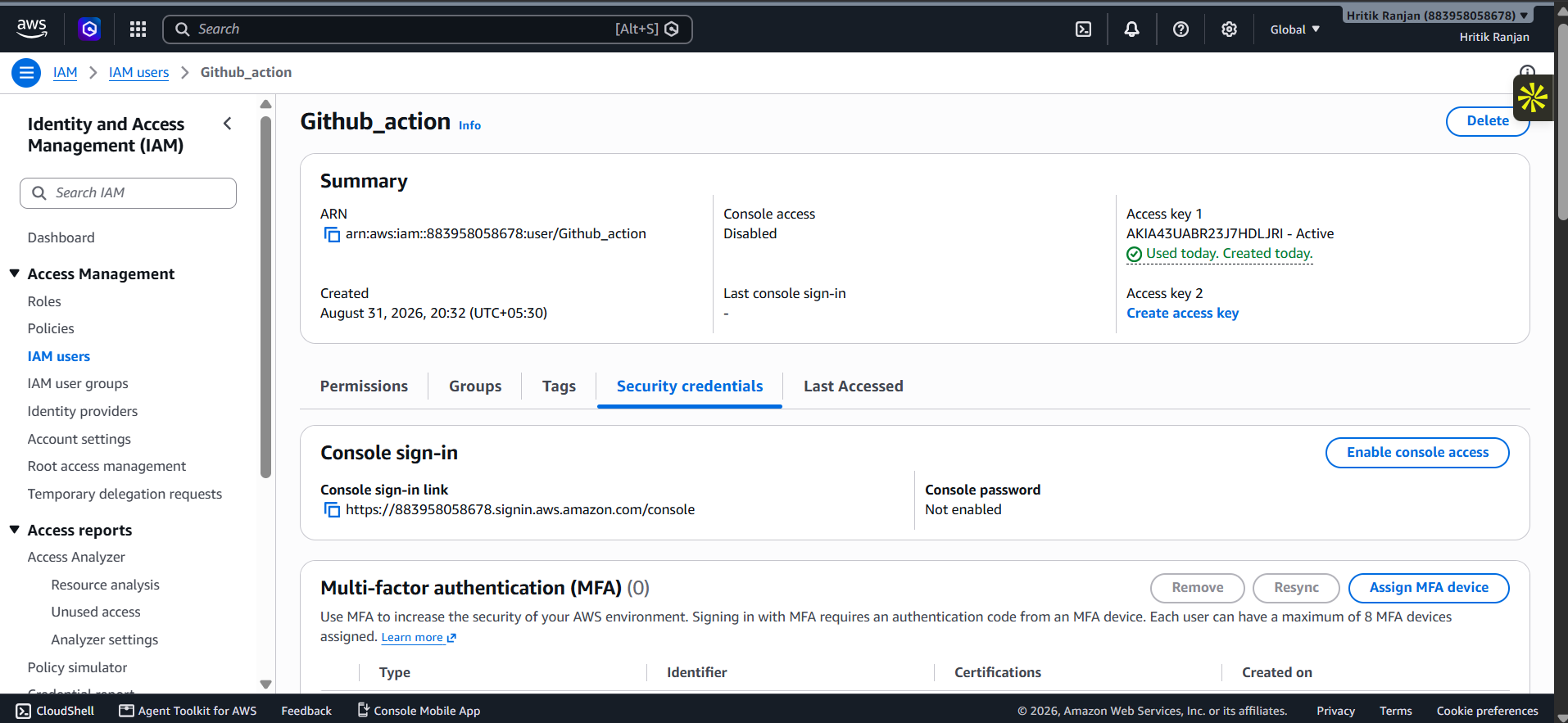
What it demonstrates: Creation/configuration of the AWS identity used for the deployment process.
2. S3 Bucket Creation
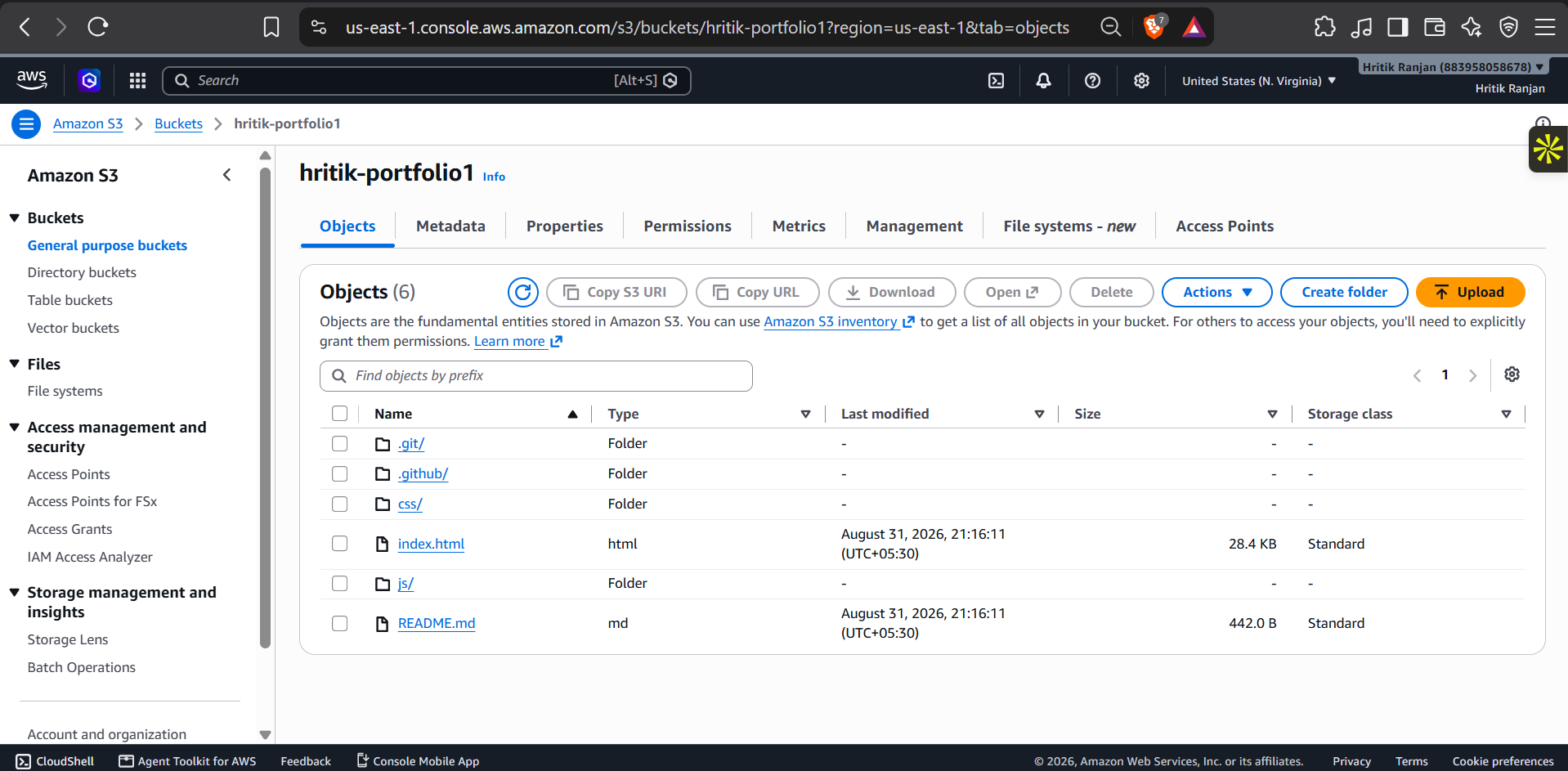
What it demonstrates: The hritik-portfolio1 S3 bucket created to store the static website files.
3. Final Live Portfolio
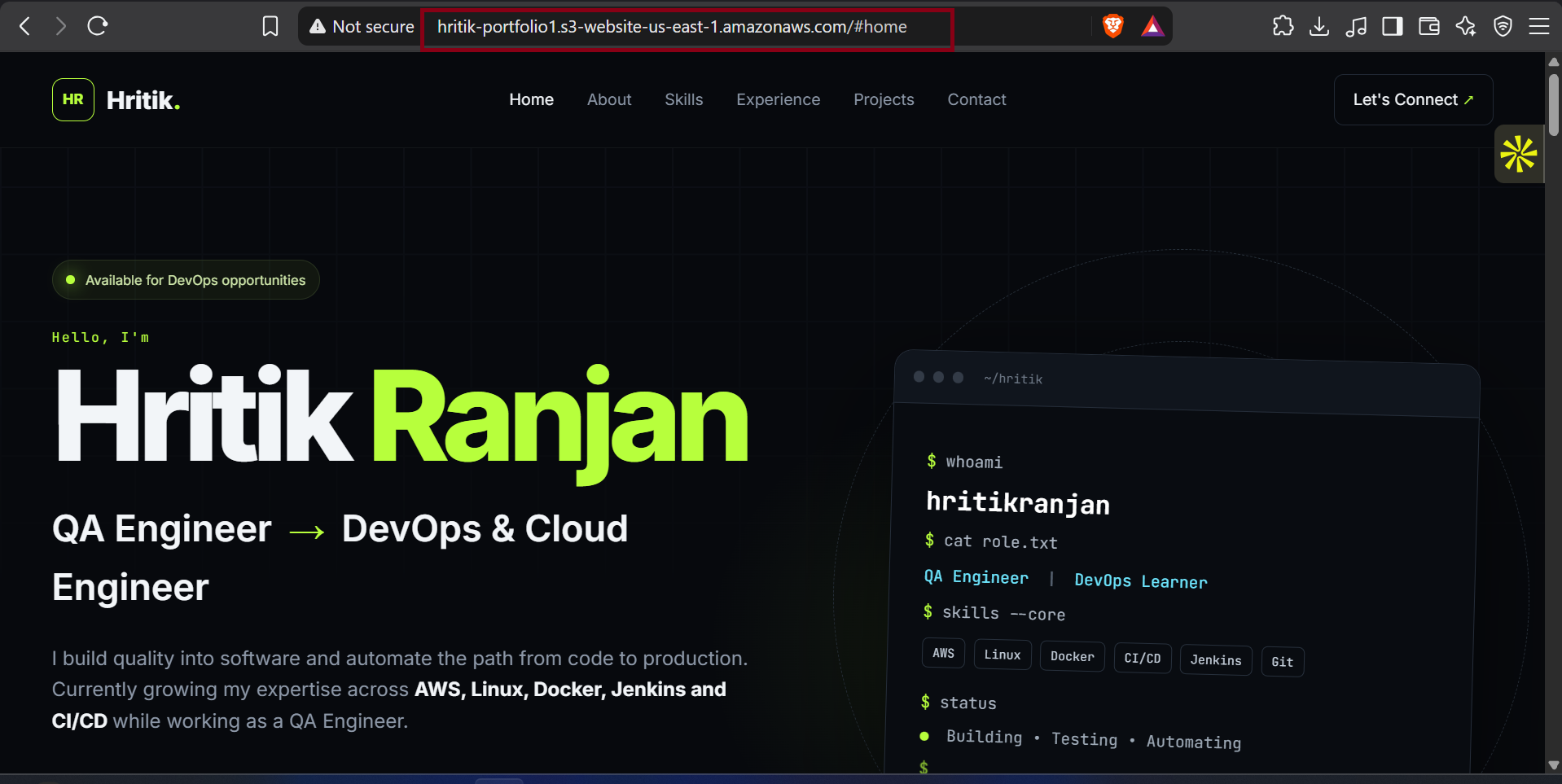
What it demonstrates: The final portfolio successfully deployed and accessible through the AWS S3 website endpoint.
📌 Key Takeaways
If you are a beginner, remember these five things:
1. GitHub stores the source code
Portfolio → GitHub
2. GitHub Actions automates the deployment
git push → GitHub Actions
3. IAM controls AWS access
IAM → Permissions
4. S3 stores and serves the static website
S3 → Website Files
5. CI/CD removes repetitive manual deployment
Code Change
     ↓
Push
     ↓
Automatic Deployment
🎯 Final DevOps Architecture
The complete project can be summarized as:
👨💻 Developer
|
|
Git Push
|
↓
☁️ GitHub Repository
|
↓
⚙️ GitHub Actions
|
↓
🐧 Ubuntu Runner
|
↓
🔐 AWS IAM
|
↓
☁️ AWS S3
|
↓
🌐 Static Website
|
↓
👥 End Users
This is a small project, but it demonstrates a real DevOps concept: automatically moving code from source control to a cloud-hosted environment through a CI/CD pipeline.
🚀 Conclusion
Deploying a portfolio website to S3 manually is easy.
But automating the deployment with GitHub Actions is where the DevOps learning begins.
In this project, we connected:
HTML
CSS
JavaScript
   +
Git
   +
GitHub
   +
GitHub Actions
   +
IAM
   +
AWS CLI
   +
Amazon S3
The final result is an automated deployment pipeline:
                    CODE
                     ↓
                  GITHUB
                     ↓
              GITHUB ACTIONS
                     ↓
                AWS AUTH
                     ↓
                  AWS S3
                     ↓
              LIVE WEBSITE
Now, whenever I update my portfolio and push the changes to GitHub, GitHub Actions can automatically synchronize the latest files with my S3 bucket.
That's the real power of CI/CD:
Build once. Automate the process. Deploy consistently. 🚀
If you're a beginner learning DevOps, this is a great project to build yourself because it combines Git, GitHub, CI/CD, AWS IAM, S3, AWS CLI, secrets management, and static website hosting in one practical project.
Happy Dockering!

🚀 Complete Learning & Career Resources | 2027–2028
A curated collection of learning resources for AI, Data Analytics, Python, Data Engineering, Cybersecurity, Cloud, Networking, Finance, Digital Marketing, Project Management, DevOps and Generative AI.
📚 Learn → 🧪 Practice → 🛠️ Build → 🐙 Share → 🚀 Grow









🌟 About This Repository
Welcome to the Complete Learning & Career Resources Repository! 🚀
This repository is designed as a centralized learning hub for students, developers, QA engineers, DevOps engineers, cloud learners, cybersecurity enthusiasts, data professionals, project managers, business professionals and anyone interested in continuous learning.
The goal is simple:
Learn → Practice → Build → Document → Share → Grow
Instead of searching for useful resources again and again, this repository brings them together in one place.
🎯 What You Will Find Here
🤖 Artificial Intelligence
🧠 Generative AI
📊 Data Analytics
🐍 Python
⚙️ Data Engineering
☁️ Cloud Computing
🌐 Computer Networking
🔐 Cybersecurity
⚙️ DevOps
📋 Project Management
💰 Finance
📈 Digital Marketing
🧩 Business Analysis
🚀 Career Development
🎓 Professional Learning
🛠️ Project Ideas
📚 Learning Roadmaps
📊 Repository Overview
| Category | Resources |
|---|---|
| 🤖 AI Courses | 15 |
| 🔵 Google Courses | 15 |
| 🟣 IBM Courses | 10 |
| 🔥 Best Courses 2027–2028 | 21 |
| 🌟 Learning & Career Resources | 14 |
| 📖 Personal Resources | 4+ |
📚 Table of Contents
🤖 AI Courses
🚀 Explore AI fundamentals, Python, AI infrastructure, Generative AI, AI governance and specialized AI applications.
| # | Course | Link |
|---|---|---|
| 1 | AI For Everyone | Start Course ↗ |
| 2 | AI Python for Beginners | Start Course ↗ |
| 3 | AI Infrastructure and Operations Fundamentals | Start Course ↗ |
| 4 | Generative AI for Human Resources (HR) Professionals | Start Course ↗ |
| 5 | AI Fundamentals | Start Course ↗ |
| 6 | AI for Healthcare | Start Course ↗ |
| 7 | AI Applications in Accounting and Finance | Start Course ↗ |
| 8 | AI Governance and Privacy Professional Certification (AIGP) | Start Course ↗ |
| 9 | Ethics and Governance in the Age of Generative AI | Start Course ↗ |
| 10 | Hands-on quantum error correction with Google Quantum AI | Start Course ↗ |
| 11 | AI-Powered Higher Education | Start Course ↗ |
| 12 | Modern Project Leadership: Agile, AI, and Beyond | Start Course ↗ |
| 13 | AI-Powered Business Analysis: Excel, KPIs & GenAI | Start Course ↗ |
| 14 | AI in Law: Research, Risk, and Legal Drafting | Start Course ↗ |
| 15 | Generative AI for Project Managers | Start Course ↗ |
🔵 Google Courses
🌐 Explore Data Analytics, AI, Cybersecurity, Networking, Cloud, Digital Marketing and Project Management.
| # | Course | Link |
|---|---|---|
| 1 | Foundations: Data, Data, Everywhere | Start Course ↗ |
| 2 | Ask Questions to Make Data-Driven Decisions | Start Course ↗ |
| 3 | Prepare Data for Exploration | Start Course ↗ |
| 4 | Agile Project Management | Start Course ↗ |
| 5 | Project Initiation: Starting a Successful Project | Start Course ↗ |
| 6 | AI Fundamentals | Start Course ↗ |
| 7 | Foundations of Digital Marketing and E-commerce | Start Course ↗ |
| 8 | Play It Safe: Manage Security Risks | Start Course ↗ |
| 9 | The Bits and Bytes of Computer Networking | Start Course ↗ |
| 10 | Analyze Data to Answer Questions | Start Course ↗ |
| 11 | Automate Cybersecurity Tasks with Python | Start Course ↗ |
| 12 | Architecting with Google Compute Engine | Start Course ↗ |
| 13 | AI for Writing and Communicating | Start Course ↗ |
| 14 | From Likes to Leads: Interact with Customers Online | Start Course ↗ |
| 15 | AI for Data Analysis | Start Course ↗ |
🟣 IBM Courses
💙 Explore SQL, Python, Data Analytics, Deep Learning, RAG and Generative AI resources.
| # | Course | Link |
|---|---|---|
| 1 | Databases and SQL for Data Science with Python | Start Course ↗ |
| 2 | RAG and Agentic AI Capstone Project | Start Course ↗ |
| 3 | Excel Basics for Data Analysis | Start Course ↗ |
| 4 | Introduction to Data Analytics | Start Course ↗ |
| 5 | Data Visualization and Dashboards with Excel and Cognos | Start Course ↗ |
| 6 | IBM AI Foundations for Business | Start Course ↗ |
| 7 | AI Capstone Project with Deep Learning | Start Course ↗ |
| 8 | Python Project for Data Engineering | Start Course ↗ |
| 9 | Building Generative AI-Powered Applications with Python | Start Course ↗ |
| 10 | Vector Databases for RAG: An Introduction | Start Course ↗ |
🔥 Best Courses 2027–2028
🎯 A broader collection covering AI, Data, Python, Finance, Cybersecurity, Marketing, Networking, Management and Data Engineering.
| # | Course | Link |
|---|---|---|
| 1 | AI For Everyone | Start Course ↗ |
| 2 | Foundations: Data, Data, Everywhere | Start Course ↗ |
| 3 | Ask Questions to Make Data-Driven Decisions | Start Course ↗ |
| 4 | Prepare Data for Exploration | Start Course ↗ |
| 5 | Financial Markets | Start Course ↗ |
| 6 | Agile Project Management | Start Course ↗ |
| 7 | Play It Safe: Manage Security Risks | Start Course ↗ |
| 8 | Project Initiation: Starting a Successful Project | Start Course ↗ |
| 9 | AI Fundamentals | Start Course ↗ |
| 10 | Analyze Data to Answer Questions | Start Course ↗ |
| 11 | Foundations of Digital Marketing and E-commerce | Start Course ↗ |
| 12 | The Bits and Bytes of Computer Networking | Start Course ↗ |
| 13 | Sequence Models | Start Course ↗ |
| 14 | Federal Taxation I: Individuals, Employees, and Sole Proprietors | Start Course ↗ |
| 15 | Designing the Organization | Start Course ↗ |
| 16 | Game Theory | Start Course ↗ |
| 17 | Using Python to Access Web Data | Start Course ↗ |
| 18 | Viral Marketing and How to Craft Contagious Content | Start Course ↗ |
| 19 | Python Project for Data Engineering | Start Course ↗ |
| 20 | Value Chain Management | Start Course ↗ |
| 21 | Applying Data Analytics in Finance | Start Course ↗ |
🌟 Learning & Career Resources
💡 Additional resources for learning, career development, language learning, hosting, education and professional growth.
🗺️ Recommended Learning Roadmaps
Choose one roadmap according to your career goal. You don't need to learn everything at once.
🤖 AI Roadmap
AI Fundamentals
      ↓
Python Basics
      ↓
Mathematics & Statistics
      ↓
Data Fundamentals
      ↓
Machine Learning
      ↓
Deep Learning
      ↓
Generative AI
      ↓
Prompt Engineering
      ↓
RAG
      ↓
Vector Databases
      ↓
Agentic AI
      ↓
AI Applications
      ↓
Real-World Projects
      ↓
GitHub Portfolio

About the author
- 👋 Hi, I’m Hritik Ranjan — a B.Tech CSE student and a passionate tech enthusiast focused on Quality Engineering, AI/ML, Cybersecurity, and DevOps. 💡 I enjoy building and testing scalable, secure, and intelligent systems that solve real-world problems. My expertise and interests include: 🔹 Quality Assurance & Testing Hands-on experience in manual and automation testing using Selenium & Java, ensuring high-quality and reliable applications. 🔹 Artificial Intelligence & Machine Learning Exploring advanced algorithms and developing intelligent systems for practical use cases. 🔹 Cybersecurity Focused on vulnerability assessment, security testing, and system hardening. 🔹 Web Development Building responsive and user-friendly applications using modern technologies. 🔹 Data Science Analyzing complex data to extract actionable insights. 💼 Key Projects: 🚀 Blindness Detection System Applied computer vision techniques to detect blindness-related conditions. 🚀 AI-Powered Rail Madad Enhancement Developed an intelligent complaint management system to improve railway customer service. 🚀 Interactive Applications Built multiple projects like quiz apps, calculators, and productivity tools. 🌱 I’m continuously learning and improving my skills in DevOps, Cloud, and Automation to become a well-rounded engineer. 🤝 Open to collaborations, internships, and opportunities in QA, DevOps, AI/ML, and Cybersecurity. 📫 Let’s connect: hritikranjan1408@gmail.com
Comments
Join the discussionNo comments yet. Be the first to comment.