
Jenkins for Beginners: Complete Guide to CI/CD, Pipelines, Agents, Jenkinsfile & Architecture
Learn Jenkins from zero with simple explanations, architecture diagrams, real-world CI/CD examples, Jenkinsfile syntax, Jobs, Agents, Credentials, Triggers, Docker integration, Shared Libraries, and production best practices.
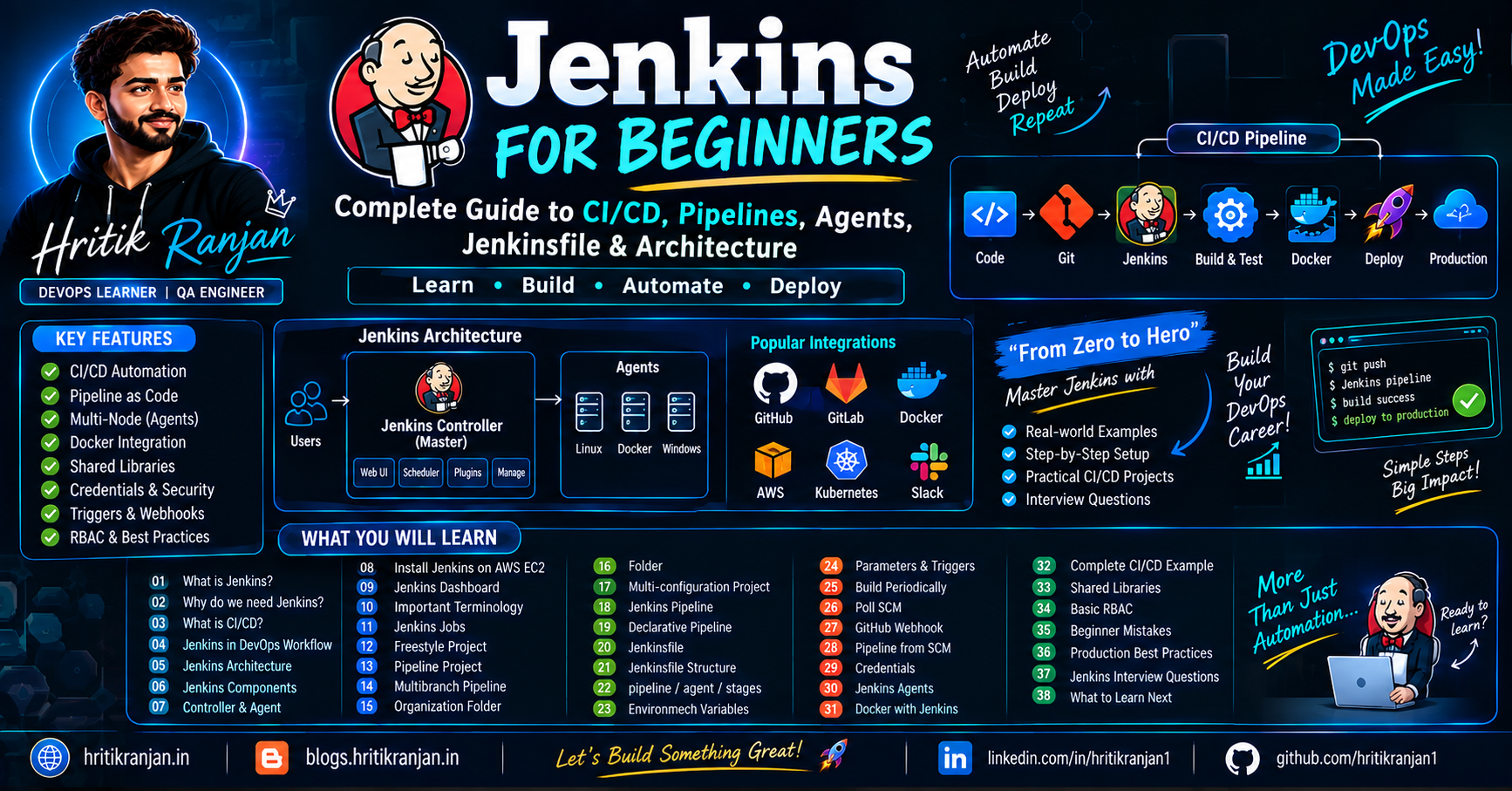
If you are learning DevOps, AWS, Docker, Kubernetes, or CI/CD, Jenkins is one of the most important tools you should understand.
At first, Jenkins can look confusing because you see terms like:
Controller
Agent
Job
Build
Workspace
Pipeline
Jenkinsfile
Stage
Step
Credentials
SCM
Freestyle Project
Multibranch Pipeline
Shared Library
Webhook
Don't worry. 😊
In this guide, we will start from zero and gradually understand Jenkins with practical examples.
📌 What We Will Learn
In this article, we will cover:
What is Jenkins?
Why do we need Jenkins?
What is CI/CD?
Jenkins in a real-world DevOps workflow
Jenkins architecture
Jenkins components
Jenkins Controller and Agent
Installing Jenkins on AWS EC2
Jenkins dashboard
Important Jenkins terminology
Jenkins Jobs
Freestyle Project
Pipeline Project
Multibranch Pipeline
Organization Folder
Folder
Multi-configuration Project
Jenkins Pipeline
Declarative Pipeline
Jenkinsfile
Jenkinsfile structure
pipelineagentstagesstagestepsEnvironment variables
Parameters
Triggers
Build periodically
Poll SCM
GitHub webhook
Pipeline from SCM
Credentials
Jenkins Agents
Docker with Jenkins
Complete CI/CD example
Shared Libraries
Basic RBAC
Beginner mistakes
Production best practices
Jenkins interview questions
What to learn next
1. 🚀 What is Jenkins?


Jenkins is an open-source automation server used to automate software development processes.
In simple words:
Jenkins automatically performs repetitive tasks such as building, testing, and deploying applications.
For example, imagine a developer pushes code to GitHub.
Without Jenkins:
Developer
   ↓
Push Code
   ↓
Developer manually builds application
   ↓
Developer manually runs tests
   ↓
Developer manually creates Docker image
   ↓
Developer manually pushes image
   ↓
Developer manually deploys application
This takes time and can introduce human errors.
With Jenkins:
Developer
    ↓
Push Code to GitHub
    ↓
Jenkins
    ↓
Build
    ↓
Test
    ↓
Docker Build
    ↓
Push Docker Image
    ↓
Deploy
    ↓
Application Running
Jenkins automates the process.
2. 🤔 Why Do We Need Jenkins?
Suppose your company deploys an application 20 times every day.
Every deployment might require:
1. Pull latest code
2. Install dependencies
3. Run tests
4. Build application
5. Build Docker image
6. Push image
7. Deploy application
8. Verify deployment
Doing this manually 20 times is inefficient.
Jenkins can automate these activities.
Benefits of Jenkins
✅ Automation
Jenkins automatically executes repetitive tasks.
✅ Faster Releases
Automation reduces deployment time.
✅ Continuous Integration
Developers can frequently integrate their code.
✅ Continuous Delivery/Deployment
Applications can automatically move toward production.
✅ Early Bug Detection
Automated tests can identify problems early.
✅ Integration
Jenkins can integrate with:
GitHub
GitLab
Bitbucket
Docker
Kubernetes
AWS
SonarQube
Slack
Jira
Maven
Gradle
npm
Terraform
3. 🔄 What is CI/CD?
Before understanding Jenkins, you should understand CI/CD.
CI/CD means:
CI = Continuous Integration

CD = Continuous Delivery / Continuous Deployment
4. What is Continuous Integration?
Continuous Integration (CI) means developers frequently merge their code into a shared repository.
For example:
Developer A → GitHub
Developer B → GitHub
Developer C → GitHub
Whenever new code is pushed, Jenkins can automatically:
Pull Code
   ↓
Build
   ↓
Run Tests
   ↓
Generate Report
If the tests fail, the team gets notified.
5. What is Continuous Delivery?
Continuous Delivery means the application is automatically prepared for deployment.
Example:
Code
 ↓
Build
 ↓
Test
 ↓
Docker Image
 ↓
Staging Environment
The production deployment may still require manual approval.
6. What is Continuous Deployment?
Continuous Deployment goes one step further.
The deployment to production is also automated.
Developer
    ↓
GitHub
    ↓
Jenkins
    ↓
Build
    ↓
Test
    ↓
Docker
    ↓
Production
No manual production approval is required if all pipeline conditions pass.
7. Jenkins in a Real-World DevOps Workflow
A typical DevOps workflow might look like this:


                 Developer
                     |
                     v
                  GitHub
                     |
                  Webhook
                     |
                     v
                  Jenkins
                     |
          +----------+----------+
          |          |          |
          v          v          v
        Build      Test       Scan
          |          |          |
          +----------+----------+
                     |
                     v
               Docker Build
                     |
                     v
              Docker Registry
                     |
                     v
          +----------+----------+
          |                     |
          v                     v
        AWS EC2             Kubernetes
          |                     |
          +----------+----------+
                     |
                     v
                 Monitoring
                     |
                     v
             Prometheus/Grafana
This is a simplified production-style architecture.
8. 🏗️ Jenkins Architecture
Jenkins follows a Controller-Agent architecture.
Older Jenkins documentation commonly used the term Master-Slave. The preferred terminology today is:
Controller
Agent
A basic architecture looks like:
                 Jenkins Controller
                       |
          +------------+------------+
          |            |            |
          v            v            v
       Agent 1      Agent 2      Agent 3
       Linux        Docker       Windows
The Controller manages Jenkins.
Agents perform the actual workload.
9. Jenkins Controller
The Jenkins Controller is the central Jenkins server.
It is responsible for things such as:
Managing jobs
Managing pipelines
Scheduling builds
Managing credentials
Managing agents
Providing the Jenkins UI
Storing Jenkins configuration
Monitoring builds
Example:
Jenkins Controller
       |
       +── Job configuration
       +── Pipeline configuration
       +── Credentials
       +── Build scheduling
       +── Agent management
10. Jenkins Agent
A Jenkins Agent is a machine that performs pipeline tasks.
For example:
Controller
     |
     +---- Linux Agent
     |
     +---- Docker Agent
     |
     +---- Windows Agent
Suppose you have:
Project A → Java
Project B → Python
Project C → Node.js
You could use different agents for different workloads.
11. Why Use Jenkins Agents?
Running every build directly on the Controller is generally not recommended for production.
Imagine 50 developers trigger builds simultaneously.
50 Builds
    ↓
Controller
    ↓
CPU/Memory overloaded
Instead:
                 Controller
                     |
        +------------+------------+
        |            |            |
        v            v            v
     Agent 1      Agent 2      Agent 3
     Java         Python       Node.js
This provides:
Better scalability
Isolation
Better performance
Different environments
Distributed builds
12. Jenkins Installation on AWS EC2
A common beginner setup is:
AWS
 |
 └── EC2
      |
      └── Ubuntu
           |
           └── Jenkins
You can create an Ubuntu EC2 instance and install Jenkins.
For learning, a machine with enough CPU and RAM is useful, especially when you run Docker builds or multiple jobs.
13. Jenkins Installation — Basic Flow
After creating your Ubuntu EC2 instance:
EC2
 ↓
SSH
 ↓
Update packages
 ↓
Install Java
 ↓
Install Jenkins
 ↓
Start Jenkins
 ↓
Open Jenkins port
 ↓
Access Jenkins UI
Jenkins requires Java.
Example:
java -version
Check Jenkins service:
sudo systemctl status jenkins
Start Jenkins:
sudo systemctl start jenkins
Enable Jenkins at boot:
sudo systemctl enable jenkins
14. Jenkins Port
By default, Jenkins commonly runs on:
8080
So your Jenkins URL might look like:
http://EC2_PUBLIC_IP:8080
You need to allow the required port through the EC2 Security Group.
For a learning environment:
Internet
   |
   | TCP 8080
   v
AWS Security Group
   |
   v
EC2
   |
   v
Jenkins
⚠️ Production Note
Do not blindly expose Jenkins directly to the public internet.
A production architecture would normally use things such as:
Internet
   ↓
Load Balancer / Reverse Proxy
   ↓
HTTPS
   ↓
Jenkins
and appropriate network restrictions.
15. Jenkins Initial Admin Password
When Jenkins is installed for the first time, you need the initial administrator password.
It is commonly stored at:
/var/lib/jenkins/secrets/initialAdminPassword
You can retrieve it with:
sudo cat /var/lib/jenkins/secrets/initialAdminPassword
Copy the password and use it during the initial Jenkins setup.
16. Jenkins Dashboard
After logging in, you will see the Jenkins dashboard.
The dashboard is the main interface for managing Jenkins.
You can:
Create jobs
Run builds
View build history
Manage credentials
Manage nodes
Configure Jenkins
View pipeline status
Check console output
17. Important Jenkins Terminology
Before creating a pipeline, understand these terms.
| Term | Simple Meaning |
|---|---|
| Job | Task/configuration Jenkins executes |
| Build | One execution of a job |
| Pipeline | Automated workflow |
| Stage | Logical section of pipeline |
| Step | Individual command/action |
| Agent | Machine that runs the job |
| Workspace | Directory where Jenkins works |
| Console Output | Build execution logs |
| Credentials | Securely stored secrets |
| Artifact | Output produced by a build |
| SCM | Source Code Management |
| Jenkinsfile | Pipeline definition file |
18. What is a Jenkins Job?
A Job is a task configured in Jenkins.
For example:
Build Django Application
or:
Run Automated Tests
or:
Deploy Application
A job can contain:
Source Code
+
Build Steps
+
Triggers
+
Post-build Actions
19. What is a Build?
A build is one execution of a Jenkins job.
For example:
Job: Django Application

Build #1
Build #2
Build #3
Build #4
Every time Jenkins executes the job, a build is created.
A build may be:
SUCCESS
FAILURE
ABORTED
UNSTABLE
20. What is a Workspace?
The workspace is the directory where Jenkins performs work for a job.
For example:
/var/lib/jenkins/workspace/my-project/
Inside it, Jenkins may have:
workspace/
├── application/
├── Dockerfile
├── requirements.txt
├── Jenkinsfile
└── tests/
Jenkins checks out your source code into the workspace.
21. What is Console Output?
Console Output contains logs generated while the job is running.
Example:
Started by user admin

Checking out source code...

Running tests...

Building Docker image...

Successfully built image

Finished: SUCCESS
When a pipeline fails, Console Output is one of the first places you should check.
22. Jenkins "New Item"
When you click:
New Item
Jenkins provides several project types.
Common options include:
Freestyle Project
Pipeline
Multi-configuration Project
Folder
Multibranch Pipeline
Organization Folder
Duplicate Existing Item
Let's understand each.
23. Freestyle Project
A Freestyle Project is the traditional Jenkins job type.
You configure the job through the Jenkins UI.
Typical workflow:
New Item
   ↓
Freestyle Project
   ↓
Configure
   ↓
Source Code Management
   ↓
Build Steps
   ↓
Post-build Actions
Example:
GitHub
  ↓
Checkout Code
  ↓
Run Maven
  ↓
Run Tests
  ↓
Archive Results
24. Freestyle Project Example
Suppose you have a Java application.
You can configure:
Source Code Management
Git
Repository:
https://github.com/example/demo.git
Build Step
mvn clean test
Jenkins executes:
Git Clone
   ↓
mvn clean test
   ↓
Test Result
25. Advantages of Freestyle Projects
Freestyle projects are:
Easy for beginners
Simple for small jobs
UI-based
Quick to configure
But there is a major limitation.
The configuration lives primarily inside Jenkins.
If someone changes the job configuration manually, tracking those changes can be difficult.
26. Why Pipelines Are Better for Modern CI/CD
Instead of configuring everything through the UI, you can define your pipeline as code.
Example:
pipeline {
    agent any

    stages {
        stage('Build') {
            steps {
                echo 'Building application'
            }
        }

        stage('Test') {
            steps {
                echo 'Running tests'
            }
        }

        stage('Deploy') {
            steps {
                echo 'Deploying application'
            }
        }
    }
}
This is called a Declarative Jenkins Pipeline.
27. What is a Jenkins Pipeline?
A Jenkins Pipeline is an automated workflow.
For example:
Checkout
   ↓
Build
   ↓
Test
   ↓
Docker Build
   ↓
Docker Push
   ↓
Deploy
Instead of manually performing these activities, Jenkins executes them automatically.
28. Declarative Pipeline
There are different ways of writing Jenkins pipelines.
One of the most commonly used approaches is:
Declarative Pipeline
It provides a structured syntax that is relatively easy to read.
Basic structure:
pipeline {

    agent any

    stages {

        stage('Build') {
            steps {
                echo 'Building'
            }
        }

        stage('Test') {
            steps {
                echo 'Testing'
            }
        }

        stage('Deploy') {
            steps {
                echo 'Deploying'
            }
        }
    }
}
29. Understanding Jenkinsfile
A Jenkinsfile is a file containing Jenkins Pipeline code.
Usually, it is stored inside your Git repository.
Example project:
django-notes-app/
│
├── app/
├── requirements.txt
├── Dockerfile
├── Jenkinsfile
└── README.md
The Jenkinsfile defines:
What Jenkins should do
How Jenkins should do it
When Jenkins should do it
Where Jenkins should run it
30. Why Store Jenkinsfile in Git?
Suppose your pipeline is configured manually inside Jenkins.
Someone changes:
Build Step
You might not know:
Who changed it?
What changed?
Why did it change?
With Jenkinsfile:
Git
 |
 +── Jenkinsfile
Changes can be tracked using Git.
Example:
Commit 1 → Build + Test

Commit 2 → Added Docker Build

Commit 3 → Added Deployment
This is called Pipeline as Code.
31. Jenkinsfile Structure
Let's understand the basic structure carefully.
pipeline {

    agent any

    stages {

        stage('Build') {

            steps {
                echo 'Building application'
            }
        }

        stage('Test') {

            steps {
                echo 'Running tests'
            }
        }

        stage('Deploy') {

            steps {
                echo 'Deploying application'
            }
        }
    }
}
The hierarchy is:
pipeline
 ├── agent
 └── stages
      ├── stage
      │    └── steps
      │
      ├── stage
      │    └── steps
      │
      └── stage
           └── steps
32. pipeline
The pipeline block is the root of a Declarative Pipeline.
Example:
pipeline {

}
Everything related to your pipeline is generally defined inside it.
33. agent
The agent tells Jenkins where the pipeline should execute.
Example:
agent any
This means:
Run this pipeline on any available Jenkins agent.
Another example:
agent {
    label 'linux'
}
This means:
Run the pipeline on an agent with the
linuxlabel.
34. stages
The stages block contains the major sections of your pipeline.
Example:
stages {

    stage('Build') {
        ...
    }

    stage('Test') {
        ...
    }

    stage('Deploy') {
        ...
    }
}
Think of stages as major milestones.
35. stage
A stage represents one logical part of your CI/CD process.
For example:
stage('Build')
stage('Test')
stage('Deploy')
A pipeline can contain many stages.
36. steps
steps contains the actual commands Jenkins executes.
Example:
steps {
    echo 'Hello Jenkins'
}
Another example:
steps {
    sh 'docker build -t myapp .'
}
On Linux, sh can execute shell commands.
For Windows agents, you may use:
bat 'dir'
37. Complete Beginner Jenkinsfile
Here is a simple example:
pipeline {

    agent any

    stages {

        stage('Checkout') {
            steps {
                echo 'Checking out source code'
            }
        }

        stage('Build') {
            steps {
                echo 'Building application'
            }
        }

        stage('Test') {
            steps {
                echo 'Running tests'
            }
        }

        stage('Deploy') {
            steps {
                echo 'Deploying application'
            }
        }
    }

}
Pipeline flow:
Checkout
   ↓
Build
   ↓
Test
   ↓
Deploy
38. Jenkins Pipeline with Shell Commands
Let's make it more practical.
pipeline {

    agent any

    stages {

        stage('Checkout') {
            steps {
                git 'https://github.com/example/demo.git'
            }
        }

        stage('Build') {
            steps {
                sh 'docker build -t demo-app .'
            }
        }

        stage('Test') {
            steps {
                sh 'echo Running tests'
            }
        }
    }
}
39. Environment Variables
Jenkins allows you to define environment variables.
Example:
pipeline {

    agent any

    environment {
        APP_NAME = 'demo-app'
        ENVIRONMENT = 'production'
    }

    stages {

        stage('Build') {
            steps {
                echo "Building ${APP_NAME}"
            }
        }
    }
}
Environment variables are useful for:
Application names
Environment names
URLs
Version numbers
Configuration values
40. Parameters
Sometimes you don't want every pipeline execution to use the same values.
For example:
Environment:
1. Dev
2. QA
3. Production
You can make the pipeline parameterized.
Example:
pipeline {

    agent any

    parameters {
        choice(
            name: 'ENVIRONMENT',
            choices: ['dev', 'qa', 'prod'],
            description: 'Select deployment environment'
        )
    }

    stages {

        stage('Deploy') {

            steps {
                echo "Deploying to ${params.ENVIRONMENT}"
            }
        }
    }
}
When you start the build, Jenkins asks:
Select Environment:

[ dev ]
[ qa  ]
[ prod ]
41. Jenkins Triggers
A trigger tells Jenkins when to start a job or pipeline.
Common triggers include:
Build after other projects are built
Build periodically
GitHub hook trigger
Poll SCM
Remote trigger
Let's understand them.
42. Build After Other Projects Are Built
Suppose you have:
Build Application
       ↓
Run Tests
       ↓
Deploy
You can configure one job to start after another job completes.
Example:
Job A
 ↓
Job B
 ↓
Job C
43. Build Periodically
This executes a job according to a schedule.
Example:
Every night at 12 AM
Cron syntax may be used.
Example:
H 0 * * *
This is useful for:
Nightly builds
Scheduled tests
Maintenance tasks
Periodic security scans
44. Poll SCM
With Poll SCM, Jenkins periodically checks the source-code repository.
For example:
Jenkins
   ↓
Check GitHub
   ↓
Any changes?
   ↓
Yes → Build
No  → Do nothing
This works, but it can generate unnecessary polling traffic.
45. GitHub Webhook
A more efficient approach is a webhook.
Flow:
Developer
   ↓
git push
   ↓
GitHub
   ↓
Webhook
   ↓
Jenkins
   ↓
Pipeline
Instead of Jenkins repeatedly asking GitHub:
"Did something change?"
GitHub tells Jenkins:
"New code was pushed. Start the pipeline."
46. Pipeline from SCM
This is one of the most important options.
SCM means:
Source Code Management
Examples:
Git
GitHub
GitLab
Bitbucket
Instead of writing the Jenkinsfile directly inside Jenkins, you can store it in Git.
Example:
GitHub Repository
│
├── application/
├── Dockerfile
├── Jenkinsfile
└── README.md
Jenkins reads the Jenkinsfile from Git.
47. Pipeline Definition
When creating a Pipeline project, Jenkins commonly provides options such as:
Definition
You may see:
Pipeline script
or:
Pipeline script from SCM
48. Pipeline Script
With:
Pipeline script
you write the Jenkinsfile directly inside Jenkins.
Example:
pipeline {

    agent any

    stages {

        stage('Hello') {
            steps {
                echo 'Hello Jenkins'
            }
        }
    }
}
This is useful for learning.
49. Pipeline Script from SCM
For real projects, you will commonly store the pipeline code in Git.
Configuration looks conceptually like:
Definition:
Pipeline script from SCM

SCM:
Git

Repository URL:
https://github.com/example/project.git

Branch:
main

Script Path:
Jenkinsfile
Then Jenkins does:
Jenkins
   ↓
Clone Git Repository
   ↓
Find Jenkinsfile
   ↓
Read Pipeline
   ↓
Execute Pipeline
50. Script Path
Suppose your repository looks like:
project/
│
├── application/
│
└── ci/
    └── Jenkinsfile
Then your Script Path would be:
ci/Jenkinsfile
If the Jenkinsfile is in the root:
Jenkinsfile
51. Lightweight Checkout
You may see:
Lightweight checkout
This allows Jenkins to retrieve the Jenkinsfile without necessarily checking out the complete repository initially.
It can reduce unnecessary work when Jenkins only needs to read the pipeline definition.
52. Discard Old Builds
Jenkins stores build history.
For example:
Build #1
Build #2
Build #3
...
Build #500
Keeping hundreds or thousands of builds can consume disk space.
You can enable:
Discard old builds
and configure retention.
For example:
Keep last 20 builds
This helps control disk usage.
53. Do Not Allow Concurrent Builds
Suppose a pipeline is currently running:
Build #101 → Running
A developer pushes more code:
Build #102 → Triggered
If concurrent builds are disabled, Jenkins waits instead of running both simultaneously.
This can be useful when deployments must happen sequentially.
54. Pipeline Resume After Controller Restart
You may see an option similar to:
Do not allow the pipeline to resume if the controller restarts
Normally, Jenkins Pipeline has mechanisms that can allow a pipeline to continue after certain controller interruptions.
Whether you disable resume depends on your pipeline design and operational requirements.
For beginners, understand the concept rather than changing it without a reason.
55. GitHub Project
The:
GitHub project
option provides GitHub-related project configuration.
It can associate the Jenkins project with a GitHub repository.
56. Pipeline Speed/Durability
Jenkins provides pipeline durability settings that affect how pipeline execution state is persisted.
There is a trade-off between:
Performance
and:
Durability / recovery
For production pipelines, choose settings based on workload and reliability requirements rather than blindly selecting an option.
57. Preserve Stashes
Jenkins Pipeline supports:
stash
and:
unstash
These are useful for temporarily sharing files between stages or agents.
Example:
stash name: 'app', includes: '**/*'
Later:
unstash 'app'
You may also see:
Preserve stashes from completed builds
This is useful when you need to reuse stashed data from completed builds, especially with certain restart/replay workflows.
58. Jenkins Credentials
CI/CD pipelines often need secrets.
Examples:
GitHub Token
Docker Hub Password
AWS Access Key
SSH Private Key
API Token
❌ Don't do this:
docker login -u admin -p MyPassword
Your password is exposed in pipeline code.
Instead, use Jenkins Credentials.
59. Credential Binding
Jenkins can securely store credentials and make them available to a pipeline when needed.
Conceptually:
Jenkins Credentials
        |
        v
Pipeline
        |
        v
Environment Variable
        |
        v
Command
Example:
withCredentials([
    usernamePassword(
        credentialsId: 'dockerhub-creds',
        usernameVariable: 'DOCKER_USER',
        passwordVariable: 'DOCKER_PASS'
    )
]) {

    sh 'docker login -u "$DOCKER_USER" -p "$DOCKER_PASS"'
}
The credentials themselves should not be committed to Git.
60. Docker + Jenkins
Docker is commonly used with Jenkins.
A typical workflow is:
GitHub
   ↓
Jenkins
   ↓
Checkout
   ↓
Docker Build
   ↓
Docker Image
   ↓
Docker Registry
   ↓
Deployment
Example:
docker build -t myapp:latest .
Then:
docker push myusername/myapp:latest
61. Complete Django CI/CD Example
Now let's create a realistic beginner pipeline.
Suppose our repository is:
django-notes-app/
│
├── app/
├── requirements.txt
├── Dockerfile
├── Jenkinsfile
└── README.md
Pipeline:
GitHub
   ↓
Checkout
   ↓
Install/Build
   ↓
Test
   ↓
Docker Build
   ↓
Docker Push
62. Example Jenkinsfile
pipeline {

    agent any

    stages {

        stage('Checkout') {
            steps {
                git branch: 'main',
                    url: 'https://github.com/example/django-notes-app.git'
            }
        }

        stage('Build') {
            steps {
                echo 'Building Django application'
            }
        }

        stage('Test') {
            steps {
                echo 'Running tests'
            }
        }

        stage('Docker Build') {
            steps {
                sh 'docker build -t myuser/django-notes-app:latest .'
            }
        }

        stage('Docker Push') {
            steps {
                echo 'Push Docker image to registry'
            }
        }
    }
}
This is intentionally simplified.
A production pipeline would add proper credentials, image versioning, tests, scanning, deployment, and error handling.
63. Pipeline Visualization
Jenkins can display the pipeline approximately like:
┌──────────┐
│ Checkout │
└────┬─────┘
     ↓
┌──────────┐
│  Build   │
└────┬─────┘
     ↓
┌──────────┐
│   Test   │
└────┬─────┘
     ↓
┌──────────────┐
│ Docker Build │
└────┬─────────┘
     ↓
┌─────────────┐
│ Docker Push │
└─────────────┘
If one stage fails:
Checkout       ✅
Build          ✅
Test           ❌
Docker Build   ⏭️
Docker Push    ⏭️
This makes troubleshooting much easier.
64. Jenkins Agents — Practical Example
Suppose your company has:
Java Application
Python Application
Node.js Application
You can create:
Jenkins Controller
       |
       +── Java Agent
       |
       +── Python Agent
       |
       +── Node Agent
Your pipeline can select the appropriate agent.
Example:
pipeline {

    agent {
        label 'docker'
    }

    stages {

        stage('Build') {

            steps {
                sh 'docker build -t myapp .'
            }
        }
    }
}
65. Agent Labels
Labels help Jenkins identify suitable agents.
For example:
linux
docker
java
python
production
Agent:
Agent-01
Labels:
linux docker
Pipeline:
agent {
    label 'docker'
}
Jenkins looks for an appropriate agent.
66. Multibranch Pipeline
A Multibranch Pipeline automatically discovers branches in a Git repository and creates pipelines for them.
Suppose GitHub contains:
main
develop
feature/login
feature/payment
A Multibranch Pipeline can discover these branches.
Conceptually:
GitHub Repository
       |
       +── main
       +── develop
       +── feature/login
       +── feature/payment
Jenkins can create corresponding branch jobs.
This is very useful for teams using Git-based development workflows.
67. Why Multibranch Pipelines Are Useful
Without Multibranch:
Create separate job
for every branch
This becomes difficult.
With Multibranch:
Repository
    ↓
Branch Discovery
    ↓
Automatic Pipelines
This is one of the important Jenkins concepts to learn for real-world CI/CD.
68. Organization Folder
An Organization Folder can scan an organization or group of repositories and automatically create appropriate Jenkins jobs, such as multibranch pipelines.
Conceptually:
GitHub Organization
       |
       +── repo-A
       +── repo-B
       +── repo-C
       +── repo-D
Jenkins can discover repositories and create corresponding jobs.
This becomes useful when an organization manages many repositories.
69. Folder
A Jenkins Folder is used to organize jobs.
For example:
Jenkins
│
├── Development
│   ├── App-A
│   └── App-B
│
├── QA
│   ├── App-A
│   └── App-B
│
└── Production
    ├── App-A
    └── App-B
Folders make large Jenkins installations easier to manage.
They also create separate namespaces, so similarly named jobs can exist in different folders.
70. Multi-Configuration Project
A Multi-configuration Project is useful when you need to run a job across many combinations of configurations.
For example:
Operating System:
Linux
Windows

Java:
21
25
You could have combinations such as:
Linux + Java 21
Linux + Java 25
Windows + Java 21
Windows + Java 25
This is useful for compatibility testing.
For modern CI/CD, Pipeline and matrix-style approaches are often more flexible, but you should still understand this Jenkins project type.
71. Duplicate Existing Item
Jenkins also allows you to create a new job by copying an existing job configuration.
For example:
Existing Job:
Django-Dev

Copy:
Django-QA
This can be useful for quickly creating similar configurations, although Pipeline as Code is generally easier to maintain at scale.
72. Jenkins Shared Libraries
When multiple teams have multiple Jenkinsfiles, you may notice repeated code.
Example:
cloneRepository()
dockerBuild()
dockerPush()
deploy()
Instead of copying the same code into every repository, Jenkins Shared Libraries allow you to centralize reusable pipeline code.
Architecture:
                 Shared Library
                      |
        +-------------+-------------+
        |             |             |
        v             v             v
     Project A     Project B     Project C
     Jenkinsfile   Jenkinsfile   Jenkinsfile
73. Example Shared Library Repository
A repository might look like:
jenkins-shared-library/
│
├── vars/
│   ├── clone.groovy
│   ├── dockerBuild.groovy
│   ├── dockerPush.groovy
│   └── deploy.groovy
│
└── README.md
Then projects can reuse those functions.
74. Why Shared Libraries?
Imagine 30 projects have:
docker build
docker login
docker push
If Docker configuration changes, you would need to modify 30 Jenkinsfiles.
With Shared Libraries:
Shared Library
      ↓
Update once
      ↓
Multiple projects use updated logic
Benefits:
Reusability
Standardization
Less duplicate code
Easier maintenance
Centralized pipeline logic
75. Jenkins User Management
Jenkins supports user management and authorization.
For example:
Admin
Developer
Tester
Viewer
Different users should have different permissions.
For example:
| Role | Permission |
|---|---|
| Admin | Full Jenkins access |
| Developer | Build/deploy selected applications |
| Tester | Run test jobs |
| Viewer | View jobs/logs |
This is called:
RBAC — Role-Based Access Control
The exact RBAC capabilities depend on the authorization strategy/plugins configured in Jenkins.
76. Jenkins Production Architecture
A more realistic Jenkins architecture might look like:
                         Internet
                            |
                            v
                     Load Balancer
                            |
                            v
                    Reverse Proxy / HTTPS
                            |
                            v
                  +--------------------+
                  | Jenkins Controller |
                  +--------------------+
                    /       |        \
                   /        |         \
                  v         v          v
             Linux Agent  Docker     Kubernetes
                         Agent        Agent
                  |         |           |
                  +---------+-----------+
                            |
                            v
                       Applications
                            |
                            v
                  Monitoring / Logging
Jenkins may integrate with:
GitHub
Docker Registry
AWS
Kubernetes
SonarQube
Prometheus
Grafana
Slack
77. Complete DevOps CI/CD Flow
Let's put everything together.
Developer
    |
    | git push
    v
GitHub
    |
    | Webhook
    v
Jenkins Controller
    |
    | Schedule
    v
Jenkins Agent
    |
    +---- Checkout
    |
    +---- Build
    |
    +---- Unit Test
    |
    +---- Security Scan
    |
    +---- Docker Build
    |
    +---- Docker Push
    |
    +---- Deploy
    |
    v
AWS / Kubernetes
    |
    v
Application
    |
    v
Monitoring
This is the basic idea behind Jenkins-powered CI/CD.
78. Beginner Jenkins Project
If you are learning Jenkins, I strongly recommend building the following project.
Project
GitHub
   ↓
Jenkins
   ↓
Docker
   ↓
Docker Hub
   ↓
AWS EC2
Step 1
Create a GitHub repository.
django-notes-app
Step 2
Add:
Dockerfile
Jenkinsfile
Step 3
Create Jenkins Pipeline.
Step 4
Configure GitHub repository.
Step 5
Configure Docker Hub credentials.
Step 6
Create Docker image.
Step 7
Push image to Docker Hub.
Step 8
Deploy container on EC2.
79. Example End-to-End Pipeline
A more complete conceptual Jenkinsfile:
pipeline {

    agent any

    environment {
        IMAGE_NAME = 'myuser/django-notes-app'
        IMAGE_TAG = "${BUILD_NUMBER}"
    }

    stages {

        stage('Checkout') {
            steps {
                checkout scm
            }
        }

        stage('Build') {
            steps {
                echo 'Building application'
            }
        }

        stage('Test') {
            steps {
                echo 'Running tests'
            }
        }

        stage('Docker Build') {
            steps {
                sh """
                    docker build \
                    -t ${IMAGE_NAME}:${IMAGE_TAG} .
                """
            }
        }

        stage('Docker Push') {
            steps {
                echo 'Pushing Docker image'
            }
        }

        stage('Deploy') {
            steps {
                echo 'Deploying application'
            }
        }
    }

    post {
        success {
            echo 'Pipeline completed successfully'
        }

        failure {
            echo 'Pipeline failed'
        }
    }
}
Notice that we use:
BUILD_NUMBER
instead of always using:
latest
This gives us versioned images.
For example:
myuser/django-notes-app:101
myuser/django-notes-app:102
myuser/django-notes-app:103
80. What is post?
The post section allows you to define actions after pipeline execution.
Example:
post {

    success {
        echo 'Build successful'
    }

    failure {
        echo 'Build failed'
    }

    always {
        echo 'Pipeline finished'
    }
}
Common conditions include:
always
success
failure
unstable
aborted
changed
81. Jenkins Pipeline Flow
Remember this simple structure:
Pipeline
   |
   +── Agent
   |
   +── Environment
   |
   +── Parameters
   |
   +── Triggers
   |
   +── Stages
   |      |
   |      +── Stage
   |             |
   |             +── Steps
   |
   +── Post
This is one of the most important structures to remember.
82. Jenkins Job vs Build vs Pipeline
Beginners often confuse these.
Job
Configuration of a task.
My Application Pipeline
Build
One execution of that job.
Build #25
Pipeline
The complete automation workflow.
Build → Test → Deploy
Easy way to remember:
Job = What is configured

Build = One execution

Pipeline = Workflow
83. Jenkins Controller vs Agent
Another common interview question.
| Controller | Agent |
|---|---|
| Manages Jenkins | Executes workloads |
| Schedules builds | Runs builds |
| Provides UI | Performs tasks |
| Manages configuration | Uses workspace |
| Manages agents | Runs pipeline steps |
Simple example:
Controller = Manager
Agent = Worker
84. Freestyle vs Pipeline
| Freestyle | Pipeline |
|---|---|
| UI based | Code based |
| Easy for beginners | Better for complex workflows |
| Less reusable | Highly reusable |
| Configuration in Jenkins | Jenkinsfile can be stored in Git |
| Difficult to version configuration | Git version control |
| Traditional | Modern CI/CD approach |
For modern production CI/CD, Pipeline as Code is generally preferred.
85. Poll SCM vs Webhook
| Poll SCM | Webhook |
|---|---|
| Jenkins checks repository | Repository notifies Jenkins |
| Periodic checking | Event-driven |
| Can create unnecessary requests | More efficient |
| Simple to understand | Common modern approach |
Flow:
Poll SCM
Jenkins → GitHub
Jenkins → GitHub
Jenkins → GitHub
Webhook
GitHub → Jenkins
when an event occurs.
86. Pipeline Script vs Pipeline from SCM
| Pipeline Script | Pipeline from SCM |
|---|---|
| Jenkinsfile written in Jenkins UI | Jenkinsfile stored in Git |
| Easy for learning | Better for real projects |
| Not ideal for version control | Version controlled |
| Quick testing | Recommended for teams |
For real projects:
GitHub
   |
   └── Jenkinsfile
is generally the better approach.
87. Common Beginner Mistakes
❌ Running everything on Controller
Better:
Controller
   ↓
Agents
❌ Hardcoding passwords
Never write:
password = 'MySecret123'
Use Jenkins Credentials.
❌ Using only latest
Prefer versioned images:
app:101
app:102
app:103
❌ No build cleanup
Old builds can consume disk.
Configure build retention.
❌ No automated testing
A CI pipeline should ideally validate code before deployment.
❌ No webhook
Polling can work, but event-driven triggers are often better for Git-based workflows.
❌ Huge Jenkinsfile
If your Jenkinsfile becomes hundreds or thousands of lines, consider:
Shared Libraries
or better pipeline design.
88. Jenkins Best Practices
For production Jenkins:
🔐 Security
Use HTTPS
Use strong authentication
Use least-privilege permissions
Protect credentials
Avoid hardcoded secrets
Restrict network access
Keep Jenkins and plugins updated
⚙️ Pipeline
Use Jenkinsfile
Store Jenkinsfile in Git
Use reusable pipeline code
Add automated tests
Add security scanning
Version Docker images
Keep pipelines readable
🖥️ Infrastructure
Avoid unnecessary builds on Controller
Use agents
Monitor disk usage
Back up Jenkins configuration
Monitor Jenkins health
89. Jenkins Learning Roadmap
If you are completely new to Jenkins, follow this order:
                    Jenkins
                       |
          +------------+------------+
          |                         |
        Basics                    CI/CD
          |                         |
      Dashboard                 GitHub
          |                         |
        Jobs                    Webhooks
          |                         |
     Freestyle                Jenkinsfile
          |                         |
       Pipeline                 Docker
          |                         |
        Stages                  AWS
          |                         |
        Agents               Kubernetes
          |
    Shared Libraries
          |
        RBAC
          |
     Production
90. Jenkins Commands You Should Know
Check Jenkins:
sudo systemctl status jenkins
Start:
sudo systemctl start jenkins
Stop:
sudo systemctl stop jenkins
Restart:
sudo systemctl restart jenkins
Enable on startup:
sudo systemctl enable jenkins
View logs:
sudo journalctl -u jenkins
Follow logs:
sudo journalctl -u jenkins -f
Check Java:
java -version
91. Jenkins Important Files and Directories
A common Jenkins home directory is:
/var/lib/jenkins
It may contain:
/var/lib/jenkins/
│
├── jobs/
├── workspace/
├── plugins/
├── secrets/
├── users/
└── config.xml
jobs/
Contains job-related data.
workspace/
Contains working directories for builds.
plugins/
Contains installed Jenkins plugins.
secrets/
Contains Jenkins security-related information.
users/
Contains user-related data.
92. What Are Jenkins Plugins?
Jenkins has a large plugin ecosystem.
Plugins extend Jenkins functionality.
For example:
Git Plugin
Docker Plugin
Pipeline Plugin
Credentials Plugin
GitHub Integration
Kubernetes Plugin
Without plugins, Jenkins would have much less functionality.
But:
Don't install plugins unnecessarily.
Every plugin adds maintenance and security considerations.
93. Jenkins + GitHub
A common integration is:
Developer
   ↓
Git push
   ↓
GitHub
   ↓
Webhook
   ↓
Jenkins
   ↓
Jenkinsfile
   ↓
Pipeline
This is one of the most common CI/CD workflows you should practice.
94. Jenkins + Docker
Jenkins can execute Docker commands.
Example:
docker build -t myapp:1.0 .
Then:
docker push myuser/myapp:1.0
Then deployment:
docker pull myuser/myapp:1.0
and:
docker run -d myuser/myapp:1.0
95. Jenkins + AWS
Jenkins can integrate with AWS services such as:
EC2
S3
ECR
ECS
EKS
CloudFormation
CodeDeploy
Example architecture:
GitHub
   ↓
Jenkins
   ↓
Docker Build
   ↓
Amazon ECR
   ↓
Amazon EKS
   ↓
Application
96. Jenkins + Kubernetes
In larger environments, Jenkins can use Kubernetes-based agents.
Conceptually:
Jenkins Controller
       |
       v
Kubernetes
       |
       +── Pod → Build
       |
       +── Pod → Test
       |
       +── Pod → Docker/Build Tool
Agents can be created dynamically according to workload.
This is an advanced topic that we will cover later in the Jenkins series.
97. Jenkins + Monitoring
Jenkins itself should also be monitored.
You can integrate Jenkins environments with monitoring and observability tools.
For example:
Jenkins
   |
   +── Logs
   +── Metrics
   +── Build Status
   |
   v
Monitoring
   |
   +── Prometheus
   +── Grafana
The important DevOps principle is:
Don't just automate deployments; monitor the automation and the applications too.
98. Jenkins Interview Questions
If you are preparing for DevOps interviews, these are important questions.
Q1. What is Jenkins?
Jenkins is an open-source automation server used to automate CI/CD workflows such as building, testing, and deploying applications.
Q2. What is CI?
Continuous Integration is the practice of frequently integrating code changes into a shared repository and automatically validating them through builds and tests.
Q3. What is CD?
Continuous Delivery/Deployment automates the process of preparing or deploying applications to environments.
Q4. What is a Jenkins Pipeline?
A Jenkins Pipeline is a code-defined workflow that automates stages such as build, test, and deployment.
Q5. What is a Jenkinsfile?
A Jenkinsfile contains the Pipeline definition and is commonly stored in the application's source-code repository.
Q6. What is a Jenkins Agent?
An Agent is a machine or execution environment where Jenkins runs pipeline tasks.
Q7. What is a Jenkins Controller?
The Controller manages Jenkins configuration, scheduling, jobs, and agents.
Q8. What is a Workspace?
The Workspace is the directory where Jenkins checks out source code and performs build activities.
Q9. Freestyle vs Pipeline?
Freestyle is primarily UI-configured, while Pipeline defines CI/CD workflow as code.
Q10. What is a webhook?
A webhook allows an external system such as GitHub to notify Jenkins about an event, such as a code push.
99. Important Jenkins Terms — Quick Revision
Before moving to Part 2, remember these:
Jenkins
   ↓
Automation Server

CI/CD
   ↓
Automated Software Delivery

Controller
   ↓
Manages Jenkins

Agent
   ↓
Runs Jobs

Job
   ↓
Configured Task

Build
   ↓
One Job Execution

Pipeline
   ↓
Automation Workflow

Jenkinsfile
   ↓
Pipeline as Code

Stage
   ↓
Major Pipeline Section

Step
   ↓
Individual Action

Workspace
   ↓
Build Working Directory

Credentials
   ↓
Secure Secrets

SCM
   ↓
Git/GitHub/etc.

Webhook
   ↓
Event-Based Trigger
100. 🎯 Final Jenkins Architecture to Remember
The most important picture from this entire article is:
                         DEVELOPER
                             |
                             | git push
                             v
                          GITHUB
                             |
                             | Webhook
                             v
                  +----------------------+
                  | Jenkins Controller   |
                  |                      |
                  | Jobs                 |
                  | Pipelines            |
                  | Credentials          |
                  | Scheduling            |
                  +----------+-----------+
                             |
                             |
                   Pipeline Execution
                             |
              +--------------+--------------+
              |              |              |
              v              v              v
           Agent 1        Agent 2        Agent 3
           Linux          Docker         Kubernetes
              |              |              |
              +--------------+--------------+
                             |
                             v
                       Build / Test
                             |
                             v
                       Docker Image
                             |
                             v
                    Docker Registry/ECR
                             |
                             v
                       AWS / Kubernetes
                             |
                             v
                       APPLICATION
                             |
                             v
                    MONITORING / LOGS
💡 Final Takeaway
If you're a beginner, don't try to memorize Jenkins syntax immediately.
First understand this flow:
Developer
    ↓
GitHub
    ↓
Webhook
    ↓
Jenkins
    ↓
Jenkinsfile
    ↓
Agent
    ↓
Build
    ↓
Test
    ↓
Docker
    ↓
Registry
    ↓
Deploy
    ↓
Monitor
Once this architecture is clear, Jenkins becomes much easier to understand.
The most important concept to remember is:
Jenkins is an automation server that takes your source-code changes and automates the journey from code → build → test → package → deploy.
And the most important modern Jenkins practice is:
Pipeline as Code — define your CI/CD workflow in a Jenkinsfile and keep it in Git.

🚀 Complete Learning & Career Resources | 2027–2028
A curated collection of learning resources for AI, Data Analytics, Python, Data Engineering, Cybersecurity, Cloud, Networking, Finance, Digital Marketing, Project Management, DevOps and Generative AI.
📚 Learn → 🧪 Practice → 🛠️ Build → 🐙 Share → 🚀 Grow









🌟 About This Repository
Welcome to the Complete Learning & Career Resources Repository! 🚀
This repository is designed as a centralized learning hub for students, developers, QA engineers, DevOps engineers, cloud learners, cybersecurity enthusiasts, data professionals, project managers, business professionals and anyone interested in continuous learning.
The goal is simple:
Learn → Practice → Build → Document → Share → Grow
Instead of searching for useful resources again and again, this repository brings them together in one place.
🎯 What You Will Find Here
🤖 Artificial Intelligence
🧠 Generative AI
📊 Data Analytics
🐍 Python
⚙️ Data Engineering
☁️ Cloud Computing
🌐 Computer Networking
🔐 Cybersecurity
⚙️ DevOps
📋 Project Management
💰 Finance
📈 Digital Marketing
🧩 Business Analysis
🚀 Career Development
🎓 Professional Learning
🛠️ Project Ideas
📚 Learning Roadmaps
📊 Repository Overview
| Category | Resources |
|---|---|
| 🤖 AI Courses | 15 |
| 🔵 Google Courses | 15 |
| 🟣 IBM Courses | 10 |
| 🔥 Best Courses 2027–2028 | 21 |
| 🌟 Learning & Career Resources | 14 |
| 📖 Personal Resources | 4+ |
📚 Table of Contents
🤖 AI Courses
🚀 Explore AI fundamentals, Python, AI infrastructure, Generative AI, AI governance and specialized AI applications.
| # | Course | Link |
|---|---|---|
| 1 | AI For Everyone | Start Course ↗ |
| 2 | AI Python for Beginners | Start Course ↗ |
| 3 | AI Infrastructure and Operations Fundamentals | Start Course ↗ |
| 4 | Generative AI for Human Resources (HR) Professionals | Start Course ↗ |
| 5 | AI Fundamentals | Start Course ↗ |
| 6 | AI for Healthcare | Start Course ↗ |
| 7 | AI Applications in Accounting and Finance | Start Course ↗ |
| 8 | AI Governance and Privacy Professional Certification (AIGP) | Start Course ↗ |
| 9 | Ethics and Governance in the Age of Generative AI | Start Course ↗ |
| 10 | Hands-on quantum error correction with Google Quantum AI | Start Course ↗ |
| 11 | AI-Powered Higher Education | Start Course ↗ |
| 12 | Modern Project Leadership: Agile, AI, and Beyond | Start Course ↗ |
| 13 | AI-Powered Business Analysis: Excel, KPIs & GenAI | Start Course ↗ |
| 14 | AI in Law: Research, Risk, and Legal Drafting | Start Course ↗ |
| 15 | Generative AI for Project Managers | Start Course ↗ |
🔵 Google Courses
🌐 Explore Data Analytics, AI, Cybersecurity, Networking, Cloud, Digital Marketing and Project Management.
| # | Course | Link |
|---|---|---|
| 1 | Foundations: Data, Data, Everywhere | Start Course ↗ |
| 2 | Ask Questions to Make Data-Driven Decisions | Start Course ↗ |
| 3 | Prepare Data for Exploration | Start Course ↗ |
| 4 | Agile Project Management | Start Course ↗ |
| 5 | Project Initiation: Starting a Successful Project | Start Course ↗ |
| 6 | AI Fundamentals | Start Course ↗ |
| 7 | Foundations of Digital Marketing and E-commerce | Start Course ↗ |
| 8 | Play It Safe: Manage Security Risks | Start Course ↗ |
| 9 | The Bits and Bytes of Computer Networking | Start Course ↗ |
| 10 | Analyze Data to Answer Questions | Start Course ↗ |
| 11 | Automate Cybersecurity Tasks with Python | Start Course ↗ |
| 12 | Architecting with Google Compute Engine | Start Course ↗ |
| 13 | AI for Writing and Communicating | Start Course ↗ |
| 14 | From Likes to Leads: Interact with Customers Online | Start Course ↗ |
| 15 | AI for Data Analysis | Start Course ↗ |
🟣 IBM Courses
💙 Explore SQL, Python, Data Analytics, Deep Learning, RAG and Generative AI resources.
| # | Course | Link |
|---|---|---|
| 1 | Databases and SQL for Data Science with Python | Start Course ↗ |
| 2 | RAG and Agentic AI Capstone Project | Start Course ↗ |
| 3 | Excel Basics for Data Analysis | Start Course ↗ |
| 4 | Introduction to Data Analytics | Start Course ↗ |
| 5 | Data Visualization and Dashboards with Excel and Cognos | Start Course ↗ |
| 6 | IBM AI Foundations for Business | Start Course ↗ |
| 7 | AI Capstone Project with Deep Learning | Start Course ↗ |
| 8 | Python Project for Data Engineering | Start Course ↗ |
| 9 | Building Generative AI-Powered Applications with Python | Start Course ↗ |
| 10 | Vector Databases for RAG: An Introduction | Start Course ↗ |
🔥 Best Courses 2027–2028
🎯 A broader collection covering AI, Data, Python, Finance, Cybersecurity, Marketing, Networking, Management and Data Engineering.
| # | Course | Link |
|---|---|---|
| 1 | AI For Everyone | Start Course ↗ |
| 2 | Foundations: Data, Data, Everywhere | Start Course ↗ |
| 3 | Ask Questions to Make Data-Driven Decisions | Start Course ↗ |
| 4 | Prepare Data for Exploration | Start Course ↗ |
| 5 | Financial Markets | Start Course ↗ |
| 6 | Agile Project Management | Start Course ↗ |
| 7 | Play It Safe: Manage Security Risks | Start Course ↗ |
| 8 | Project Initiation: Starting a Successful Project | Start Course ↗ |
| 9 | AI Fundamentals | Start Course ↗ |
| 10 | Analyze Data to Answer Questions | Start Course ↗ |
| 11 | Foundations of Digital Marketing and E-commerce | Start Course ↗ |
| 12 | The Bits and Bytes of Computer Networking | Start Course ↗ |
| 13 | Sequence Models | Start Course ↗ |
| 14 | Federal Taxation I: Individuals, Employees, and Sole Proprietors | Start Course ↗ |
| 15 | Designing the Organization | Start Course ↗ |
| 16 | Game Theory | Start Course ↗ |
| 17 | Using Python to Access Web Data | Start Course ↗ |
| 18 | Viral Marketing and How to Craft Contagious Content | Start Course ↗ |
| 19 | Python Project for Data Engineering | Start Course ↗ |
| 20 | Value Chain Management | Start Course ↗ |
| 21 | Applying Data Analytics in Finance | Start Course ↗ |
🌟 Learning & Career Resources
💡 Additional resources for learning, career development, language learning, hosting, education and professional growth.
🗺️ Recommended Learning Roadmaps
Choose one roadmap according to your career goal. You don't need to learn everything at once.
🤖 AI Roadmap
AI Fundamentals
      ↓
Python Basics
      ↓
Mathematics & Statistics
      ↓
Data Fundamentals
      ↓
Machine Learning
      ↓
Deep Learning
      ↓
Generative AI
      ↓
Prompt Engineering
      ↓
RAG
      ↓
Vector Databases
      ↓
Agentic AI
      ↓
AI Applications
      ↓
Real-World Projects
      ↓
GitHub Portfolio

About the author
- 👋 Hi, I’m Hritik Ranjan — a B.Tech CSE student and a passionate tech enthusiast focused on Quality Engineering, AI/ML, Cybersecurity, and DevOps. 💡 I enjoy building and testing scalable, secure, and intelligent systems that solve real-world problems. My expertise and interests include: 🔹 Quality Assurance & Testing Hands-on experience in manual and automation testing using Selenium & Java, ensuring high-quality and reliable applications. 🔹 Artificial Intelligence & Machine Learning Exploring advanced algorithms and developing intelligent systems for practical use cases. 🔹 Cybersecurity Focused on vulnerability assessment, security testing, and system hardening. 🔹 Web Development Building responsive and user-friendly applications using modern technologies. 🔹 Data Science Analyzing complex data to extract actionable insights. 💼 Key Projects: 🚀 Blindness Detection System Applied computer vision techniques to detect blindness-related conditions. 🚀 AI-Powered Rail Madad Enhancement Developed an intelligent complaint management system to improve railway customer service. 🚀 Interactive Applications Built multiple projects like quiz apps, calculators, and productivity tools. 🌱 I’m continuously learning and improving my skills in DevOps, Cloud, and Automation to become a well-rounded engineer. 🤝 Open to collaborations, internships, and opportunities in QA, DevOps, AI/ML, and Cybersecurity. 📫 Let’s connect: hritikranjan1408@gmail.com
Comments
Join the discussionNo comments yet. Be the first to comment.