
☁️ AWS S3 (Simple Storage Service) Deep Dive
Learn AWS S3 from scratch with practical examples, architecture diagrams, bucket policies, versioning, encryption, lifecycle rules, static website hosting, interview questions, best practices, and real-world production use cases.

Complete Beginner's Guide with Architecture, Projects, Security, Versioning, Static Website Hosting & Production Use Cases 🚀
Table of Contents
Introduction
What is AWS S3?
Why was S3 Created?
Why do companies use S3?
Traditional Storage vs AWS S3
What is Object Storage?
Types of Storage in AWS
AWS S3 Architecture
Important Terminologies
Bucket
Object
Metadata
Object Key
Region
Storage Classes
Versioning
Lifecycle Policies
Bucket Policies
IAM Policies
ACL
Encryption
Public Access Block
Static Website Hosting
S3 Event Notifications
Cross Region Replication
Transfer Acceleration
Multipart Upload
Storage Classes Deep Dive
Hands-on Project 1
Hands-on Project 2
Production Use Cases
Security Best Practices
Cost Optimization
Monitoring
Interview Questions
Common Mistakes
Summary
☁️ What is AWS S3?

AWS S3 (Simple Storage Service) is Amazon's cloud-based object storage service.
Instead of storing files on your laptop or local server, S3 allows you to store them securely in AWS Cloud.
Think of S3 as a giant online hard drive that is:
Highly Available
Highly Durable
Secure
Scalable
Cost Effective
It is one of the most popular AWS services because almost every AWS application uses S3 in some way.
Why was S3 Created?
Imagine a company has
Millions of Images
Videos
PDF Files
Application Backups
Log Files
Database Dumps
Storing all this on physical servers becomes expensive.
Problems:
❌ Limited Storage
❌ Hardware Failure
❌ Maintenance Cost
❌ Scaling Issues
❌ Backup Problems
AWS solved this by introducing S3.
Real Life Analogy
Imagine Google Drive.
You upload
Photos
Documents
Videos
Google stores everything safely.
AWS S3 works similarly but is designed for developers and enterprises.
Why Companies Use AWS S3

Companies use S3 for
Website Hosting
Image Storage
Video Storage
Application Backups
Log Storage
Big Data
Data Lakes
Machine Learning Datasets
Disaster Recovery
Static Website Hosting
Companies like
Netflix
Airbnb
Adobe
Pinterest
Samsung
Expedia
store petabytes of data on S3.
Traditional Storage vs AWS S3
| Traditional Server | AWS S3 |
|---|---|
| Fixed Storage | Unlimited Storage |
| Hardware Failure | 99.999999999% Durable |
| Manual Backup | Automatic |
| High Maintenance | Fully Managed |
| Limited Availability | Highly Available |
| Difficult Scaling | Auto Scales |

What is Object Storage?
AWS S3 stores data as Objects.
Every Object contains
Actual File
Metadata
Unique Key
Example
photo.jpg
Actually stored as
Object
photo.jpg

Metadata:
Owner
Date
Size
Encryption
Version
Types of Storage in AWS
1. Block Storage
Used by
- EC2
Service
- EBS
Example
Virtual Hard Disk
2. File Storage
Used by
- Shared Applications
Service
- EFS
3. Object Storage
Used by
Images
Videos
Logs
PDFs
Service
- S3
AWS S3 Architecture
            User
              |
              |
          Internet
              |
      -----------------
      AWS S3 Bucket
      -----------------
       |     |      |
     Image  PDF   Video
       |      |      |
      Object Object Object
What is a Bucket?
Bucket is a container.
Everything inside S3 is stored inside a Bucket.
Example
company-backup

employee-images

application-logs

website-files
Bucket names must be globally unique.
Example
mycompany

Already Exists ❌

mycompany123987

Unique ✅

What is an Object?
Every file stored in S3 is called an Object.
Example
resume.pdf

holiday.jpg

video.mp4

backup.zip
Maximum object size
5 TB
What is Object Key?
Object Key is the file path.
Example
images/profile.png

videos/demo.mp4

backup/database.sql
Bucket Naming Rules
Bucket names
✔ Unique
✔ Lowercase
✔ No Spaces
✔ No Uppercase
✔ No Special Characters except (-)
Correct
company-backup

my-static-website

employee-data
Wrong
MyBucket

My Bucket

bucket@123
S3 Storage Classes

AWS provides multiple storage classes.
Each one balances
Cost
Speed
Availability
S3 Standard
Best for
- Frequently accessed files
Example
Website Images
Intelligent Tiering
Automatically moves data between tiers.
No manual work.
Standard IA
Infrequent Access
Cheaper
Used for backups.
One Zone IA
Stores data in one AZ only.
Lower cost.
Glacier Instant Retrieval
Archive data.
Retrievable within seconds.
Glacier Flexible Retrieval
Minutes to hours.
Cheaper.
Glacier Deep Archive
Cheapest.
Retrieval
12–48 hours.
Used for
Legal documents
Government records
Old backups


Understanding S3 Durability
AWS promises
99.999999999%
This means
11 Nines Durability
Practically,
if you store
10 Million files
you may lose only one file in 10,000 years (statistically).
Versioning
Versioning stores multiple versions of a file.
Example
resume.pdf

↓

Updated

↓

resume.pdf

↓

Updated

↓

resume.pdf
Without Versioning
Only latest file exists.
With Versioning
Version1
Version2
Version3
Can restore anytime.
Why Versioning?
Protects against
Accidental deletion
Ransomware
Human mistakes
Data corruption
Lifecycle Rules
Automatically move files
Example
30 Days

↓

Standard

↓

90 Days

↓

Standard IA

↓

180 Days

↓

Glacier

↓

365 Days

↓

Delete
Helps reduce AWS bill.
Bucket Policy
Bucket Policy controls access at Bucket level.
Example
Allow
Only specific IAM User
Only EC2
Only CloudFront
Only one IP
Only HTTPS
Example
Allow only company IP

Allow Read

Deny Delete

Allow Upload
IAM Policy vs Bucket Policy
| IAM | Bucket Policy |
|---|---|
| User Level | Bucket Level |
| Identity Based | Resource Based |
| Controls User | Controls Bucket |

ACL
ACL = Access Control List
Older permission model.
Nowadays
AWS recommends
Bucket Policies + IAM Policies.
Encryption
AWS encrypts data
Types
SSE-S3
Managed by AWS
SSE-KMS
Managed using AWS KMS
More Secure
Audit Logs
SSE-C
Customer manages keys.
Public Access Block
By default
AWS blocks public access.
To host website
Disable Public Block
Only if required.
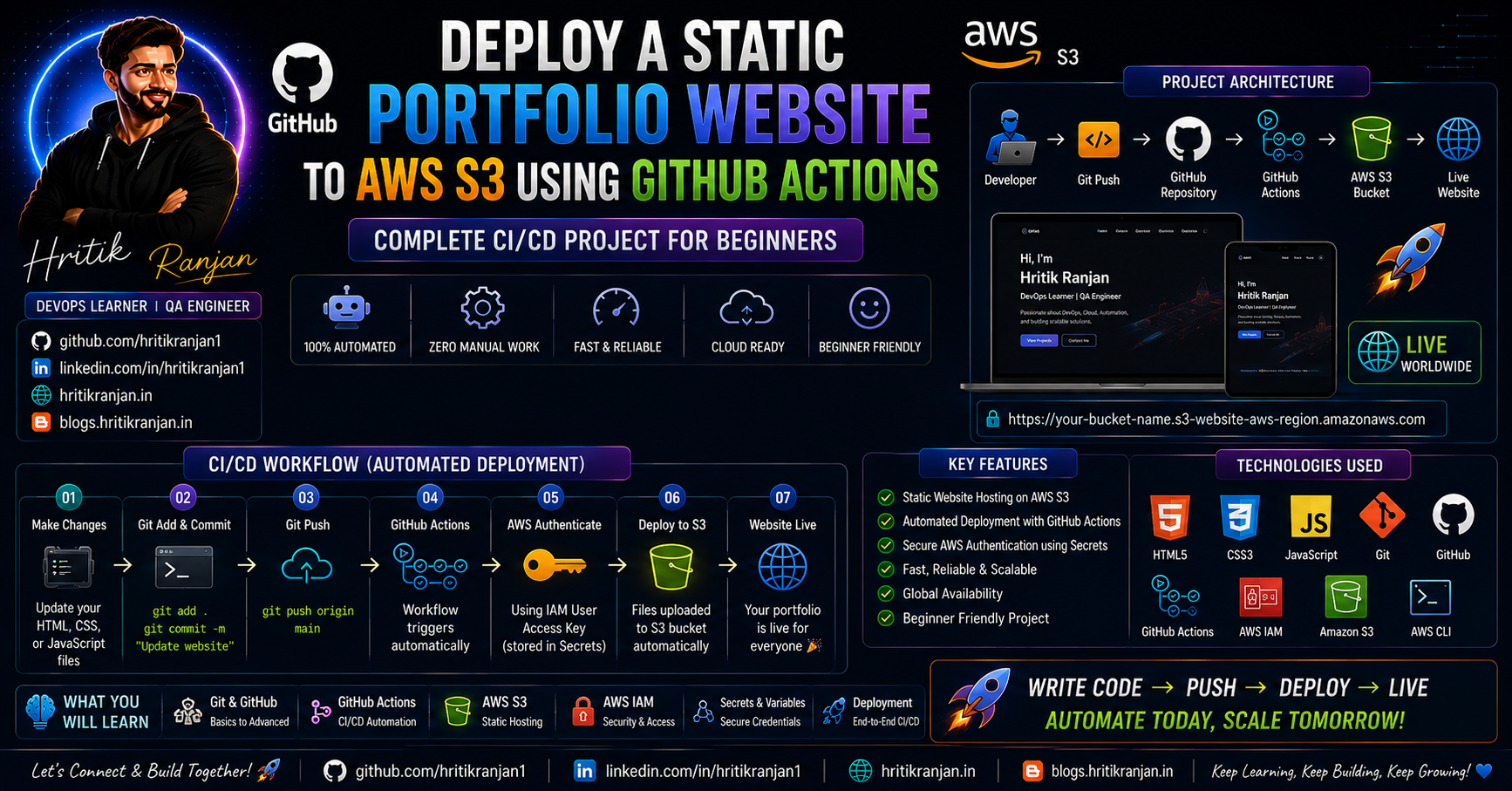
Static Website Hosting
One of S3's coolest features.
Steps
Create Bucket
↓
Upload HTML CSS JS
↓
Enable Website Hosting
↓
Allow Public Access
↓
Attach Bucket Policy
↓
Website Live
Example
index.html

style.css

app.js
Website URL
http://bucket-name.s3-website-region.amazonaws.com

Project 1

Restrict Bucket Access
Objective
Even if IAM user has
AmazonS3FullAccess
restrict access to one bucket.
Steps
Create Bucket
↓
Create IAM User
↓
Attach AmazonS3FullAccess
↓
Create Bucket Policy
↓
Allow only selected bucket
↓
Test Upload
Project 2
Static Website Hosting
Upload
index.html
Enable
Static Website Hosting
Allow Public Policy
Access Website.

Cross Region Replication
Automatically copies files
Mumbai
↓
Singapore
Used for
Disaster Recovery
Multipart Upload
Large files
Split into pieces
Upload simultaneously
Faster
Supports resume.
Event Notifications
Trigger
Lambda
SNS
SQS
EventBridge
Whenever
File Upload
Delete
Restore
Occurs.
Production Use Cases

Store Application Logs
EC2
↓
S3
↓
Athena
↓
Analysis
Store Images
Mobile App
↓
Upload
↓
S3
↓
CloudFront
↓
Users
Backup Database
RDS Backup
↓
S3
↓
Lifecycle
↓
Glacier
Terraform State
terraform.tfstate
↓
S3
↓
Versioning Enabled
↓
Safe State Storage
Kubernetes Backup
Velero
↓
S3
Security Best Practices

✅ Enable Versioning
✅ Enable Encryption
✅ Block Public Access
✅ Least Privilege IAM
✅ Enable Logging
✅ MFA Delete
✅ Lifecycle Policies
Cost Optimization
Use
Lifecycle Rules
↓
Intelligent Tiering
↓
Compression
↓
Delete Old Logs
↓
Glacier
Monitoring
Use
CloudWatch
↓
S3 Metrics
↓
CloudTrail
↓
Access Logs

🎯 AWS S3 Interview Questions & Answers (Most Asked) | Beginner to Advanced
These are some of the most frequently asked AWS S3 interview questions for DevOps, Cloud Engineer, AWS Engineer, SRE, and Solutions Architect roles.

1. What is AWS S3?
Answer
AWS S3 (Simple Storage Service) is an object storage service provided by Amazon Web Services that allows users to store and retrieve unlimited amounts of data over the internet.
It is designed to be:
Highly Scalable
Highly Durable (99.999999999%)
Highly Available
Secure
Cost Effective
S3 stores data as Objects inside Buckets.
Examples of storing in S3
Images
Videos
PDFs
Backups
Logs
Static Website Files
Machine Learning Datasets
2. What are the main features of AWS S3?
Answer
Some important features are:
Unlimited Storage
Object Storage
High Availability
11 Nines Durability
Versioning
Lifecycle Policies
Server-side Encryption
Bucket Policies
Cross Region Replication
Event Notifications
Static Website Hosting
3. What is a Bucket?
Answer
A Bucket is a logical container that stores objects in AWS S3.
Every object must be stored inside a bucket.
Example:
company-backup

employee-images

terraform-state

application-logs
Bucket names must be globally unique.
4. What is an Object in S3?
Answer
An Object is a file stored inside an S3 bucket.
It consists of:
File Data
Metadata
Object Key
Version ID
Example:
resume.pdf

photo.jpg

backup.zip
Maximum object size is 5 TB.
5. What is Object Storage?
Answer
Object Storage stores data as individual objects instead of blocks or files.
Each object contains:
Data
Metadata
Unique Identifier (Key)
AWS S3 is an Object Storage service.
6. Difference between Object Storage, Block Storage and File Storage?
| Object Storage | Block Storage | File Storage |
|---|---|---|
| AWS S3 | AWS EBS | AWS EFS |
| Stores Objects | Stores Blocks | Stores Files |
| Unlimited | Attached to EC2 | Shared Storage |
| Internet Accessible | VM Storage | Shared Between Servers |
7. What is the maximum object size in S3?
Answer
Maximum object size is
5 TB
For files larger than 100 MB, AWS recommends using Multipart Upload.
8. Is there any limit on Bucket Size?
Answer
No.
Bucket storage is virtually unlimited.
You can store billions of objects inside one bucket.
9. What is the maximum Bucket Name length?
Answer
Bucket names:
3 to 63 characters
Lowercase only
Globally unique
No spaces
No uppercase letters
10. Explain S3 Durability.
Answer
AWS S3 provides
99.999999999% durability (11 Nines)
This means AWS automatically stores multiple copies of your data across multiple devices in multiple Availability Zones.
It protects data from hardware failures.
11. Difference between Availability and Durability?
Answer
Availability
Means the service is accessible whenever users want to use it.
Example:
99.99% Availability
Durability
Means data is protected against loss.
Example:
11 Nines Durability
12. What are S3 Storage Classes?
Answer
AWS provides different storage classes based on cost and access frequency.
Standard
Intelligent Tiering
Standard-IA
One Zone-IA
Glacier Instant Retrieval
Glacier Flexible Retrieval
Glacier Deep Archive
13. Which Storage Class is the cheapest?
Answer
Glacier Deep Archive
It is used for long-term archival storage.
Retrieval time:
12–48 hours.
14. What is Versioning?
Answer
Versioning stores multiple versions of the same object.
Benefits:
Recover deleted files
Undo accidental overwrites
Protect against ransomware
Maintain history
15. Why should we enable Versioning?
Answer
It helps in:
Disaster Recovery
Backup
File Recovery
Audit
Data Protection
16. What are Lifecycle Rules?
Answer
Lifecycle Rules automatically move objects between storage classes or delete old files.
Example:
30 Days

↓

Standard

↓

90 Days

↓

Standard IA

↓

180 Days

↓

Glacier

↓

365 Days

↓

Delete
It helps reduce storage costs.
17. What is Multipart Upload?
Answer
Multipart Upload divides a large file into multiple smaller parts and uploads them simultaneously.
Benefits:
Faster Upload
Resume Failed Upload
Better Performance
Recommended for files larger than 100 MB.
18. What is Cross Region Replication (CRR)?
Answer
CRR automatically copies objects from one bucket to another bucket in a different AWS Region.
Benefits:
Disaster Recovery
Compliance
Global Applications
19. Difference between CRR and Same Region Replication (SRR)?
| CRR | SRR |
|---|---|
| Different Region | Same Region |
| Disaster Recovery | Compliance |
| Higher Cost | Lower Cost |
20. What is Bucket Policy?
Answer
Bucket Policy is a resource-based policy attached directly to an S3 bucket.
It controls:
Who can access the bucket
What actions are allowed
Which IPs can access
Whether HTTPS is required
21. Difference between IAM Policy and Bucket Policy?
| IAM Policy | Bucket Policy |
|---|---|
| Attached to User/Role | Attached to Bucket |
| Identity Based | Resource Based |
| Controls User Access | Controls Bucket Access |
22. Can Bucket Policy override IAM Policy?
Answer
Yes.
An explicit Deny in a Bucket Policy overrides an IAM Allow.
AWS always evaluates Deny first.
23. What is ACL?
Answer
ACL (Access Control List) is an older permission mechanism.
AWS now recommends using:
IAM Policies
Bucket Policies
instead of ACLs.
24. How can you secure an S3 Bucket?
Answer
Best practices:
Enable Versioning
Enable Encryption
Block Public Access
Use Bucket Policies
Use IAM Roles
Enable MFA Delete
Enable Logging
Use Least Privilege
25. What is Server Side Encryption?
Answer
AWS encrypts data before storing it.
Types:
SSE-S3
SSE-KMS
SSE-C
26. Difference between SSE-S3 and SSE-KMS?
| SSE-S3 | SSE-KMS |
|---|---|
| AWS Managed Keys | AWS KMS Keys |
| Simpler | More Secure |
| Basic Encryption | Audit Logs + Key Rotation |
27. What is Public Access Block?
Answer
Public Access Block prevents accidental exposure of buckets to the internet.
AWS recommends enabling it unless you intentionally need public access (e.g., static websites).
28. Can we host a website on S3?
Answer
Yes.
AWS S3 supports Static Website Hosting.
You can host:
HTML
CSS
JavaScript
Dynamic applications (PHP, Node.js, Java) cannot run directly on S3.
29. Can S3 host Dynamic Websites?
Answer
No.
S3 only hosts static content.
For dynamic applications, use:
EC2
ECS
EKS
Elastic Beanstalk
Lambda + API Gateway
30. What is S3 Event Notification?
Answer
S3 can trigger events when:
File Uploaded
File Deleted
File Restored
Supported services:
AWS Lambda
Amazon SNS
Amazon SQS
Amazon EventBridge
31. What is Transfer Acceleration?
Answer
S3 Transfer Acceleration speeds up uploads and downloads by routing traffic through AWS Edge Locations using the CloudFront network.
It is useful for users uploading files from distant geographic locations.
32. How is S3 used in DevOps?
Answer
Common DevOps use cases include:
Terraform Remote State Storage
Jenkins Build Artifacts
Application Backups
Log Storage
Static Website Hosting
Kubernetes Backups (Velero)
CloudFront Origin
CI/CD Pipeline Artifacts
33. How is S3 used with CloudFront?
Answer
S3 stores static files (HTML, CSS, JS, images), while CloudFront caches and delivers them through global edge locations for faster access, lower latency, and improved performance.
34. What is S3 Version ID?
Answer
When Versioning is enabled, every version of an object receives a unique Version ID, allowing you to retrieve or restore previous versions.
35. What happens if you delete a file from a versioned bucket?
Answer
S3 adds a Delete Marker instead of permanently removing the object. Older versions remain available until explicitly deleted.
36. What is the difference between S3 Standard and Glacier?
| S3 Standard | Glacier |
|---|---|
| Frequent access | Archive storage |
| Millisecond retrieval | Minutes to hours retrieval |
| Higher cost | Lower cost |
37. Can an EC2 instance access an S3 bucket without access keys?
Answer
Yes. The recommended approach is to attach an IAM Role to the EC2 instance. This avoids hardcoding access keys and is more secure.
38. What is the Principle of Least Privilege in S3?
Answer
Grant users and applications only the minimum permissions they need to perform their tasks, reducing the risk of accidental or malicious actions.
39. What are some common production use cases of AWS S3?
Answer
Static website hosting
Image and video storage
Application log storage
Database backups
Disaster recovery
Terraform remote state
CloudFront origin
Data lakes for analytics
Machine learning datasets
40. What are common mistakes beginners make with S3?
Answer
Making buckets public without need
Disabling encryption
Not enabling versioning
Giving
AmazonS3FullAccessto all usersForgetting lifecycle rules
Using long-term access keys instead of IAM roles
Ignoring bucket policies and monitoring
⭐ Bonus Interview Tip
When answering S3 interview questions, don't just define the service. Explain how you've used it in real-world scenarios, such as:
Hosting a static website
Storing Jenkins build artifacts
Saving Terraform state files
Configuring lifecycle rules to reduce costs
Enabling versioning for backup and recovery
Using IAM roles and bucket policies to secure access
Practical examples make your answers much stronger in interviews than theoretical definitions alone.
Common Mistakes Beginners Make
❌ Making buckets public unnecessarily.
❌ Disabling encryption.
❌ No versioning.
❌ Using Standard Storage for backups.
❌ Giving AmazonS3FullAccess to everyone.
❌ Forgetting lifecycle rules, increasing storage costs.
Final Summary
AWS S3 is one of the most important AWS services and is widely used in almost every cloud application. Whether you're hosting a static website, storing application logs, backing up databases, managing Terraform state files, or serving images through CloudFront, S3 provides a secure, scalable, highly durable, and cost-effective storage solution.
By understanding buckets, objects, storage classes, versioning, lifecycle rules, bucket policies, encryption, replication, event notifications, and monitoring, you'll build a strong foundation for AWS, DevOps, and Cloud Engineering. Mastering S3 is essential because it appears in almost every real-world AWS architecture and is one of the most frequently discussed services in technical interviews.
🚀 Continue Your Learning Journey
Thank you for taking the time to read this article.
Technology is evolving rapidly, and continuous learning is one of the most valuable investments you can make in your career. Whether you're exploring DevOps, Cloud Computing, Artificial Intelligence, Cybersecurity, Software Development, Data Science, or Career Growth, the resources below can help you deepen your knowledge and stay ahead in the industry.
🎓 Recommended Learning Platforms
🚀 Coursera
Learn from world-renowned universities and industry leaders including Google, IBM, Stanford, Microsoft, Meta, and many more.
✔ Professional Certificates ✔ Career-focused Learning Paths ✔ AI & Machine Learning Programs ✔ Cloud & DevOps Certifications ✔ Business & Leadership Courses
🔗 https://imp.i384100.net/k0KvbV
💻 Udemy
One of the largest online learning platforms with practical, hands-on courses covering:
✔ DevOps & Kubernetes ✔ Docker & Cloud Computing ✔ AWS, Azure & GCP ✔ Programming & Development ✔ Cybersecurity & Ethical Hacking
🔗 https://trk.udemy.com/MAL2MY
📊 DataCamp
A great platform for anyone interested in:
✔ Python Programming ✔ SQL & Databases ✔ Data Analytics ✔ Machine Learning ✔ Artificial Intelligence
Interactive learning paths and hands-on projects make it ideal for beginners and professionals alike.
🔗 https://datacamp.pxf.io/nX4kER
🎓 edX
Access high-quality courses and certifications from leading institutions such as:
✔ Harvard University ✔ MIT ✔ Berkeley ✔ Microsoft
Perfect for learners seeking university-level education online.
🎨 Domestika
Enhance your creative skills with courses on:
✔ Graphic Design ✔ Video Editing ✔ Animation ✔ Digital Marketing ✔ Content Creation
🔗 https://domestika.sjv.io/dynKAW
🛠️ Recommended Tools & Resources
🔥 AppSumo
Discover exclusive lifetime deals on:
✔ AI Tools ✔ Productivity Software ✔ Developer Utilities ✔ Marketing Platforms ✔ Business Applications
A must-have resource for developers, creators, freelancers, and entrepreneurs looking to save money while accessing premium tools.
🔗 https://appsumo.8odi.net/L04a33
🛒 Shopify
Looking to start an online business or launch an eCommerce store?
Shopify provides everything you need to build, manage, and scale an online business.
✔ Online Store Builder ✔ Payment Integration ✔ Inventory Management ✔ Marketing Tools
🔗 https://shopify.pxf.io/Vxv09k
🌐 WordPress, WooCommerce & Jetpack
Create professional websites, blogs, and online stores with one of the most trusted web ecosystems in the world.
Ideal for:
✔ Personal Blogs ✔ Portfolio Websites ✔ Business Websites ✔ eCommerce Stores
🔗 https://automattic.pxf.io/Z6vR5W
🌍 Language Learning Resources
🗣️ Preply
Learn English and other languages through personalized one-on-one tutoring sessions with experts from around the world.
🔗 https://preply.sjv.io/o4gBDY
📚 British Council English Online
Improve your professional communication skills and English fluency through structured learning programs.
🔗 https://englishonline.sjv.io/9VOGa4
🧠 Rosetta Stone
One of the most recognized language-learning platforms for immersive language acquisition.
🔗 https://aff.rosettastone.com/X4OyqG
🧪 Science & Educational Resources
🔬 MEL Science
Interactive science kits and educational experiences designed to make STEM learning engaging and practical.
🔗 https://imp.i328067.net/bk2beg
📖 Carson Dellosa Education
Educational materials and learning resources for students, teachers, and lifelong learners.
🔗 https://carsondellosaeducation.sjv.io/E0JbjW
❤️ Support My Work
Creating detailed technical content, tutorials, guides, and learning resources takes significant time and effort.
If you find my articles helpful and would like to support my work, you can do so through the following platforms:
⭐ Become a GitHub Sponsor
Support my open-source contributions, technical content, and community projects.
🔗 https://github.com/sponsors/hritikranjan1
☕ Buy Me a Chai
Enjoying my content? Consider buying me a chai and supporting future tutorials, guides, and educational resources.
🔗 https://www.chai4.me/hritikranjan
👨💻 Connect With Me
Hritik Ranjan
💡 AI Enthusiast ☁️ DevOps Learner 🔐 Cybersecurity Advocate 💻 Software Developer
Connect & Follow
🔗 GitHub: https://github.com/hritikranjan1
🔗 LinkedIn: https://linkedin.com/in/hritikranjan1
🔗Telegram: https://t.me/codewithluv143
🔗Github repo - https://github.com/hritikranjan1/aws-s3-complete-guide
📢 Found This Article Helpful?
If this article added value to your learning journey:
✅ Share it with your network ✅ Bookmark it for future reference ✅ Follow for more DevOps, AI, Cloud, Cybersecurity, and Software Engineering content
Thank you for reading and being part of this learning journey.
Keep Learning. Keep Building. Keep Growing. 🚀