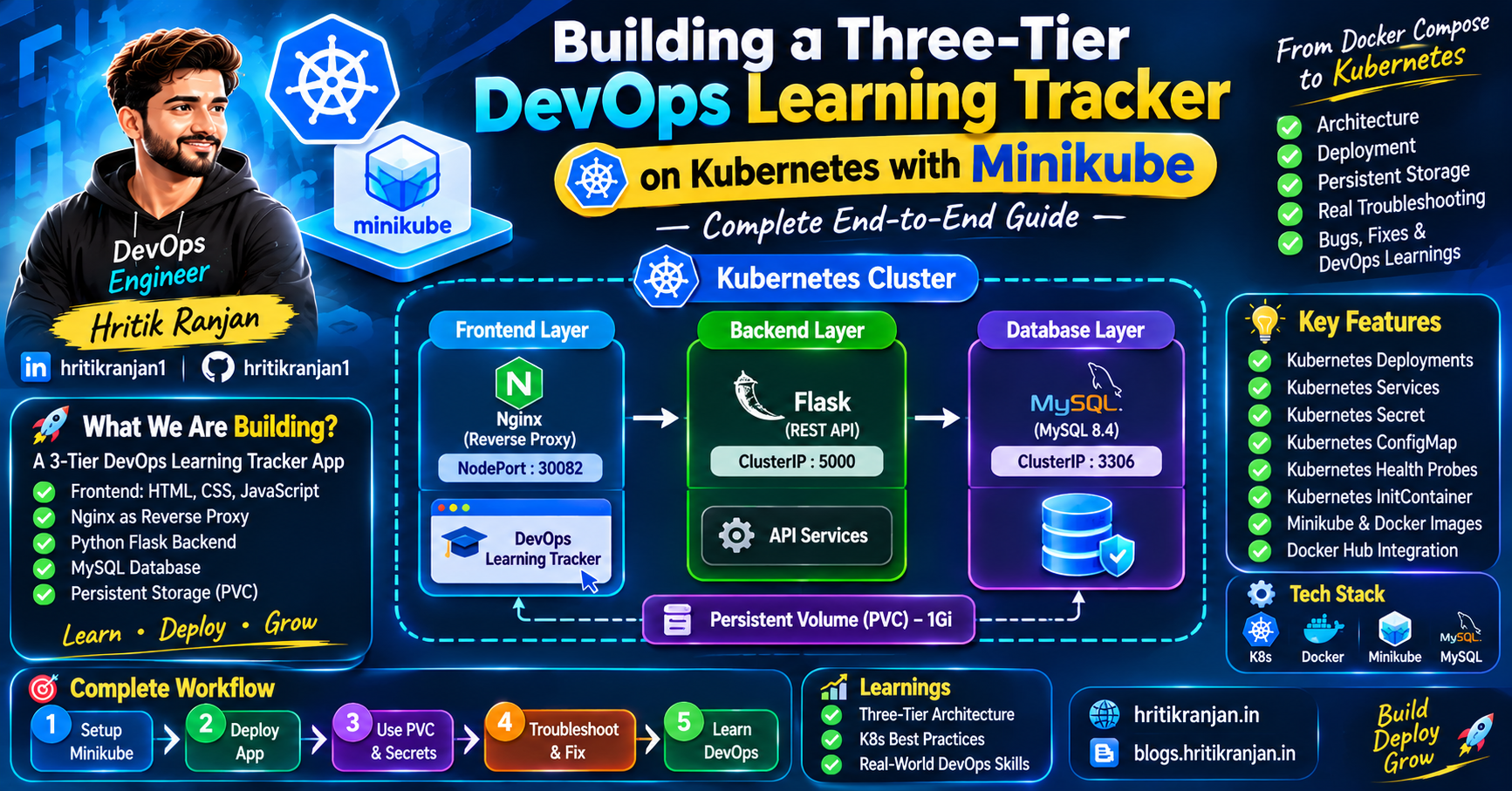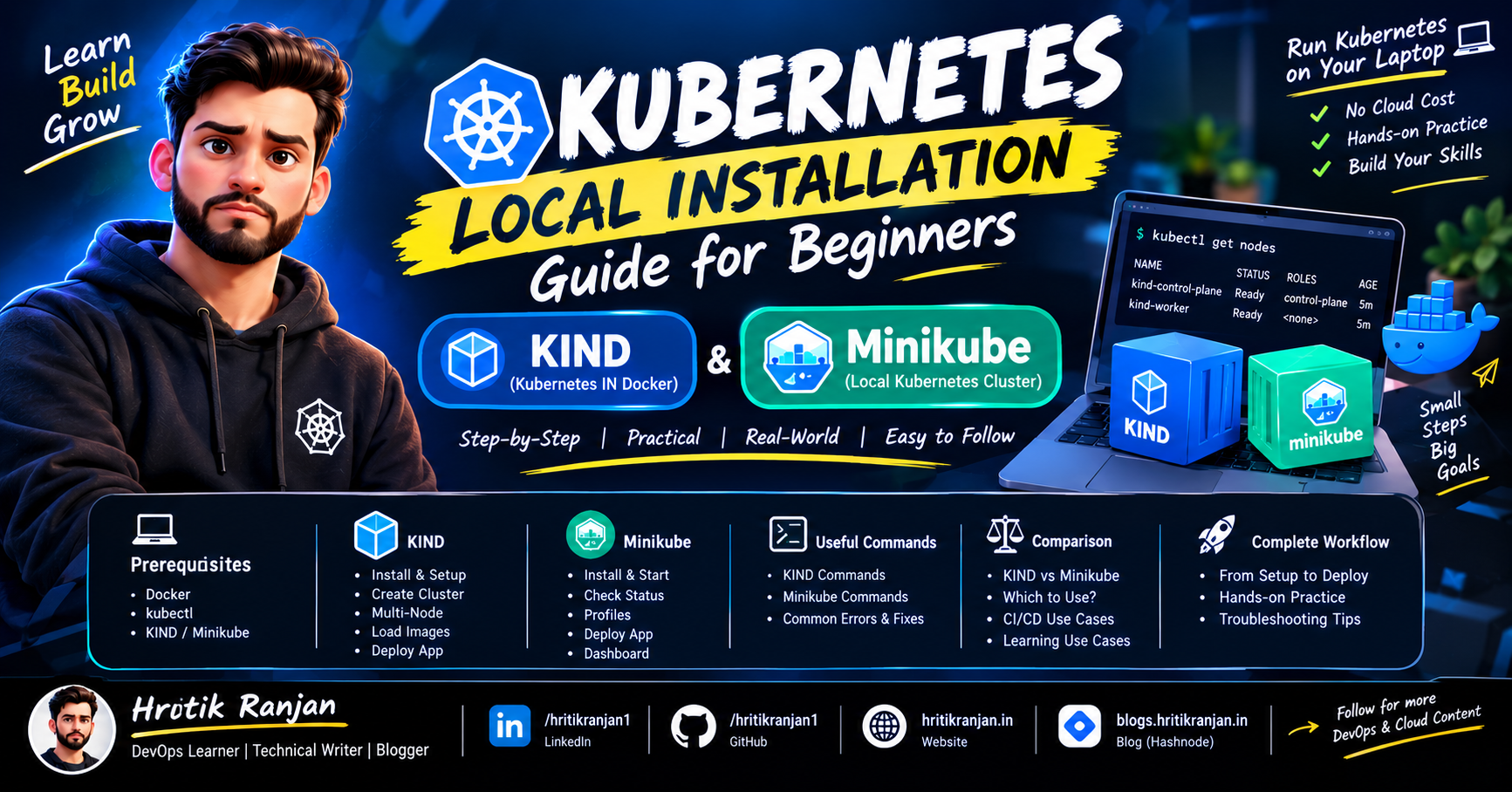

Kubernetes (K8s) Part 1: Complete Beginner's Guide to Kubernetes
Learn Kubernetes from scratch with simple explanations of architecture, Control Plane, Worker Nodes, Pods, Deployments, ReplicaSets, Namespaces, StatefulSets, and DaemonSets, along with practical YAML examples and essential kubectl commands.
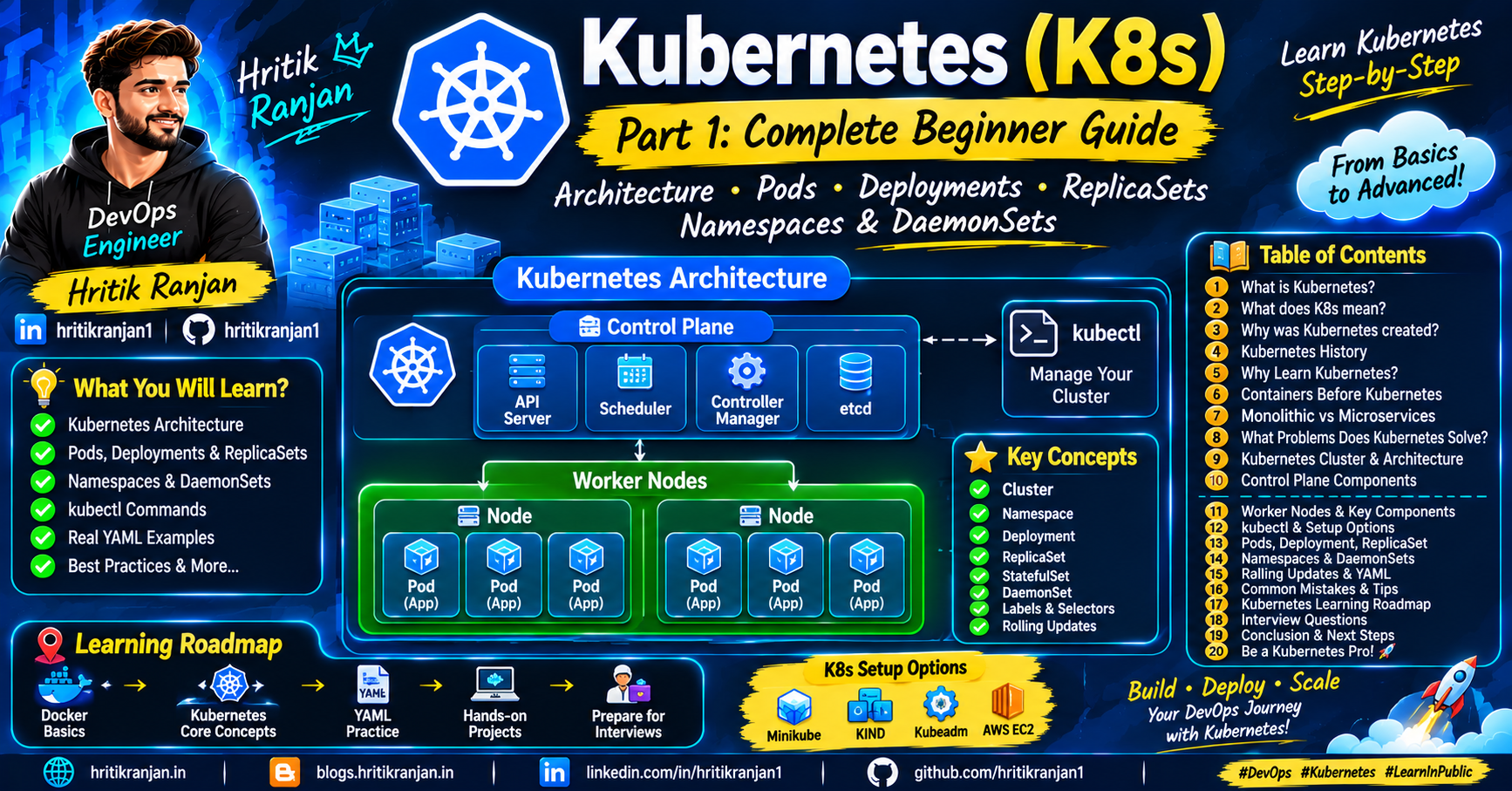
Kubernetes is one of the most important technologies to learn if you are preparing for a DevOps, Cloud, SRE, or Platform Engineering role.
If you have worked with Docker, you already know how to run applications inside containers. But when you have hundreds or thousands of containers, managing them manually becomes difficult.
This is where Kubernetes comes in.
Kubernetes helps us manage containerized applications by providing features such as:
- Container orchestration
- Self-healing
- Auto-scaling
- High availability
- Rolling updates
- Service discovery
- Load balancing
- Resource management
- Application deployment
- Container scheduling
In this Kubernetes Part 1 guide, we will start from the absolute basics and gradually move toward practical Kubernetes concepts.
We will cover:
- What is Kubernetes?
- What does K8s mean?
- History of Kubernetes
- Why Kubernetes is important for DevOps
- Monolithic vs Microservices
- Kubernetes architecture
- Control Plane
- Worker Nodes
- Kubernetes API Server
- etcd
- Scheduler
- Controller Manager
- Kubelet
- Kube-proxy
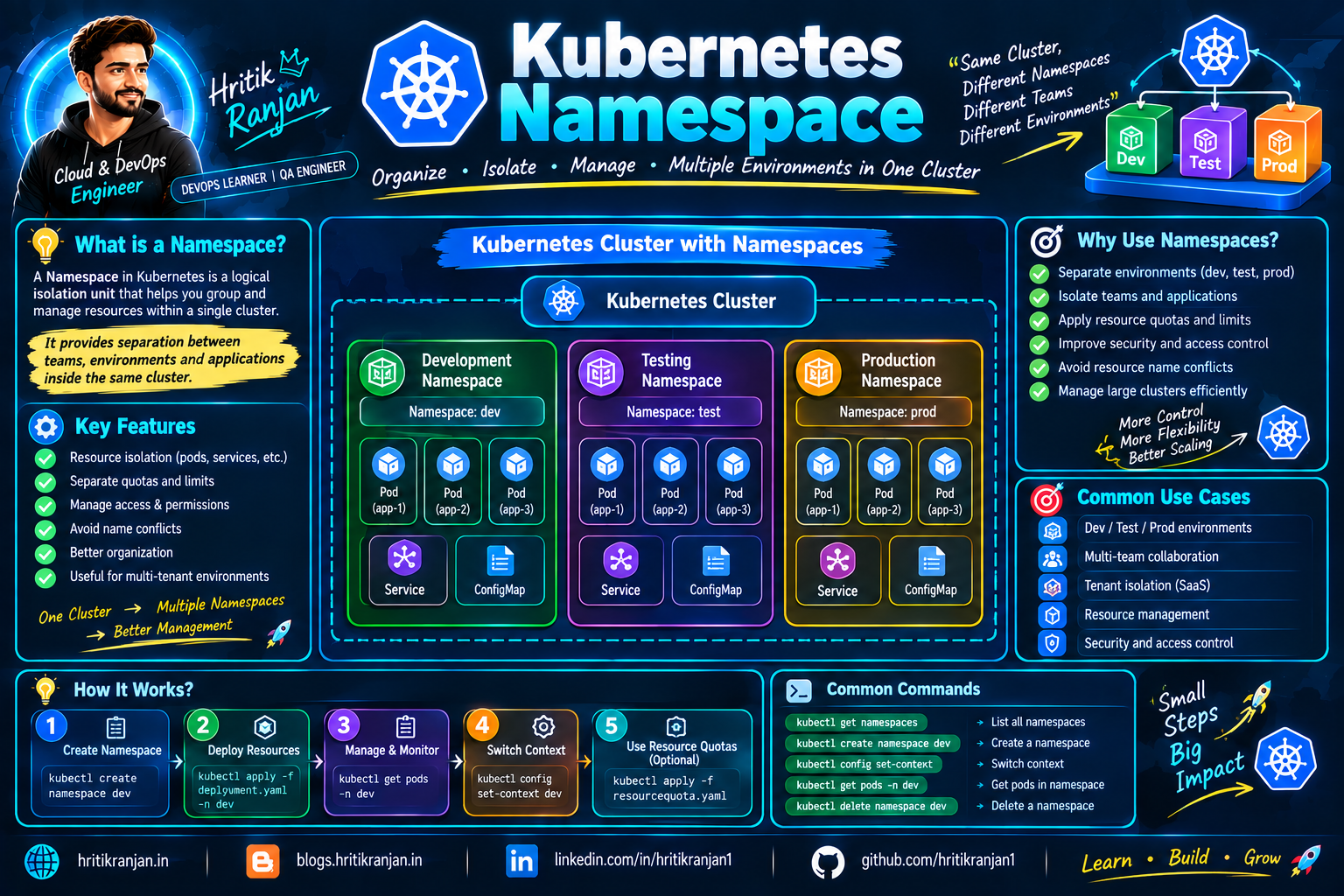
- Container Runtime
- kubectl
- Kubernetes cluster
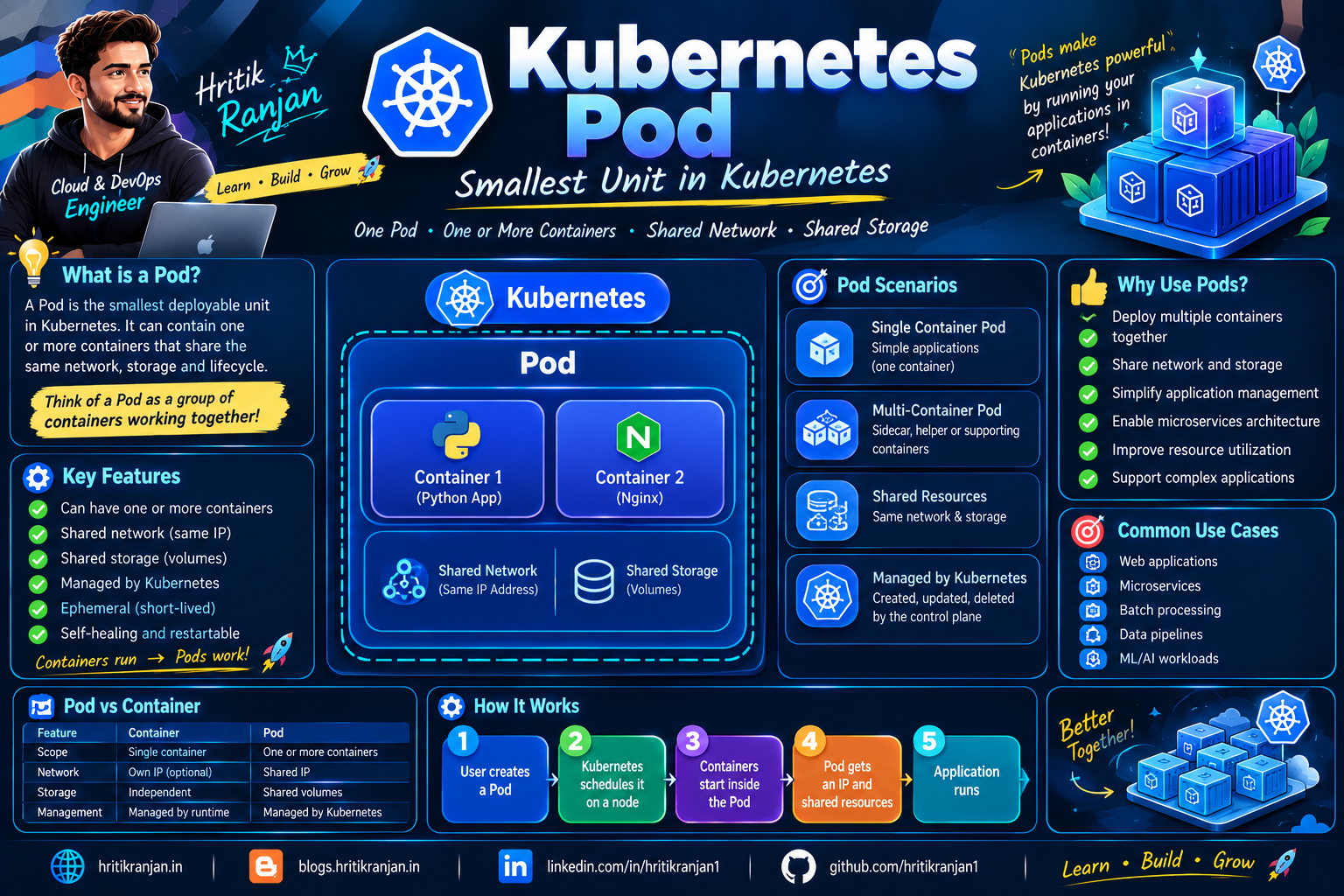
- Kubernetes setup options
- KIND
- Minikube
- Kubeadm
- AWS EC2 Kubernetes setup
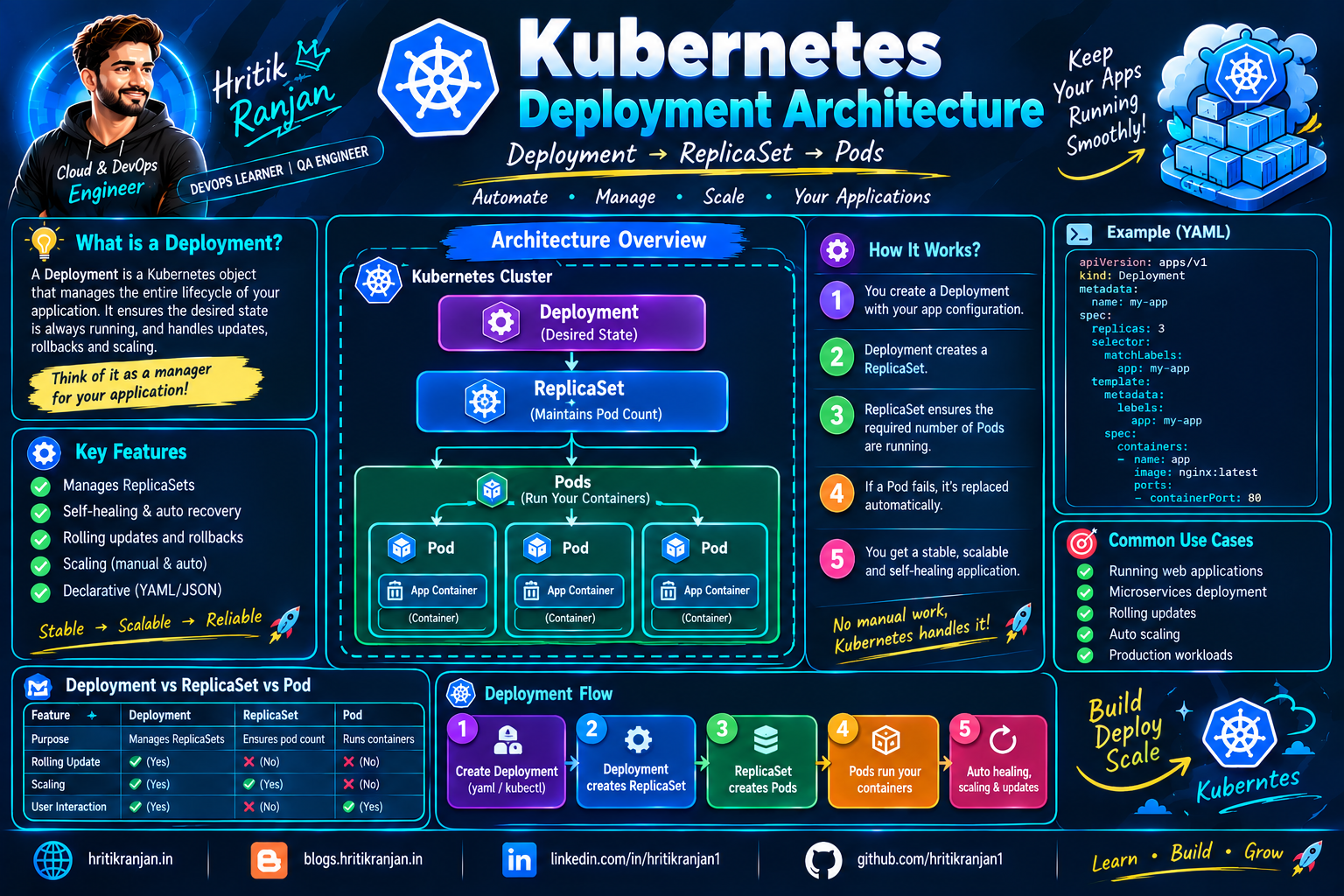
- Namespaces
- Pods
- Deployments
- ReplicaSets
- StatefulSets
- DaemonSets
- Labels and Selectors
- Rolling Updates
- Practical YAML examples
- Important kubectl commands
- Beginner mistakes
- Kubernetes interview questions
Note: This is Part 1 of the Kubernetes series. More advanced topics such as Services, Ingress, ConfigMaps, Secrets, Volumes, Stateful applications, RBAC, HPA, Helm, monitoring, and production deployments can be covered in the upcoming parts.
📌 Table of Contents
- What is Kubernetes?
- What does K8s mean?
- Why was Kubernetes created?
- Kubernetes History
- Why Should You Learn Kubernetes?
- Containers Before Kubernetes
- Monolithic vs Microservices
- What Problems Does Kubernetes Solve?
- Kubernetes Cluster
- Kubernetes Architecture
- Control Plane
- API Server
- etcd
- Scheduler
- Controller Manager
- Worker Nodes
- Kubelet
- Kube Proxy
- Container Runtime
- kubectl
- How Kubernetes Components Work Together
- Kubernetes Setup Options
- KIND
- Minikube
- Kubeadm
- Kubernetes on AWS EC2
- Namespace
- Pods
- Deployment
- ReplicaSet
- StatefulSet
- Deployment vs ReplicaSet vs StatefulSet
- Labels and Selectors
- Rolling Updates
- DaemonSet
- Practical Kubernetes YAML
- Important kubectl Commands
- Common Beginner Mistakes
- Kubernetes Learning Roadmap
- Kubernetes Interview Questions
- Conclusion
1. 🚀 What is Kubernetes?
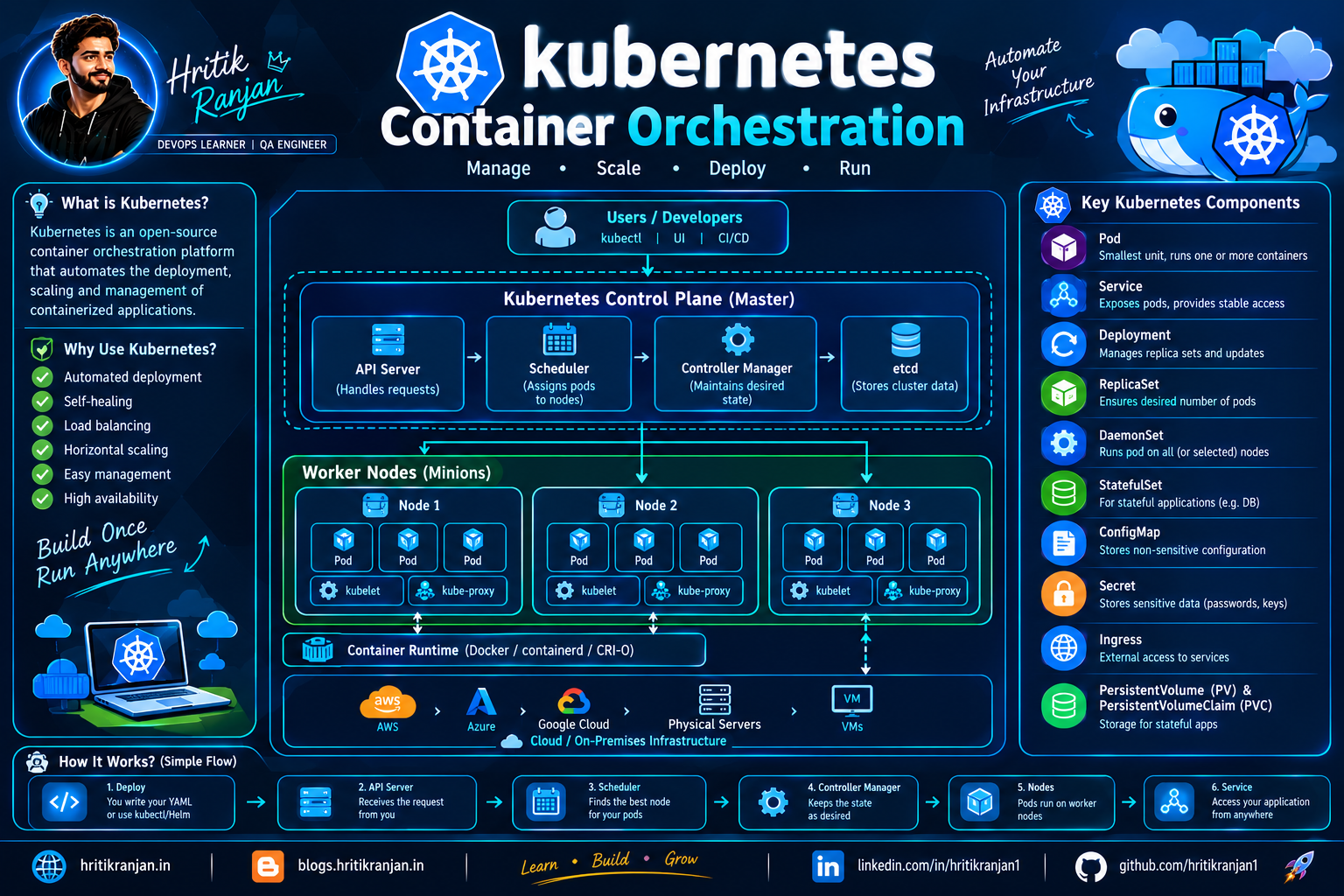
Kubernetes is an open-source container orchestration platform.
The simple definition is:
Kubernetes helps us deploy, manage, scale, and maintain containerized applications automatically.
Suppose you have a Docker container running your application.
You can start it manually:
docker run nginx
This works perfectly when you have one or a few containers.
But imagine a company has:
100 Applications
        ↓
500 Containers
        ↓
50 Servers
Now several questions appear:
- What happens if a container crashes?
- Who restarts it?
- What if a server goes down?
- How do we run 10 copies of an application?
- How do we distribute traffic?
- How do we update the application without downtime?
- How do we scale applications when traffic increases?
- How do we manage hundreds of containers?
Doing all of this manually would be extremely difficult.
Kubernetes automates these tasks.
Simple Example
Suppose your application normally needs:
3 application containers
You tell Kubernetes:
replicas: 3
Kubernetes continuously checks the desired state.
If one Pod crashes:
Before:

Pod 1
Pod 2
Pod 3
One crashes:
Pod 1
Pod 2
X Pod 3
Kubernetes creates another Pod:
Pod 1
Pod 2
Pod 4
This is called self-healing.
2. 🔤 What Does K8s Mean?
You will often see Kubernetes written as:
K8s
Why?
The word Kubernetes starts with:
K u b e r n e t e s
There are:
8 letters
between:
K
and:
s
Therefore:
K + 8 + s = K8s
So:
Kubernetes = K8s
Both mean the same thing.
3. 🏗️ Why Was Kubernetes Created?
Before Kubernetes, companies were already using containers.
Docker made containers much easier to create and run.
But large organizations had another problem:
How do we manage thousands of containers across hundreds of machines?
Google had already solved a similar problem internally.
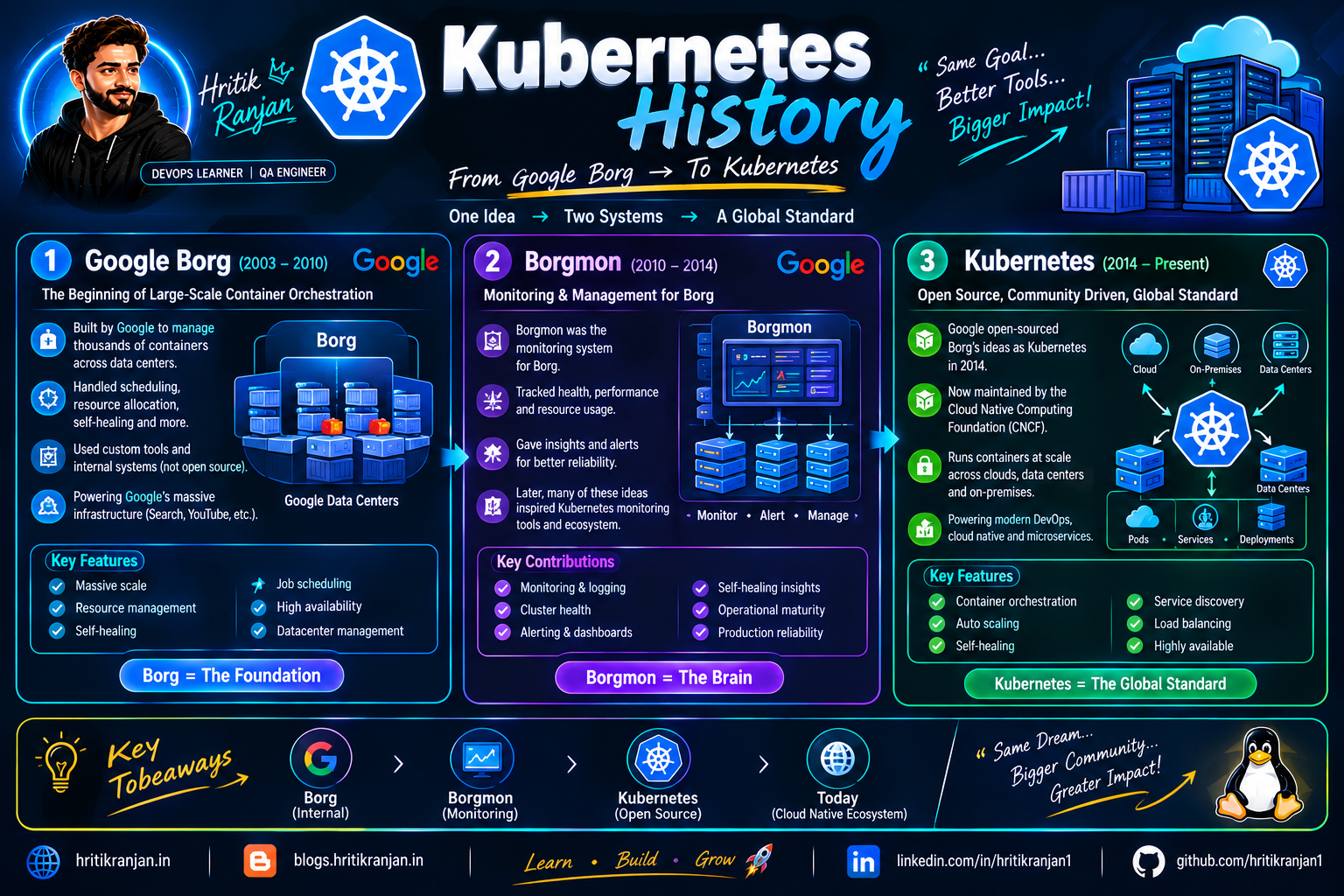
Google developed a container management system called Borg.
Borg was designed to manage Google's huge infrastructure.
Kubernetes was later created as an open-source container orchestration project and was heavily influenced by Google's experience with Borg.
Kubernetes became publicly available in 2014 and later became a major open-source project under the Cloud Native Computing Foundation (CNCF).
4. 📜 Kubernetes History
A simplified history looks like this:
Google
   ↓
Borg
   ↓
Lessons from large-scale container management
   ↓
Kubernetes
   ↓
Open Source
   ↓
CNCF ecosystem
   ↓
Cloud-native infrastructure
The important thing for a DevOps engineer is not memorizing every historical date.
The important point is:
Kubernetes was designed to solve large-scale container management problems.
5. 💡 Why Should You Learn Kubernetes?
If you are learning DevOps, Kubernetes is extremely useful because modern applications are increasingly deployed using containers and cloud-native platforms.
Kubernetes provides features such as:
1. Self-Healing
If a Pod crashes, Kubernetes can create a replacement.
2. Scaling
You can increase replicas:
kubectl scale deployment nginx --replicas=5
3. High Availability
Applications can run across multiple nodes.
4. Rolling Updates
You can update applications gradually.
5. Rollbacks
If a deployment fails, you can roll back to a previous version.
6. Service Discovery
Applications can communicate with other applications using Kubernetes Services and DNS.
7. Load Balancing
Kubernetes can distribute traffic across application instances using Services and related networking components.
8. Resource Management
You can define CPU and memory requirements.
6. 🐳 Containers Before Kubernetes
Let's understand the problem using Docker.
Suppose we have:
Application
    ↓
Docker Container
    ↓
Server
This is easy.
But suppose we have:
Application
    ↓
10 Containers
    ↓
3 Servers
Now we need to manage:
- Container failures
- Server failures
- Networking
- Scaling
- Updates
- Traffic
- Storage
- Scheduling
With:
100 containers
500 containers
1000 containers
manual management becomes extremely difficult.
Kubernetes acts as the orchestration layer.
                 Kubernetes
                      |
       +--------------+--------------+
       |              |              |
   Container       Container       Container
   Application     Application     Application
7. 🏢 Monolithic vs Microservices
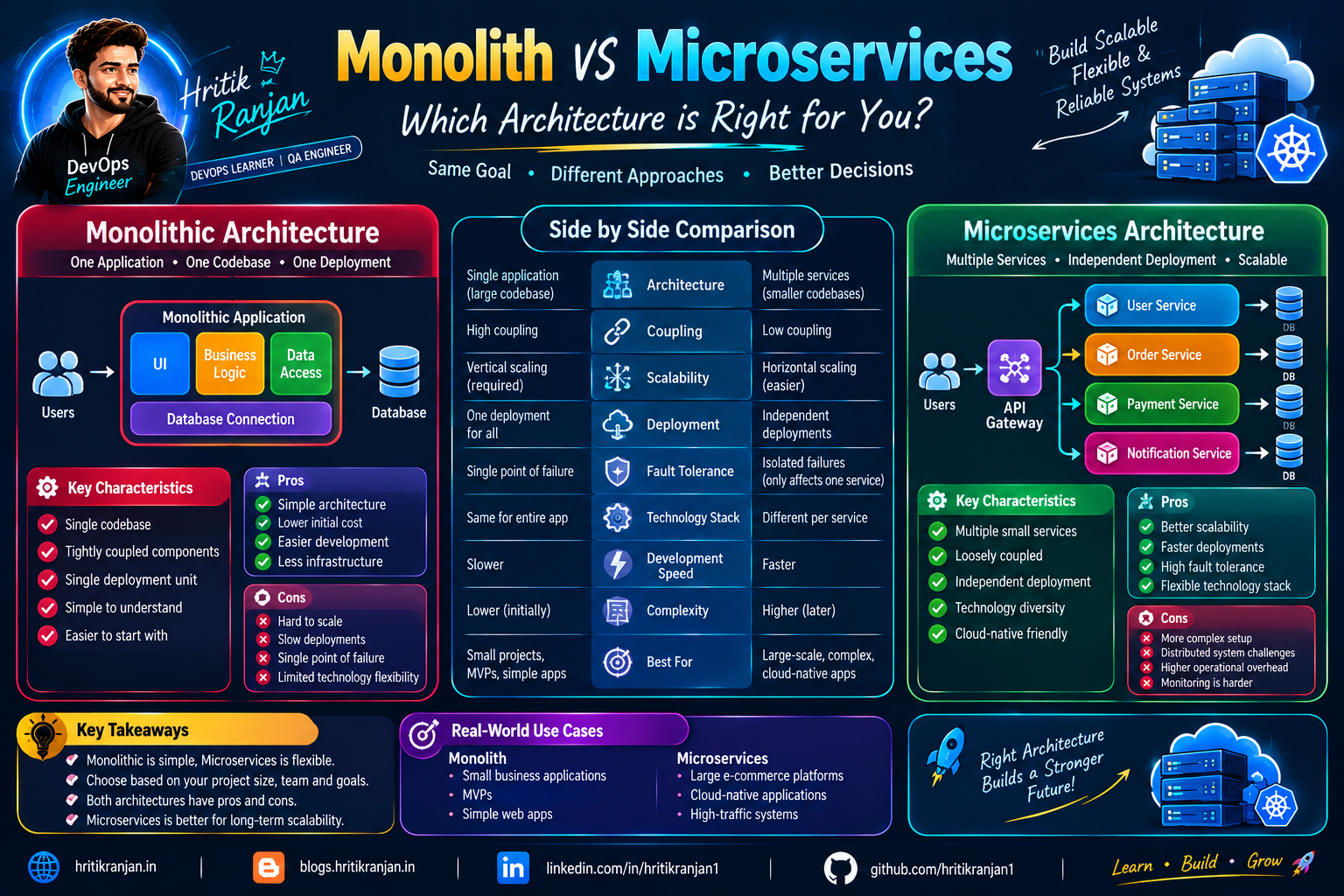
Before understanding Kubernetes, it is important to understand application architecture.
Monolithic Application
In a monolithic application, many components are packaged together.
For example:
              E-Commerce Application
                     |
       +-------------+-------------+
       |             |             |
      UI           Orders        Payment
       |             |             |
       +-------------+-------------+
                     |
                  Database
Everything may be deployed as one large application.
Problem
If you want to update only the payment module, you may need to deploy the entire application.
Microservices Architecture
Microservices divide the application into smaller independent services.
For example:
             E-Commerce System
                    |
     +--------------+--------------+
     |              |              |
 User Service   Order Service   Payment Service
     |              |              |
     +--------------+--------------+
                    |
                Databases
Each service can be:
- Developed independently
- Deployed independently
- Scaled independently
For example:
User Service       → 2 replicas

Order Service      → 5 replicas

Payment Service    → 3 replicas
Kubernetes is particularly useful for managing these distributed workloads.
8. 🛠️ What Problems Does Kubernetes Solve?
Let's imagine a production application.
Without orchestration:
Server 1
 ├── Container A
 ├── Container B

Server 2
 ├── Container C
 ├── Container D
You need to manually monitor everything.
With Kubernetes:
                 Kubernetes
                     |
       +-------------+-------------+
       |             |             |
    Node 1         Node 2        Node 3
       |             |             |
     Pods          Pods          Pods
Kubernetes manages the desired state.
For example:
replicas: 3
means:
I want three running instances of this workload.
Kubernetes continuously tries to make the actual state match the desired state.
This is one of the most important Kubernetes concepts.
9. ☸️ What is a Kubernetes Cluster?
A Kubernetes cluster is a collection of machines that work together to run containerized applications.
A basic cluster contains:
Kubernetes Cluster
│
├── Control Plane
│
├── Worker Node
├── Worker Node
└── Worker Node
The Control Plane manages the cluster.
Worker Nodes run application workloads.
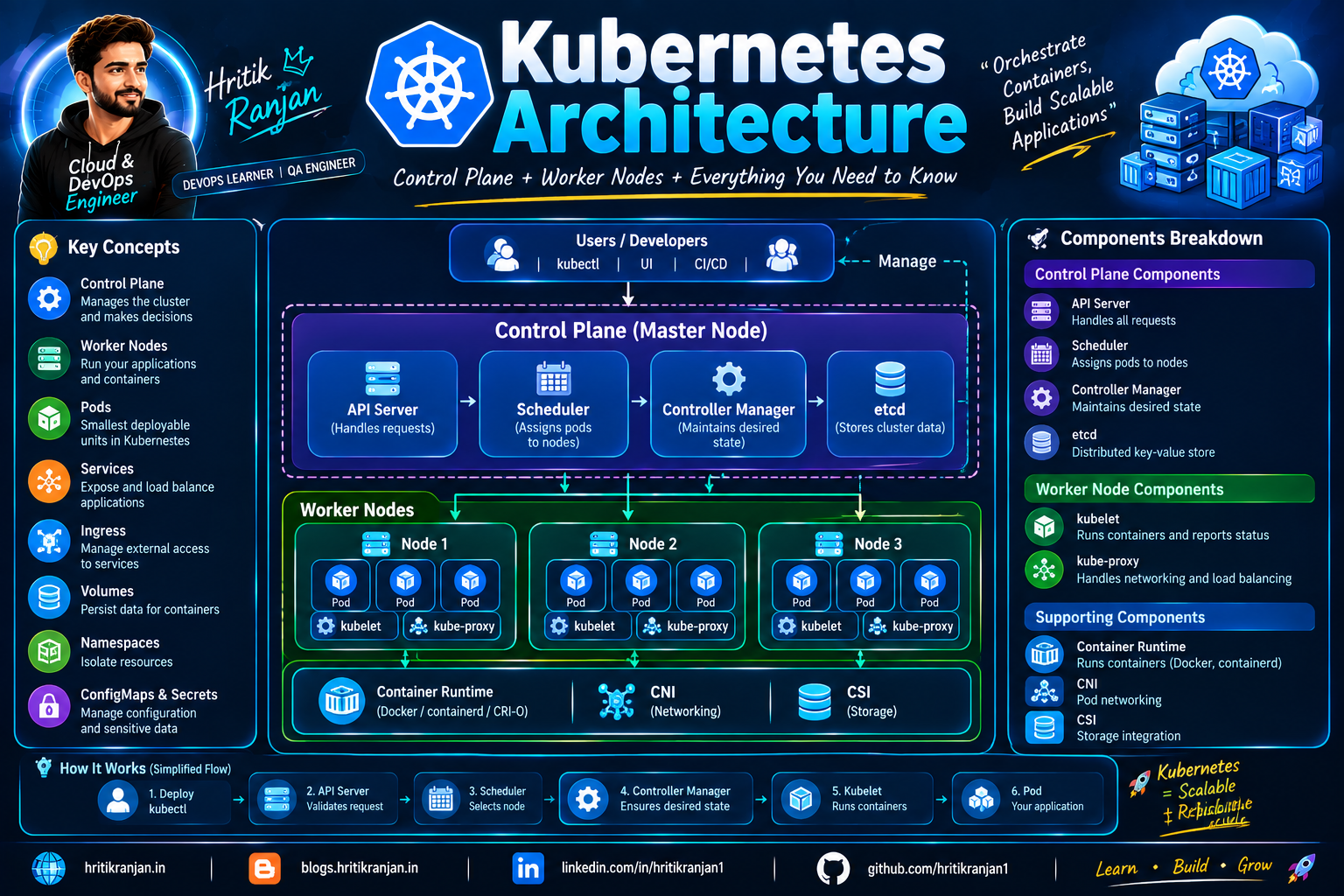
10. 🏗️ Kubernetes Architecture
Kubernetes architecture can be divided into two major parts:
                 Kubernetes Cluster
                        |
             +----------+----------+
             |                     |
       Control Plane          Worker Nodes
             |                     |
       Makes decisions        Runs workloads
Control Plane
Responsible for:
- Cluster management
- Scheduling
- Desired state
- API requests
- Controllers
Worker Nodes
Responsible for:
- Running Pods
- Running containers
- Networking
- Reporting node/container status
11. 🎛️ Control Plane
The Control Plane is the brain of the Kubernetes cluster.
It makes decisions about the cluster.
Important Control Plane components are:
Control Plane
│
├── API Server
├── etcd
├── Scheduler
└── Controller Manager
In some environments, additional components may be deployed as part of the control plane.
12. 🌐 Kubernetes API Server
The kube-apiserver is one of the most important Kubernetes components.
It acts as the main communication point for the cluster.
When you execute:
kubectl get pods
your request goes through the Kubernetes API Server.
Conceptually:
User
  |
kubectl
  |
API Server
  |
Kubernetes Cluster
The API Server communicates with other Kubernetes components and exposes the Kubernetes API.
Example
When you run:
kubectl create deployment nginx --image=nginx
the request goes approximately like:
kubectl
   ↓
API Server
   ↓
Cluster State
   ↓
Controllers/Scheduler
   ↓
Worker Node
   ↓
Pod
   ↓
Container
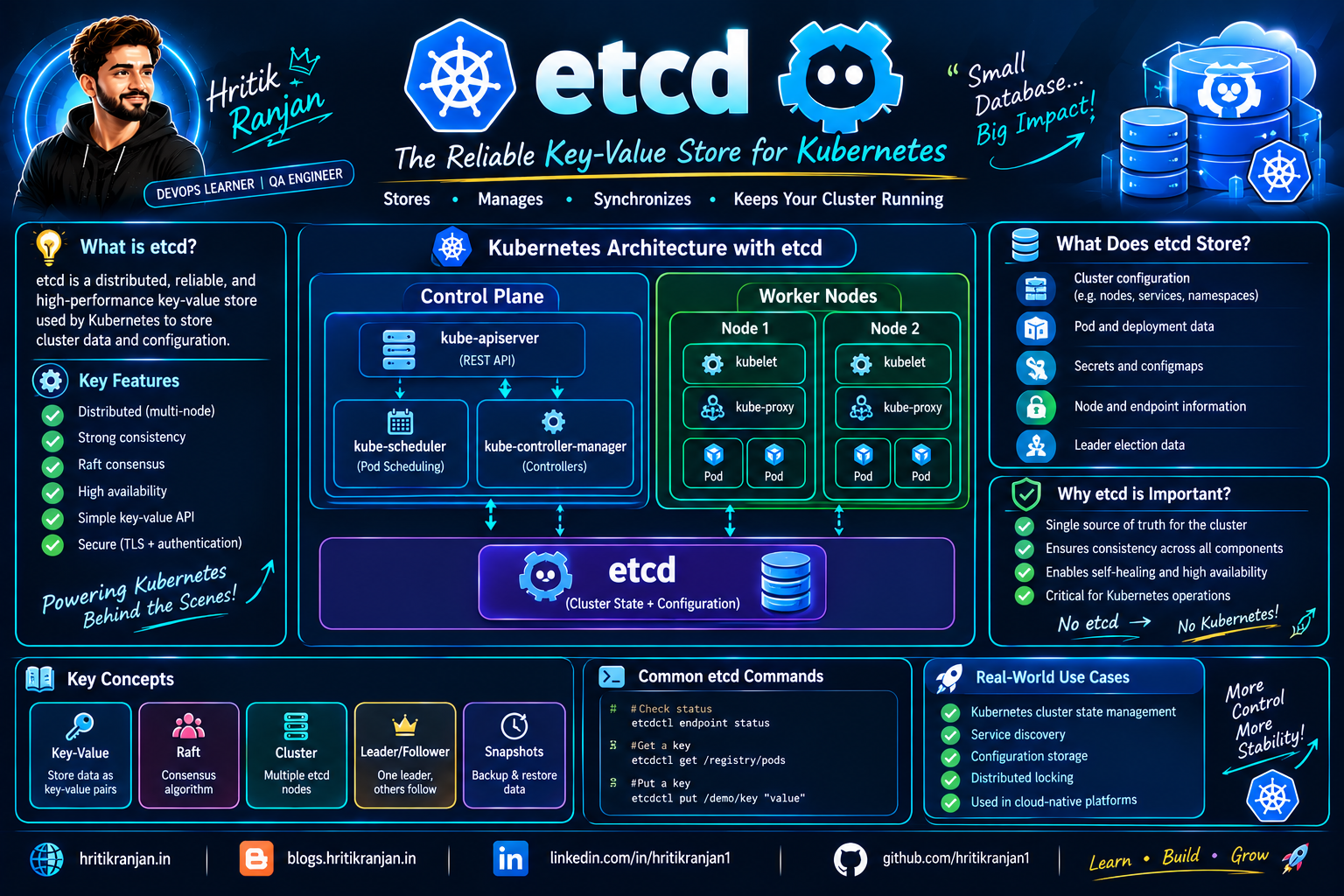
13. 🗄️ etcd
etcd is a distributed key-value data store used by Kubernetes to store cluster state and configuration information.
Think of it as the cluster's important state database.
It stores information such as:
- Kubernetes objects
- Cluster configuration
- Desired state
- Metadata
For example:
Deployment
Pod
Service
ConfigMap
Secret
Node
Namespace
Their Kubernetes state is represented in the cluster's data store.
Important
etcd is critical to the Kubernetes control plane.
If you are managing a production cluster, etcd backup and recovery are very important operational tasks.
14. 📅 Kubernetes Scheduler
The kube-scheduler decides which Worker Node should run a Pod.
Suppose we create:
Pod A
The scheduler checks available nodes.
Node 1 → CPU available
Node 2 → CPU busy
Node 3 → CPU available
The scheduler selects a suitable node based on scheduling rules and constraints.
Conceptually:
Pod
 ↓
Scheduler
 ↓
Suitable Worker Node
The scheduler considers factors such as:
- Available resources
- Resource requests
- Node constraints
- Affinity/anti-affinity
- Taints and tolerations
- Other scheduling policies
15. 🔄 Controller Manager
The Controller Manager runs Kubernetes controllers.
Controllers continuously compare:
Desired State
       vs
Current State
Example:
You specify:
replicas: 3
Current state:
2 Pods
Controller logic detects:
Desired = 3
Current = 2
So Kubernetes works toward:
3 Pods
This reconciliation concept is fundamental to Kubernetes.
16. 🖥️ Worker Nodes
Worker Nodes are the machines where application workloads actually run.
A Worker Node commonly contains:
Worker Node
│
├── kubelet
├── kube-proxy
└── Container Runtime
And it runs:
Pods
  ↓
Containers
Example:
Worker Node 1
│
├── Pod A
│   └── Container
│
├── Pod B
│   └── Container
│
└── Pod C
    └── Container
17. 👷 Kubelet
The kubelet is the primary node agent.
It runs on every Kubernetes Worker Node.
Its job includes:
- Communicating with the API Server
- Ensuring assigned Pods are running
- Monitoring containers
- Reporting node and Pod status
Simplified:
API Server
     |
     ↓
  Kubelet
     |
     ↓
Containers
If Kubernetes schedules a Pod to a particular node, kubelet works with the container runtime to make sure the Pod's containers are running.
18. 🔀 Kube-proxy
kube-proxy is associated with implementing Kubernetes Service networking behavior on nodes.
It helps handle network traffic destined for Kubernetes Services according to the cluster's networking configuration.
Simple view:
Client
  ↓
Kubernetes Service
  ↓
Networking rules
  ↓
Pod
Modern Kubernetes networking can involve several components depending on the environment and CNI implementation, so kube-proxy should not be thought of as the entire Kubernetes networking system.
19. 📦 Container Runtime
Kubernetes needs a container runtime to actually run containers.
Modern Kubernetes uses the CRI (Container Runtime Interface).
Common runtime technologies include:
- containerd
- CRI-O
The runtime is responsible for operations such as creating and running containers.
Conceptually:
Kubernetes
    ↓
kubelet
    ↓
CRI
    ↓
Container Runtime
    ↓
Container
20. 💻 kubectl
kubectl is the primary command-line tool used to interact with Kubernetes clusters.
For example:
kubectl get pods
Other commands:
kubectl get nodes
kubectl get deployments
kubectl get services
kubectl describe pod <pod-name>
kubectl logs <pod-name>
kubectl delete pod <pod-name>
kubectl Architecture
Your Terminal
     |
   kubectl
     |
 API Server
     |
 Kubernetes Cluster
kubectl does not directly manage containers itself.
It communicates with the Kubernetes API.
21. 🔄 How Kubernetes Components Work Together
Let's understand a complete example.
You run:
kubectl create deployment nginx --image=nginx
Step 1 — kubectl
Your command is sent to:
API Server
Step 2 — API Server
The API Server validates and processes the request.
Step 3 — etcd
The desired cluster state is stored.
Step 4 — Controller
The Deployment controller creates the required ReplicaSet.
Step 5 — ReplicaSet
The ReplicaSet creates the required Pod.
Step 6 — Scheduler
The scheduler chooses a suitable Worker Node.
Step 7 — kubelet
The kubelet on that node receives the workload information.
Step 8 — Container Runtime
The runtime pulls the image if necessary and starts the container.
Final result:
kubectl
   ↓
API Server
   ↓
etcd
   ↓
Deployment Controller
   ↓
ReplicaSet
   ↓
Scheduler
   ↓
Worker Node
   ↓
kubelet
   ↓
Container Runtime
   ↓
Container
This flow is extremely important for Kubernetes interviews.
22. 🧪 Kubernetes Setup Options
There are multiple ways to create Kubernetes clusters.
For learning and local development, common choices are:
KIND
Minikube
For creating a cluster on your own VMs:
Kubeadm
For managed cloud Kubernetes:
Amazon EKS
Google GKE
Azure AKS
In this Part 1 guide, we focus on:
- KIND
- Minikube
- Kubeadm
- AWS EC2 setup
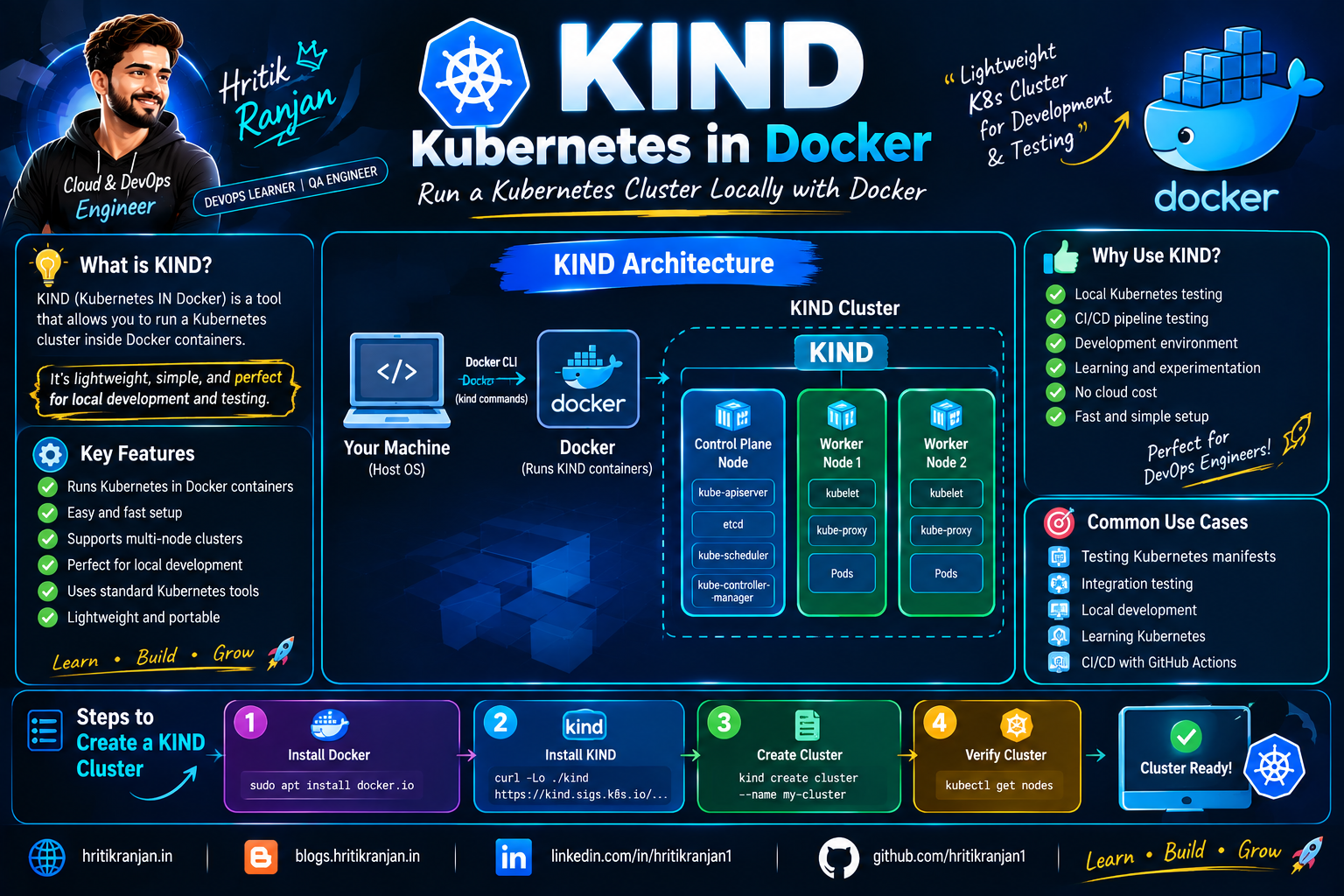
23. 🐳 What is KIND?
KIND means:
Kubernetes IN Docker
KIND allows you to run Kubernetes clusters using Docker containers as Kubernetes nodes.
Instead of creating multiple physical or virtual machines:
Physical VM 1
Physical VM 2
Physical VM 3
KIND can represent nodes using containers:
Docker
│
├── Kubernetes Control Plane Container
├── Kubernetes Worker Container
└── Kubernetes Worker Container
This makes KIND very useful for:
- Learning
- Local testing
- Kubernetes development
- CI environments
- Testing Kubernetes configurations
24. ⚙️ KIND Installation
First make sure Docker is installed.
Check:
docker --version
Then install KIND using the official installation method for your operating system.
After installation:
kind version
Create a cluster:
kind create cluster
Check Kubernetes:
kubectl get nodes
You may see something similar to:
NAME                 STATUS   ROLES           AGE
kind-control-plane   Ready    control-plane   1m
25. 🧪 Creating a Multi-Node KIND Cluster
You can also define a cluster configuration.
Example:
kind: Cluster
apiVersion: kind.x-k8s.io/v1alpha4

nodes:
  - role: control-plane
  - role: worker
  - role: worker
Save it as:
kind-config.yaml
Then:
kind create cluster --config kind-config.yaml
Check:
kubectl get nodes
You should have multiple nodes.
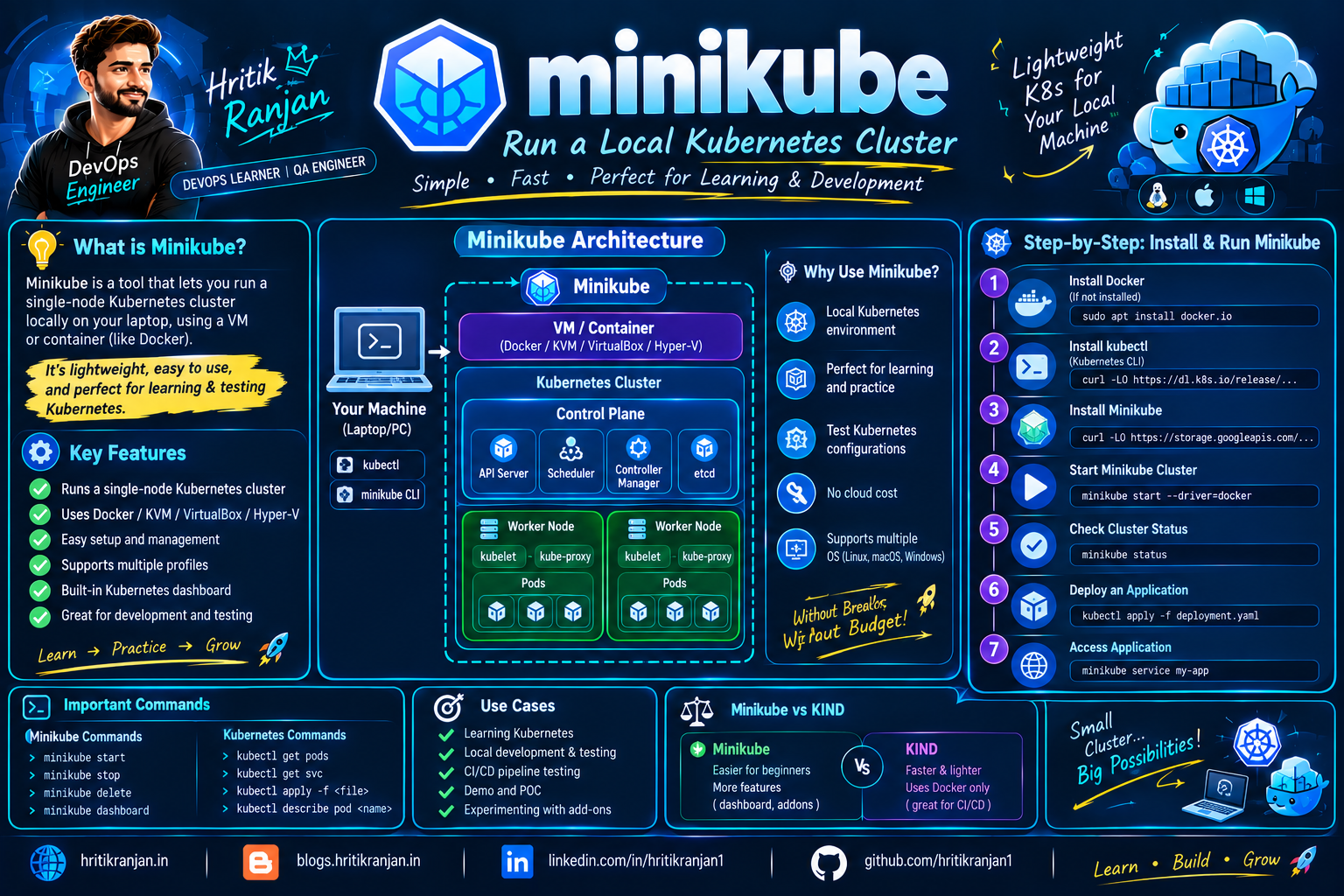
26. 🏔️ What is Minikube?
Minikube is another popular tool for running Kubernetes locally.
It is mainly designed for learning and development.
You can run a Kubernetes cluster on your local machine using a supported driver such as Docker or a VM-based driver.
Architecture:
Your Computer
     |
 Minikube
     |
Kubernetes Cluster
     |
    Node
     |
   Pods
Minikube is very useful for beginners because it makes Kubernetes experimentation easier.
27. ⚙️ Basic Minikube Commands
Start Minikube:
minikube start
Check status:
minikube status
Check nodes:
kubectl get nodes
Open Minikube dashboard if enabled:
minikube dashboard
Stop:
minikube stop
Delete:
minikube delete
28. 🛠️ What is Kubeadm?
kubeadm is a Kubernetes tool used to bootstrap a Kubernetes cluster.
It is useful when you want to build Kubernetes on your own infrastructure such as:
AWS EC2
VMware VMs
Physical Servers
Cloud VMs
Unlike Minikube, kubeadm is designed for creating a more realistic multi-node cluster.
A simplified architecture:
                Kubernetes Cluster
                       |
             +---------+---------+
             |                   |
        Control Plane        Worker Node
             |                   |
          kubeadm             kubelet
29. 🏗️ Kubeadm Cluster Setup Concept
Suppose you have:
Master / Control Plane
10.0.0.10

Worker 1
10.0.0.11

Worker 2
10.0.0.12
The Control Plane manages the cluster.
Worker Nodes run applications.
The basic flow is:
Install container runtime
        ↓
Install kubeadm
        ↓
Install kubelet
        ↓
Install kubectl
        ↓
Initialize Control Plane
        ↓
Configure kubectl
        ↓
Install CNI networking
        ↓
Join Worker Nodes
30. ☁️ Kubernetes on AWS EC2
You can also build a Kubernetes cluster using AWS EC2 instances.
For example:
AWS VPC
│
├── EC2 Control Plane
│
├── EC2 Worker 1
│
└── EC2 Worker 2
The exact instance size depends on the Kubernetes version, workload, networking plugin, and environment.
For a learning lab, choose instances with enough CPU and RAM for the control-plane components and your workloads rather than treating one instance type as a universal requirement.
AWS Setup Components
You typically need:
- VPC
- Subnet
- Security Group
- EC2 instances
- SSH access
- Container runtime
- kubeadm
- kubelet
- kubectl
- CNI networking plugin
🖼️ Image Suggestion — Kubernetes on AWS
🔎 Google Images search:
Kubernetes cluster AWS EC2 control plane worker nodes architectureAlt text: Kubernetes cluster deployed across AWS EC2 instances
31. 🔐 AWS Security Group Considerations
For a Kubernetes lab, networking must be configured correctly.
You may need access for:
SSH
Kubernetes API Server
Node-to-node communication
CNI networking
However, do not blindly open every port to the internet.
For production environments:
Avoid:
0.0.0.0/0
for sensitive management ports whenever possible.
Restrict access using:
- Specific IP addresses
- Private subnets
- Security groups
- Network policies
- VPN/bastion architecture
32. 📁 What is a Namespace?
A Namespace provides a logical way to separate Kubernetes resources inside a cluster.
Think of it like folders inside a cluster.
For example:
Kubernetes Cluster
│
├── dev
│   ├── Pods
│   ├── Services
│   └── Deployments
│
├── test
│   ├── Pods
│   └── Deployments
│
└── prod
    ├── Pods
    └── Deployments
Namespaces are useful for organizing and isolating resources.
33. 🛠️ Creating a Namespace
Create:
kubectl create namespace dev
Check:
kubectl get namespaces
or:
kubectl get ns
Create a Pod inside it:
kubectl run nginx \
  --image=nginx \
  -n dev
Check:
kubectl get pods -n dev
34. 📄 Namespace YAML
Instead of using the command line, you can create YAML.
apiVersion: v1
kind: Namespace

metadata:
  name: dev
Save:
namespace.yaml
Apply:
kubectl apply -f namespace.yaml
Check:
kubectl get ns
35. 📦 What is a Pod?
A Pod is the smallest deployable unit in Kubernetes.
This is one of the most important concepts for beginners.
A Pod contains one or more containers.
Simple architecture:
Pod
│
└── Container
A Pod can also contain multiple containers:
Pod
│
├── Application Container
└── Sidecar Container
Containers inside the same Pod share certain resources such as:
- Network namespace
- IP address
- Local storage volumes attached to the Pod
36. 🤔 Why Doesn't Kubernetes Manage Containers Directly?
Kubernetes manages workloads using Pods.
Instead of saying:
Run this container
Kubernetes works with a higher-level abstraction:
Run this Pod
The Pod can then contain one or more containers.
This gives Kubernetes a consistent unit for:
- Scheduling
- Networking
- Storage
- Lifecycle management
37. 🧪 Creating a Pod
You can create a simple Pod:
kubectl run nginx --image=nginx
Check:
kubectl get pods
More information:
kubectl get pods -o wide
Describe:
kubectl describe pod nginx
Check logs:
kubectl logs nginx
38. 📄 Pod YAML Example
Example:
apiVersion: v1
kind: Pod

metadata:
  name: nginx-pod

spec:
  containers:
    - name: nginx
      image: nginx:latest
      ports:
        - containerPort: 80
Save:
pod.yaml
Apply:
kubectl apply -f pod.yaml
Check:
kubectl get pods
39. 🧠 Important Pod Concept
A Pod is not the same thing as a container.
Think:
Kubernetes
    ↓
   Pod
    ↓
Container
A common beginner mistake is saying:
"Kubernetes Pod means Docker container."
That is not completely correct.
A Pod is a Kubernetes abstraction that can contain one or more containers.
40. 🚀 What is a Deployment?
A Deployment is a Kubernetes workload resource used primarily to manage stateless applications.
Instead of manually creating individual Pods, we create a Deployment.
Example:
Deployment
     |
 ReplicaSet
     |
 +---+---+
 |   |   |
Pod Pod Pod
Deployment manages the desired state of the application.
41. 📄 Deployment YAML Example
Example:
apiVersion: apps/v1
kind: Deployment

metadata:
  name: nginx-deployment

spec:
  replicas: 3

  selector:
    matchLabels:
      app: nginx

  template:
    metadata:
      labels:
        app: nginx

    spec:
      containers:
        - name: nginx
          image: nginx:1.25
          ports:
            - containerPort: 80
Let's understand it.
apiVersion
apiVersion: apps/v1
Specifies the Kubernetes API version for the Deployment resource.
kind
kind: Deployment
Tells Kubernetes:
This YAML describes a Deployment.
metadata
metadata:
  name: nginx-deployment
Provides information such as the resource name.
replicas
replicas: 3
Means:
I want three Pods.
selector
selector:
  matchLabels:
    app: nginx
The Deployment uses labels to identify the Pods it manages.
template
template:
Defines the Pod template.
The Deployment creates Pods based on this template.
42. 🔢 Creating a Deployment
Apply:
kubectl apply -f deployment.yaml
Check:
kubectl get deployments
Check ReplicaSets:
kubectl get rs
Check Pods:
kubectl get pods
You may see:
NAME                                READY   STATUS
nginx-deployment-xxxxx              1/1     Running
nginx-deployment-yyyyy              1/1     Running
nginx-deployment-zzzzz              1/1     Running
43. 🔄 What is a ReplicaSet?
A ReplicaSet ensures that the required number of Pods are running.
Suppose:
replicas: 3
ReplicaSet tries to maintain:
Pod 1
Pod 2
Pod 3
If one Pod disappears:
Pod 1
Pod 2
X Pod 3
ReplicaSet creates another Pod.
Pod 1
Pod 2
Pod 4
🖼️ Image Suggestion — ReplicaSet
🔎 Google Images search:
Kubernetes ReplicaSet ensures pod replicas diagramAlt text: ReplicaSet maintaining the desired number of Kubernetes Pods
44. 🔗 Deployment and ReplicaSet Relationship
This is very important:
Deployment
     |
     ↓
ReplicaSet
     |
     ↓
Pods
     |
     ↓
Containers
Deployment does not normally create Pods completely independently.
It manages ReplicaSets, and ReplicaSets maintain the required number of Pods.
45. 🧩 ReplicaSet YAML Example
Although Deployments are more commonly used for application management, you can create a ReplicaSet directly.
apiVersion: apps/v1
kind: ReplicaSet

metadata:
  name: nginx-rs

spec:
  replicas: 3

  selector:
    matchLabels:
      app: nginx

  template:
    metadata:
      labels:
        app: nginx

    spec:
      containers:
        - name: nginx
          image: nginx:latest
Apply:
kubectl apply -f replicaset.yaml
Check:
kubectl get rs
46. 🗃️ What is a StatefulSet?
A StatefulSet is designed for workloads that need stable identity and/or stable storage characteristics.
Typical examples include:
- Databases
- Stateful applications
- Distributed systems
Examples:
MySQL
PostgreSQL
MongoDB
Kafka
ZooKeeper
However, simply saying "all databases must use StatefulSet" is too simplistic. The right workload architecture depends on the application and storage design.
47. 🆚 Deployment vs StatefulSet
Deployment
Usually used for stateless applications.
Example:
Frontend
API
Web Server
Pods can be replaced without requiring a permanent identity.
Example:
nginx-pod-abc
nginx-pod-def
nginx-pod-xyz
StatefulSet
Useful when Pods need stable identity.
Example:
mysql-0
mysql-1
mysql-2
The identities are predictable.
StatefulSets can also work with persistent storage using PersistentVolumeClaims.
🖼️ Image Suggestion — StatefulSet
🔎 Google Images search:
Kubernetes StatefulSet persistent volume diagramAlt text: Kubernetes StatefulSet providing stable Pod identity and persistent storage
48. ⚖️ Deployment vs ReplicaSet vs StatefulSet
| Feature | Deployment | ReplicaSet | StatefulSet |
|---|---|---|---|
| Main purpose | Manage application rollouts | Maintain Pod count | Manage stateful workloads |
| Common use | Stateless applications | Low-level replica management | Stateful applications |
| Rolling updates | Yes | Limited/direct management | Yes |
| Stable identity | No | No | Yes |
| Stable storage | Not inherently | Not inherently | Supports persistent storage patterns |
| Usually managed directly? | Yes | Usually by Deployment | Yes |
| Example | Nginx/API | Pod replicas | MySQL/Kafka-style workloads |
The important relationship is:
Deployment
     ↓
ReplicaSet
     ↓
Pods
while:
StatefulSet
     ↓
Pods
49. 🏷️ What are Labels?
Labels are key-value pairs attached to Kubernetes objects.
Example:
labels:
  app: nginx
  environment: production
Another example:
labels:
  app: backend
  team: payments
Labels help Kubernetes identify and organize resources.
50. 🎯 What are Selectors?
Selectors are used to select objects based on labels.
For example:
selector:
  matchLabels:
    app: nginx
This means:
Find objects with the label
app=nginx.
The relationship can be visualized as:
Pod 1
app=nginx

Pod 2
app=nginx

Pod 3
app=backend
Selector:
app=nginx
selects:
Pod 1
Pod 2
but not:
Pod 3
🖼️ Image Suggestion — Labels and Selectors
🔎 Google Images search:
Kubernetes labels selectors diagramAlt text: Kubernetes labels and selectors connecting workloads
51. ⚠️ Labels Must Match Correctly
Consider:
selector:
  matchLabels:
    app: nginx
Pod template:
labels:
  app: nginx
These match.
But if you write:
selector:
  matchLabels:
    app: nginx
and:
labels:
  app: apache
the Deployment will not correctly match its Pod template.
This is a very common beginner YAML mistake.
52. 🔄 What is a Rolling Update?
Suppose your application is running:
nginx:1.25
You want to upgrade to:
nginx:1.26
You don't necessarily want to stop all Pods at once.
Kubernetes Deployments support rolling updates.
For example:
Old Version

Pod 1 → v1
Pod 2 → v1
Pod 3 → v1
During update:
Pod 1 → v2
Pod 2 → v1
Pod 3 → v1
Then:
Pod 1 → v2
Pod 2 → v2
Pod 3 → v1
Finally:
Pod 1 → v2
Pod 2 → v2
Pod 3 → v2
This can help reduce application downtime.
🖼️ Image Suggestion — Kubernetes Rolling Update
🔎 Google Images search:
Kubernetes rolling update deployment diagramAlt text: Kubernetes Deployment performing a rolling update from old Pods to new Pods
53. 🚀 Performing a Rolling Update
Suppose your Deployment contains:
image: nginx:1.25
You can update it using:
kubectl set image deployment/nginx-deployment nginx=nginx:1.26
Check rollout status:
kubectl rollout status deployment/nginx-deployment
Check rollout history:
kubectl rollout history deployment/nginx-deployment
54. ↩️ Kubernetes Rollback
If a deployment update has a problem, you can roll back.
kubectl rollout undo deployment/nginx-deployment
Check:
kubectl rollout status deployment/nginx-deployment
This is one reason Deployments are extremely useful for application release management.
55. 🖥️ What is a DaemonSet?
A DaemonSet ensures that a Pod runs on each eligible node according to the DaemonSet's scheduling rules.
A simplified example:
Node 1 → Logging Pod
Node 2 → Logging Pod
Node 3 → Logging Pod
This is useful for node-level services such as:
- Log collectors
- Monitoring agents
- Security agents
- Node-level utilities
🖼️ Image Suggestion — DaemonSet
🔎 Google Images search:
Kubernetes DaemonSet one pod per node diagramAlt text: Kubernetes DaemonSet running a Pod on each worker node
56. 📄 DaemonSet YAML Example
apiVersion: apps/v1
kind: DaemonSet

metadata:
  name: nginx-daemon

spec:
  selector:
    matchLabels:
      app: nginx-daemon

  template:
    metadata:
      labels:
        app: nginx-daemon

    spec:
      containers:
        - name: nginx
          image: nginx:latest
Apply:
kubectl apply -f daemonset.yaml
Check:
kubectl get daemonsets
Check Pods:
kubectl get pods -o wide
You should see the DaemonSet Pod scheduled across eligible nodes.
57. 🧠 Deployment vs DaemonSet
Deployment
You specify how many replicas you want.
replicas: 3
Example:
Node 1 → Pod
Node 2 → Pod
Node 3 → Pod
The scheduler decides placement based on the scheduling constraints.
DaemonSet
The intention is generally:
One Pod per eligible node
Example:
Node 1 → Agent
Node 2 → Agent
Node 3 → Agent
This makes DaemonSets useful for node-level agents.
58. 🧪 Complete Beginner Kubernetes Lab
Now let's combine several concepts.
We will create:
Namespace
   ↓
Deployment
   ↓
ReplicaSet
   ↓
Pods
Step 1 — Create Namespace
Create:
apiVersion: v1
kind: Namespace

metadata:
  name: devops-demo
Apply:
kubectl apply -f namespace.yaml
Check:
kubectl get ns
Step 2 — Create Deployment
apiVersion: apps/v1
kind: Deployment

metadata:
  name: nginx-deployment
  namespace: devops-demo

spec:
  replicas: 3

  selector:
    matchLabels:
      app: nginx

  template:
    metadata:
      labels:
        app: nginx

    spec:
      containers:
        - name: nginx
          image: nginx:1.25
          ports:
            - containerPort: 80
Apply:
kubectl apply -f deployment.yaml
Step 3 — Check Deployment
kubectl get deployment -n devops-demo
Step 4 — Check ReplicaSet
kubectl get rs -n devops-demo
Step 5 — Check Pods
kubectl get pods -n devops-demo
Step 6 — See Pod Details
kubectl get pods -o wide -n devops-demo
Step 7 — Describe Pod
kubectl describe pod <pod-name> -n devops-demo
This command is extremely useful for troubleshooting.
59. 🔍 Important kubectl Commands
Cluster Information
kubectl cluster-info
kubectl version
kubectl get nodes
Namespace Commands
kubectl get namespaces
kubectl get ns
kubectl create namespace dev
Pod Commands
kubectl get pods
kubectl get pods -o wide
kubectl describe pod <pod-name>
kubectl logs <pod-name>
kubectl delete pod <pod-name>
Deployment Commands
kubectl get deployments
kubectl describe deployment <deployment-name>
kubectl rollout status deployment/<deployment-name>
kubectl rollout history deployment/<deployment-name>
kubectl rollout undo deployment/<deployment-name>
ReplicaSet Commands
kubectl get rs
kubectl describe rs <replicaset-name>
DaemonSet Commands
kubectl get daemonsets
kubectl describe daemonset <daemonset-name>
60. 📋 Useful kubectl get Options
Basic:
kubectl get pods
Detailed:
kubectl get pods -o wide
YAML:
kubectl get pod <pod-name> -o yaml
JSON:
kubectl get pod <pod-name> -o json
All namespaces:
kubectl get pods -A
Specific namespace:
kubectl get pods -n dev
Watch changes:
kubectl get pods -w
61. 🐚 Executing Commands Inside a Pod
You can enter a running container using:
kubectl exec -it <pod-name> -- /bin/bash
Some lightweight images may not contain Bash.
Then try:
kubectl exec -it <pod-name> -- /bin/sh
For example:
kubectl exec -it nginx-pod -- /bin/sh
Now you are inside the container.
You can run:
ls
hostname
ps
depending on what tools are available in the image.
62. 📜 Checking Logs
Application troubleshooting often starts with logs.
Use:
kubectl logs <pod-name>
If a Pod contains multiple containers:
kubectl logs <pod-name> -c <container-name>
Follow logs:
kubectl logs -f <pod-name>
This is similar to:
tail -f
in Linux.
63. 🩺 Kubernetes Troubleshooting Flow
Suppose a Pod is not running.
Start with:
kubectl get pods
If you see:
CrashLoopBackOff
check:
kubectl logs <pod-name>
Then:
kubectl describe pod <pod-name>
Check events:
kubectl get events
For a namespace:
kubectl get events -n devops-demo
A simple troubleshooting flow is:
Pod problem
    ↓
kubectl get pods
    ↓
kubectl describe pod
    ↓
kubectl logs
    ↓
Check Events
    ↓
Check Image
    ↓
Check Resources
    ↓
Check Configuration
64. ⚠️ Common Kubernetes Beginner Mistakes
Mistake 1 — YAML indentation
Kubernetes YAML is indentation-sensitive.
Wrong:
metadata:
name: nginx
Correct:
metadata:
  name: nginx
Mistake 2 — Wrong API Version
For Deployment:
apiVersion: apps/v1
not:
apiVersion: v1
Mistake 3 — Typo in kind
Correct:
kind: Deployment
Not:
kind: Deployement
Mistake 4 — Wrong containerPort capitalization
Correct:
containerPort: 80
Not:
ContainerPort: 80
YAML field names are case-sensitive.
Mistake 5 — Selector and labels don't match
Correct:
selector:
  matchLabels:
    app: nginx

template:
  metadata:
    labels:
      app: nginx
65. 🧠 Kubernetes Desired State
One of the most important concepts in Kubernetes is desired state.
Suppose you say:
replicas: 5
You are telling Kubernetes:
I want five replicas.
If the current state is:
4 Pods
Kubernetes works to reach:
5 Pods
If the current state becomes:
3 Pods
Kubernetes works to return to:
5 Pods
This continuous reconciliation is one of the foundations of Kubernetes.
66. 🔄 Declarative vs Imperative Kubernetes
Kubernetes supports both styles.
Imperative
You directly tell Kubernetes what command to execute.
Example:
kubectl create deployment nginx --image=nginx
Declarative
You define the desired state in YAML.
Example:
apiVersion: apps/v1
kind: Deployment

metadata:
  name: nginx

spec:
  replicas: 3
Then:
kubectl apply -f deployment.yaml
For real DevOps work, declarative configuration is extremely important because YAML manifests can be stored in Git and managed through CI/CD and GitOps workflows.
67. 🗂️ Recommended Kubernetes Project Structure
As your Kubernetes projects become bigger, you can organize files like:
k8s/
│
├── namespace.yaml
├── deployment.yaml
├── service.yaml
├── configmap.yaml
├── secret.yaml
├── daemonset.yaml
└── ingress.yaml
Later you can use tools such as:
Helm
Kustomize
GitOps tools
to manage larger configurations.
68. 🏢 Real-World Kubernetes Architecture
A simplified production architecture can look like:
                     Internet
                        |
                    Load Balancer
                        |
                 Kubernetes Service
                        |
             +----------+----------+
             |          |          |
           Pod        Pod        Pod
             |          |          |
          App        App        App
             \          |         /
              \         |        /
                 Kubernetes
                     |
          +----------+----------+
          |          |          |
       Worker 1   Worker 2   Worker 3
The Control Plane manages the cluster:
              Control Plane
              /     |      \
        API Server etcd Scheduler
              |
       Controller Manager
69. 🧩 Kubernetes Object Relationship
This is an important diagram to remember:
Namespace
    |
    +-- Deployment
           |
           +-- ReplicaSet
                  |
                  +-- Pod
                  |    |
                  |    +-- Container
                  |
                  +-- Pod
                  |
                  +-- Pod
And:
DaemonSet
    |
    +-- Pod → Node 1
    +-- Pod → Node 2
    +-- Pod → Node 3
StatefulSet:
StatefulSet
    |
    +-- Pod 0
    +-- Pod 1
    +-- Pod 2
         |
      Persistent Storage
70. 🧠 Kubernetes Components Cheat Sheet
| Component | Simple Explanation |
|---|---|
| Kubernetes | Container orchestration platform |
| Cluster | Collection of Kubernetes nodes |
| Control Plane | Manages cluster decisions |
| Worker Node | Runs application workloads |
| API Server | Main Kubernetes API |
| etcd | Stores cluster state |
| Scheduler | Selects nodes for Pods |
| Controller Manager | Reconciles desired and current state |
| kubelet | Node agent |
| kube-proxy | Helps implement Service networking behavior |
| Container Runtime | Runs containers |
| kubectl | CLI for Kubernetes |
| Namespace | Logical resource separation |
| Pod | Smallest deployable unit |
| Deployment | Manages application rollout |
| ReplicaSet | Maintains Pod replica count |
| StatefulSet | Manages stateful workloads |
| DaemonSet | Runs a Pod on each eligible node |
| Label | Key-value metadata |
| Selector | Selects objects using labels |
71. 🎯 Kubernetes Interview Questions for Beginners
Q1. What is Kubernetes?
Kubernetes is an open-source container orchestration platform used to deploy, manage, scale, and maintain containerized applications.
Q2. What is K8s?
K8s is the short form of Kubernetes.
There are eight characters between K and s.
Q3. What is a Kubernetes cluster?
A Kubernetes cluster is a collection of Control Plane and Worker Node components that work together to run containerized workloads.
Q4. What is a Pod?
A Pod is the smallest deployable unit in Kubernetes and can contain one or more containers.
Q5. What is a Deployment?
A Deployment manages stateless application workloads and provides features such as replica management and rolling updates.
Q6. What is a ReplicaSet?
A ReplicaSet ensures that the desired number of matching Pods are running.
Q7. Deployment vs ReplicaSet?
Deployment manages application rollout and normally manages ReplicaSets.
ReplicaSet maintains the desired number of Pods.
Deployment
    ↓
ReplicaSet
    ↓
Pods
Q8. What is StatefulSet?
StatefulSet manages workloads that require stable identity and/or persistent storage characteristics.
Q9. Deployment vs StatefulSet?
Deployment is commonly used for stateless workloads.
StatefulSet is designed for workloads requiring stable identity and storage behavior.
Q10. What is DaemonSet?
DaemonSet ensures that a Pod runs on each eligible node according to its scheduling rules.
It is commonly used for logging, monitoring, and node-level agents.
Q11. What is a Namespace?
A Namespace provides logical separation and organization of Kubernetes resources within a cluster.
Q12. What is kubectl?
kubectl is the command-line tool used to communicate with the Kubernetes API.
Q13. What is kubelet?
Kubelet is the primary Kubernetes node agent responsible for ensuring that Pods assigned to its node are running and for reporting node/container status.
Q14. What is etcd?
etcd is a distributed key-value store used by Kubernetes to store cluster state and configuration information.
Q15. What is kube-scheduler?
The scheduler selects an appropriate node for Pods that need to be scheduled.
Q16. What is a rolling update?
A rolling update gradually replaces old application Pods with new ones rather than replacing everything at once.
Q17. What are labels?
Labels are key-value pairs attached to Kubernetes objects.
Example:
app: nginx
Q18. What are selectors?
Selectors are used to select Kubernetes resources based on labels.
Q19. What is KIND?
KIND stands for Kubernetes IN Docker and runs Kubernetes nodes using Docker containers.
Q20. What is Minikube?
Minikube is a tool for running Kubernetes locally, commonly for learning and development.
Q21. What is kubeadm?
kubeadm is a Kubernetes tool used to bootstrap clusters on machines such as VMs and physical/cloud servers.
72. 🧠 Important Kubernetes Flow to Remember
If you remember only one architecture flow from this blog, remember this:
User
 |
kubectl
 |
API Server
 |
+-------------------------+
|                         |
etcd                Controllers
                        |
                    Deployment
                        |
                    ReplicaSet
                        |
                       Pod
                        |
                    Scheduler
                        |
                   Worker Node
                        |
                     kubelet
                        |
                Container Runtime
                        |
                    Container
This flow will help you understand many advanced Kubernetes concepts later.
73. 🛣️ Kubernetes Learning Roadmap
After completing Part 1, your next topics should be:
Kubernetes Basics
       ↓
Pods
       ↓
Deployments
       ↓
ReplicaSets
       ↓
Namespaces
       ↓
Services
       ↓
ConfigMaps
       ↓
Secrets
       ↓
Volumes
       ↓
PersistentVolumes
       ↓
PersistentVolumeClaims
       ↓
StatefulSets
       ↓
Ingress
       ↓
RBAC
       ↓
Resource Requests/Limits
       ↓
Probes
       ↓
HPA
       ↓
DaemonSets
       ↓
Jobs/CronJobs
       ↓
Helm
       ↓
Monitoring
       ↓
Logging
       ↓
Security
       ↓
Production Kubernetes
       ↓
EKS
74. 💼 Why Kubernetes is Important for DevOps
A modern DevOps engineer may work with:
Git
 ↓
CI/CD
 ↓
Docker
 ↓
Kubernetes
 ↓
Cloud
 ↓
Monitoring
For example:
Developer
    ↓
Git Push
    ↓
Jenkins / GitHub Actions
    ↓
Build Docker Image
    ↓
Push Image to Registry
    ↓
Deploy to Kubernetes
    ↓
Pods
    ↓
Application
Kubernetes therefore becomes an important part of modern CI/CD and cloud-native environments.
75. 📝 Final Kubernetes Part 1 Cheat Sheet
Cluster
kubectl get nodes
kubectl cluster-info
Pods
kubectl get pods
kubectl describe pod <pod>
kubectl logs <pod>
kubectl delete pod <pod>
Deployment
kubectl get deployments
kubectl describe deployment <deployment>
kubectl rollout status deployment/<deployment>
kubectl rollout history deployment/<deployment>
kubectl rollout undo deployment/<deployment>
ReplicaSet
kubectl get rs
DaemonSet
kubectl get daemonsets
Namespace
kubectl get ns
kubectl create ns dev
kubectl get pods -n dev
All Resources
kubectl get all
All Namespaces
kubectl get pods -A
YAML
kubectl apply -f file.yaml
Delete:
kubectl delete -f file.yaml
76. 🚨 Important Commands to Remember
These commands will be used regularly in Kubernetes:
kubectl get pods
kubectl get pods -o wide
kubectl get nodes
kubectl get all
kubectl describe pod <pod-name>
kubectl logs <pod-name>
kubectl exec -it <pod-name> -- /bin/sh
kubectl apply -f deployment.yaml
kubectl delete -f deployment.yaml
kubectl get events
kubectl get pods -A
If you practice these commands regularly, Kubernetes will become much easier to understand.
🎯 Conclusion
Kubernetes can look complicated at first because it contains many components and objects.
But if you understand the basic hierarchy, everything starts becoming easier.
Remember:
Kubernetes
     ↓
Cluster
     ↓
Control Plane + Worker Nodes
     ↓
Deployment
     ↓
ReplicaSet
     ↓
Pod
     ↓
Container
And remember the main responsibilities:
API Server      → Communication
etcd            → Cluster state
Scheduler       → Pod placement
Controller      → Desired state reconciliation
kubelet         → Node agent
kube-proxy     → Service networking behavior
Runtime         → Runs containers
kubectl         → CLI
For workloads:
Deployment  → Stateless applications
StatefulSet → Stateful workloads
ReplicaSet  → Maintains Pod replicas
DaemonSet   → Pod on each eligible node
Pod         → Smallest deployable unit
Namespace   → Logical resource separation
Kubernetes is not something you should try to memorize in one day.
The best way to learn it is:
Learn the concept → write YAML → run it → break it → troubleshoot it → fix it.
That practical approach will make Kubernetes much easier to understand and will also prepare you for real-world DevOps interviews.
🚀 What's Next?
This is Kubernetes Part 1.
In the next parts, we can go deeper into:
- Kubernetes Services
- ClusterIP
- NodePort
- LoadBalancer
- Service Discovery
- ConfigMaps
- Secrets
- Volumes
- PersistentVolumes
- PersistentVolumeClaims
- StorageClasses
- StatefulSets in detail
- Ingress
- Ingress Controller
- RBAC
- Service Accounts
- Resource Requests & Limits
- Liveness & Readiness Probes
- Jobs & CronJobs
- HPA
- Kubernetes Networking
- CNI
- Helm
- EKS
- Kubernetes Security
- Monitoring with Prometheus & Grafana
- Logging
- Production Kubernetes architecture
Keep practicing. Kubernetes becomes much easier when you stop only reading about it and start creating clusters, deploying Pods, breaking configurations, and troubleshooting them. ☸️🚀
w

🚀 Complete Learning & Career Resources | 2027–2028
A curated collection of learning resources for AI, Data Analytics, Python, Data Engineering, Cybersecurity, Cloud, Networking, Finance, Digital Marketing, Project Management, DevOps and Generative AI.
📚 Learn → 🧪 Practice → 🛠️ Build → 🐙 Share → 🚀 Grow









🌟 About This Repository
Welcome to the Complete Learning & Career Resources Repository! 🚀
This repository is designed as a centralized learning hub for students, developers, QA engineers, DevOps engineers, cloud learners, cybersecurity enthusiasts, data professionals, project managers, business professionals and anyone interested in continuous learning.
The goal is simple:
Learn → Practice → Build → Document → Share → Grow
Instead of searching for useful resources again and again, this repository brings them together in one place.
🎯 What You Will Find Here
- 🤖 Artificial Intelligence
- 🧠 Generative AI
- 📊 Data Analytics
- 🐍 Python
- ⚙️ Data Engineering
- ☁️ Cloud Computing
- 🌐 Computer Networking
- 🔐 Cybersecurity
- ⚙️ DevOps
- 📋 Project Management
- 💰 Finance
- 📈 Digital Marketing
- 🧩 Business Analysis
- 🚀 Career Development
- 🎓 Professional Learning
- 🛠️ Project Ideas
- 📚 Learning Roadmaps
📊 Repository Overview
| Category | Resources |
|---|---|
| 🤖 AI Courses | 15 |
| 🔵 Google Courses | 15 |
| 🟣 IBM Courses | 10 |
| 🔥 Best Courses 2027–2028 | 21 |
| 🌟 Learning & Career Resources | 14 |
| 📖 Personal Resources | 4+ |
📚 Table of Contents
- 🌟 About This Repository
- 🎯 What You Will Find Here
- 📊 Repository Overview
- 🤖 AI Courses
- 🔵 Google Courses
- 🟣 IBM Courses
- 🔥 Best Courses 2027–2028
- 🌟 Learning & Career Resources
- 🗺️ Recommended Learning Roadmaps
- 📊 Data Analytics Roadmap
- 🐍 Python Roadmap
- ☁️ Cloud & DevOps Roadmap
- 🔐 Cybersecurity Roadmap
- 🤖 AI Roadmap
- 🧪 How to Learn Effectively
- 🛠️ Project Ideas
- 📂 Recommended GitHub Project Structure
- 📈 Career Roadmap
- 💡 Learning Checklist
- 🧠 Golden Rules
- 📖 My Resources
- 🌐 Useful Links
- ⭐ Support This Repository
- 🔄 Future Updates
- ⚠️ Affiliate Disclosure
🤖 AI Courses
🚀 Explore AI fundamentals, Python, AI infrastructure, Generative AI, AI governance and specialized AI applications.
| # | Course | Link |
|---|---|---|
| 1 | AI For Everyone | Start Course ↗ |
| 2 | AI Python for Beginners | Start Course ↗ |
| 3 | AI Infrastructure and Operations Fundamentals | Start Course ↗ |
| 4 | Generative AI for Human Resources (HR) Professionals | Start Course ↗ |
| 5 | AI Fundamentals | Start Course ↗ |
| 6 | AI for Healthcare | Start Course ↗ |
| 7 | AI Applications in Accounting and Finance | Start Course ↗ |
| 8 | AI Governance and Privacy Professional Certification (AIGP) | Start Course ↗ |
| 9 | Ethics and Governance in the Age of Generative AI | Start Course ↗ |
| 10 | Hands-on quantum error correction with Google Quantum AI | Start Course ↗ |
| 11 | AI-Powered Higher Education | Start Course ↗ |
| 12 | Modern Project Leadership: Agile, AI, and Beyond | Start Course ↗ |
| 13 | AI-Powered Business Analysis: Excel, KPIs & GenAI | Start Course ↗ |
| 14 | AI in Law: Research, Risk, and Legal Drafting | Start Course ↗ |
| 15 | Generative AI for Project Managers | Start Course ↗ |
🔵 Google Courses
🌐 Explore Data Analytics, AI, Cybersecurity, Networking, Cloud, Digital Marketing and Project Management.
| # | Course | Link |
|---|---|---|
| 1 | Foundations: Data, Data, Everywhere | Start Course ↗ |
| 2 | Ask Questions to Make Data-Driven Decisions | Start Course ↗ |
| 3 | Prepare Data for Exploration | Start Course ↗ |
| 4 | Agile Project Management | Start Course ↗ |
| 5 | Project Initiation: Starting a Successful Project | Start Course ↗ |
| 6 | AI Fundamentals | Start Course ↗ |
| 7 | Foundations of Digital Marketing and E-commerce | Start Course ↗ |
| 8 | Play It Safe: Manage Security Risks | Start Course ↗ |
| 9 | The Bits and Bytes of Computer Networking | Start Course ↗ |
| 10 | Analyze Data to Answer Questions | Start Course ↗ |
| 11 | Automate Cybersecurity Tasks with Python | Start Course ↗ |
| 12 | Architecting with Google Compute Engine | Start Course ↗ |
| 13 | AI for Writing and Communicating | Start Course ↗ |
| 14 | From Likes to Leads: Interact with Customers Online | Start Course ↗ |
| 15 | AI for Data Analysis | Start Course ↗ |
🟣 IBM Courses
💙 Explore SQL, Python, Data Analytics, Deep Learning, RAG and Generative AI resources.
| # | Course | Link |
|---|---|---|
| 1 | Databases and SQL for Data Science with Python | Start Course ↗ |
| 2 | RAG and Agentic AI Capstone Project | Start Course ↗ |
| 3 | Excel Basics for Data Analysis | Start Course ↗ |
| 4 | Introduction to Data Analytics | Start Course ↗ |
| 5 | Data Visualization and Dashboards with Excel and Cognos | Start Course ↗ |
| 6 | IBM AI Foundations for Business | Start Course ↗ |
| 7 | AI Capstone Project with Deep Learning | Start Course ↗ |
| 8 | Python Project for Data Engineering | Start Course ↗ |
| 9 | Building Generative AI-Powered Applications with Python | Start Course ↗ |
| 10 | Vector Databases for RAG: An Introduction | Start Course ↗ |
🔥 Best Courses 2027–2028
🎯 A broader collection covering AI, Data, Python, Finance, Cybersecurity, Marketing, Networking, Management and Data Engineering.
| # | Course | Link |
|---|---|---|
| 1 | AI For Everyone | Start Course ↗ |
| 2 | Foundations: Data, Data, Everywhere | Start Course ↗ |
| 3 | Ask Questions to Make Data-Driven Decisions | Start Course ↗ |
| 4 | Prepare Data for Exploration | Start Course ↗ |
| 5 | Financial Markets | Start Course ↗ |
| 6 | Agile Project Management | Start Course ↗ |
| 7 | Play It Safe: Manage Security Risks | Start Course ↗ |
| 8 | Project Initiation: Starting a Successful Project | Start Course ↗ |
| 9 | AI Fundamentals | Start Course ↗ |
| 10 | Analyze Data to Answer Questions | Start Course ↗ |
| 11 | Foundations of Digital Marketing and E-commerce | Start Course ↗ |
| 12 | The Bits and Bytes of Computer Networking | Start Course ↗ |
| 13 | Sequence Models | Start Course ↗ |
| 14 | Federal Taxation I: Individuals, Employees, and Sole Proprietors | Start Course ↗ |
| 15 | Designing the Organization | Start Course ↗ |
| 16 | Game Theory | Start Course ↗ |
| 17 | Using Python to Access Web Data | Start Course ↗ |
| 18 | Viral Marketing and How to Craft Contagious Content | Start Course ↗ |
| 19 | Python Project for Data Engineering | Start Course ↗ |
| 20 | Value Chain Management | Start Course ↗ |
| 21 | Applying Data Analytics in Finance | Start Course ↗ |
🌟 Learning & Career Resources
💡 Additional resources for learning, career development, language learning, hosting, education and professional growth.
🗺️ Recommended Learning Roadmaps
Choose one roadmap according to your career goal. You don't need to learn everything at once.
🤖 AI Roadmap
AI Fundamentals
      ↓
Python Basics
      ↓
Mathematics & Statistics
      ↓
Data Fundamentals
      ↓
Machine Learning
      ↓
Deep Learning
      ↓
Generative AI
      ↓
Prompt Engineering
      ↓
RAG
      ↓
Vector Databases
      ↓
Agentic AI
      ↓
AI Applications
      ↓
Real-World Projects
      ↓
GitHub Portfolio

About the author
- 👋 Hi, I’m Hritik Ranjan — a B.Tech CSE student and a passionate tech enthusiast focused on Quality Engineering, AI/ML, Cybersecurity, and DevOps. 💡 I enjoy building and testing scalable, secure, and intelligent systems that solve real-world problems. My expertise and interests include: 🔹 Quality Assurance & Testing Hands-on experience in manual and automation testing using Selenium & Java, ensuring high-quality and reliable applications. 🔹 Artificial Intelligence & Machine Learning Exploring advanced algorithms and developing intelligent systems for practical use cases. 🔹 Cybersecurity Focused on vulnerability assessment, security testing, and system hardening. 🔹 Web Development Building responsive and user-friendly applications using modern technologies. 🔹 Data Science Analyzing complex data to extract actionable insights. 💼 Key Projects: 🚀 Blindness Detection System Applied computer vision techniques to detect blindness-related conditions. 🚀 AI-Powered Rail Madad Enhancement Developed an intelligent complaint management system to improve railway customer service. 🚀 Interactive Applications Built multiple projects like quiz apps, calculators, and productivity tools. 🌱 I’m continuously learning and improving my skills in DevOps, Cloud, and Automation to become a well-rounded engineer. 🤝 Open to collaborations, internships, and opportunities in QA, DevOps, AI/ML, and Cybersecurity. 📫 Let’s connect: hritikranjan1408@gmail.com