
🚀 DevTrack: Building a Three-Tier DevOps Learning Tracker with Docker, Flask, MySQL & Nginx
A beginner-friendly, hands-on DevOps project demonstrating Docker, Docker Compose, container networking, persistent storage, health checks, environment variables, Nginx reverse proxy, CRUD APIs, and real-world troubleshooting.
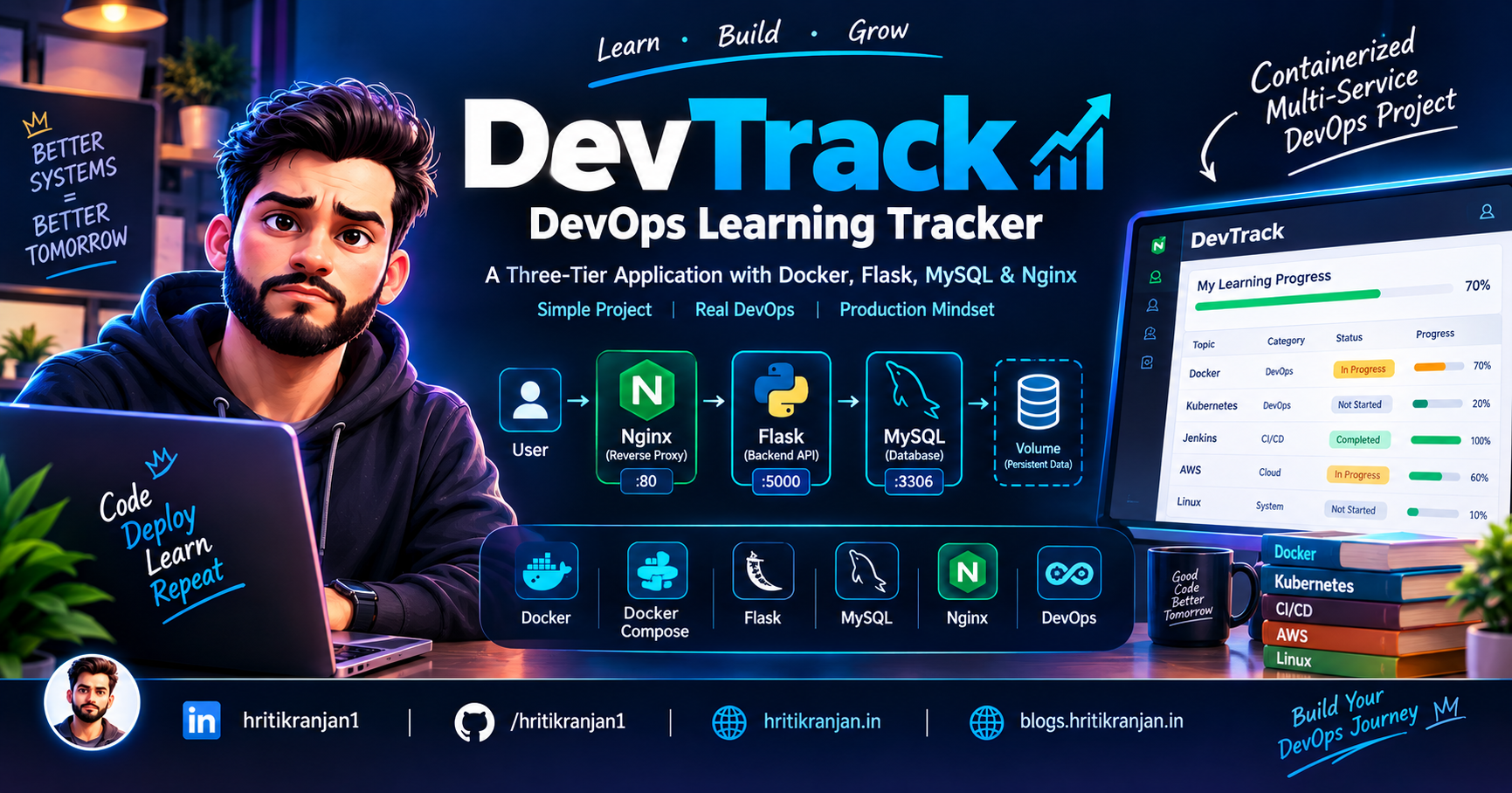
📌 What We Are Building
In this project, we will build DevTrack – DevOps Learning Tracker, a simple web application designed to track DevOps learning topics.
The application allows users to:
- Add learning topics
- View learning topics
- Update learning progress
- Delete learning topics
- Store data in MySQL
- Access the application through Nginx
- Run the complete application using Docker Compose
The application itself is intentionally simple.
The main purpose of this project is not to build a complicated application.
Instead, the goal is to understand how a real multi-container application works from a DevOps perspective.
We will learn:
- Docker
- Docker images
- Docker containers
- Dockerfiles
- Docker Compose
- Container networking
- Environment variables
- MySQL
- Docker volumes
- Health checks
- Service dependencies
- Nginx
- Reverse proxy
- Flask REST APIs
- CRUD operations
- Troubleshooting
- Application-to-database communication
- Container logs
- Persistent storage
- Production-readiness concepts
🧑💻 Project Overview
The project is called:
DevTrack – DevOps Learning Tracker
The application follows a simple three-service architecture:
User
  │
  ▼
Nginx
  │
  ▼
Flask
  │
  ▼
MySQL
  │
  ▼
Docker Volume
Each component has a specific responsibility.
| Component | Responsibility |
|---|---|
| Nginx | Reverse proxy and public entry point |
| Flask | Backend/API and application logic |
| MySQL | Database |
| Docker Volume | Persistent database storage |
| Docker Compose | Container orchestration |
🎯 Project Goals
The main objective of this project is to understand how multiple containers work together.
By completing this project, you should understand:
- How to containerize a Flask application
- How to create a Docker image
- How to run multiple containers
- How Docker Compose manages multiple services
- How containers communicate with each other
- How Nginx works as a reverse proxy
- How Flask communicates with MySQL
- How Docker volumes provide persistence
- How health checks work
- How environment variables are used
- How to troubleshoot Docker applications
- How to think about a project from a DevOps perspective
🏗️ Final Architecture
Here is the complete architecture of DevTrack:
                         USER
                          │
                          │ HTTP
                          ▼
                ┌───────────────────┐
                │       NGINX       │
                │   Reverse Proxy   │
                │      :80          │
                └─────────┬─────────┘
                          │
                          │ HTTP
                          ▼
                ┌───────────────────┐
                │       FLASK       │
                │   Backend / API   │
                │      :5000        │
                └─────────┬─────────┘
                          │
                          │ MySQL
                          │ :3306
                          ▼
                ┌───────────────────┐
                │       MYSQL       │
                │     Database      │
                │      :3306        │
                └─────────┬─────────┘
                          │
                          ▼
                ┌───────────────────┐
                │   mysql_data      │
                │   Docker Volume   │
                └───────────────────┘
🔄 Complete Request Flow
When a user opens the application, the request follows this path:
Browser
   │
   │ http://localhost:8081
   ▼
Host Port 8081
   │
   ▼
Nginx Container :80
   │
   ▼
Flask Container :5000
   │
   ▼
MySQL Container :3306
   │
   ▼
MySQL Data
The response travels back through the same architecture:
MySQL
  │
  ▼
Flask
  │
  ▼
Nginx
  │
  ▼
Browser
This simple request flow is one of the most important things to understand before working with multi-container applications.
🧩 Why Three Services?
You may ask:
Why not put everything inside one container?
Because each service has a different responsibility.
We separate the application into:
Nginx
  ↓
Traffic handling

Flask
  ↓
Application logic

MySQL
  ↓
Data storage
This follows the idea of separation of responsibilities.
For example:
If the Flask application has a problem, we can investigate the Flask container without mixing it with the database.
If MySQL has a problem, we can inspect the MySQL container independently.
If Nginx has a configuration issue, we can check the Nginx container.
This makes troubleshooting easier.
🐳 Why Docker?
Without Docker, we might need to install:
- Python
- Flask
- MySQL
- Nginx
- Python dependencies
- Database configuration
- Application configuration
directly on the host machine.
This can create dependency and configuration problems.
Docker allows us to package applications and their dependencies into isolated containers.
For example:
Host Machine
     │
     ├── Nginx Container
     │
     ├── Flask Container
     │
     └── MySQL Container
Each container has its own environment.
🐳 What Is a Docker Image?
A Docker image can be considered a blueprint or template.
For example:
Python Docker Image
        │
        ▼
Flask Container
The image contains the files and dependencies required to run the application.
A container is a running instance of an image.
Docker Image
     │
     ▼
Docker Container
📦 What Is a Docker Container?
A container is a running environment created from a Docker image.
For example:
Flask Docker Image
       │
       ▼
Flask Container
In this project, we have containers for:
Nginx
Flask
MySQL
🧰 Technologies Used
This project uses:
HTML
CSS
JavaScript
Python
Flask
MySQL
Nginx
Docker
Docker Compose
REST API
The DevOps concepts are more important than the frontend complexity.
📁 Suggested Project Structure
The project can be organized like this:
devops-learning-tracker/
│
├── backend/
│   ├── Dockerfile
│   ├── app.py
│   └── requirements.txt
│
├── frontend/
│   ├── index.html
│   ├── style.css
│   └── script.js
│
├── nginx/
│   └── nginx.conf
│
├── docker-compose.yml
│
├── .env
│
├── .gitignore
│
└── README.md
The exact structure can vary depending on how the project is implemented, but the important concept is to keep the different responsibilities organized.
🐍 Flask Backend
Flask is responsible for:
- Receiving API requests
- Processing application logic
- Communicating with MySQL
- Returning API responses
- Performing CRUD operations
The Flask application runs on:
Port: 5000
🗄️ MySQL Database
MySQL stores the learning data.
A learning item can contain information such as:
id
title
category
status
progress
created_at
For example:
| ID | Title | Category | Status | Progress |
|---|---|---|---|---|
| 1 | Docker | DevOps | In Progress | 70% |
| 2 | Kubernetes | DevOps | Not Started | 20% |
| 3 | Jenkins | CI/CD | Completed | 100% |
🔁 CRUD Operations
The application follows CRUD operations.
CRUD means:
C → Create
R → Read
U → Update
D → Delete
Create
To create a learning item:
POST /api/learning
Example request:
{
  "title": "Docker",
  "category": "DevOps",
  "status": "In Progress",
  "progress": 70
}
Read
To retrieve learning items:
GET /api/learning
Update
To update a learning item:
PUT /api/learning/<id>
Delete
To delete a learning item:
DELETE /api/learning/<id>
❤️ Health Check API
The application also provides:
GET /api/health
A health endpoint is useful for quickly checking whether the application is responding.
For example:
/api/health
can return a successful response when the Flask service is running correctly.
🐳 Creating the Flask Dockerfile
A simplified backend Dockerfile looks like this:
FROM python:3.12-slim

WORKDIR /app

COPY requirements.txt .

RUN pip install --no-cache-dir -r requirements.txt

COPY app.py .

EXPOSE 5000

CMD ["python", "app.py"]
Now let's understand every line.
🔍 Understanding the Dockerfile
1. FROM
FROM python:3.12-slim
This selects Python 3.12 Slim as the base image.
The slim image is smaller than the full Python image and is useful when we don't need unnecessary operating-system packages.
2. WORKDIR
WORKDIR /app
This sets /app as the working directory inside the container.
After this instruction, commands operate from:
/app
3. Copy requirements
COPY requirements.txt .
This copies:
requirements.txt
into:
/app
4. Install dependencies
RUN pip install --no-cache-dir -r requirements.txt
This installs the Python dependencies required by the Flask application.
The --no-cache-dir option prevents pip from keeping its package cache, which can help reduce image size.
5. Copy application
COPY app.py .
This copies the Flask application into the image.
6. EXPOSE
EXPOSE 5000
This documents that the application listens on port 5000.
Important:
EXPOSE does not publish the port to the host.
7. CMD
CMD ["python", "app.py"]
This is the default command used to start the application.
💡 Why Copy requirements.txt Separately?
We could write:
COPY . .
first.
But separating:
COPY requirements.txt .
RUN pip install ...
COPY app.py .
provides a useful Docker layer-caching advantage.
If only app.py changes, Docker may reuse the dependency-installation layer.
This means Docker does not necessarily need to reinstall every dependency on every build.
🌐 Nginx Reverse Proxy
Now let's look at Nginx.
Nginx acts as the public entry point.
Instead of exposing Flask directly to users:
Browser
   ↓
Flask
we use:
Browser
   ↓
Nginx
   ↓
Flask
Nginx receives the request and forwards it to Flask.
🔀 What Is a Reverse Proxy?
A reverse proxy is a server that receives client requests and forwards those requests to backend servers.
In our project:
Client
  │
  ▼
Nginx
  │
  ▼
Flask
The browser does not need to know the internal Flask service details.
🔥 Why Use Nginx?
Nginx provides several benefits.
It can act as:
- Reverse proxy
- Web server
- Traffic entry point
- Load balancer
- Static-content server
It also gives us a cleaner architecture for future improvements such as:
- HTTPS
- Load balancing
- Multiple Flask instances
- Better traffic management
🧠 Nginx and Docker Networking
One very important concept is this:
Inside Docker Compose, services can communicate using their service names.
For example:
web
is the Flask service.
Therefore Nginx can forward traffic to:
web:5000
rather than:
localhost:5000
❌ Why Not localhost?
This is one of the most common beginner mistakes.
Suppose we write:
localhost:5000
inside the Nginx container.
What does localhost mean?
It means:
The Nginx container itself
It does not mean the Flask container.
The Flask application is running in another container.
Therefore we use:
web:5000
where:
web
is the Flask service name.
🌐 Docker Compose Networking
Docker Compose automatically creates a network for the services.
Conceptually:
              Docker Network
                    │
       ┌────────────┼────────────┐
       │            │            │
       ▼            ▼            ▼
     nginx         web           db
       │            │            │
       │            │            │
       └────────────┴────────────┘
The services can communicate using service names.
For example:
nginx → web:5000
web   → db:3306
🐬 MySQL Service
The MySQL container runs the database.
The standard MySQL port is:
3306
The Flask application connects to MySQL through the Compose network.
The important configuration is conceptually:
DB_HOST=db
DB_PORT=3306
Notice that:
DB_HOST=db
not:
DB_HOST=localhost
🔐 Environment Variables
Application configuration should not be hardcoded directly into the application code.
For example:
environment:
  DB_HOST: db
  DB_USER: devopsuser
  DB_PASSWORD: devopspass
  DB_NAME: devops_tracker
The Flask application reads these values.
💡 Why Use Environment Variables?
Environment variables allow configuration to be separated from application code.
For example:
Development
     ↓
Development database

Production
     ↓
Production database
The application code does not necessarily need to change.
⚠️ Important Security Note
For a learning project, environment variables are useful.
However, credentials should not be committed to a public Git repository.
A .gitignore should include:
.env
For production environments, use a proper secret-management solution rather than committing passwords into source control.
🐳 Docker Compose
Now we reach the most important part of this project:
docker-compose.yml
Docker Compose allows us to define multiple related services in one configuration file.
Instead of manually starting:
MySQL
Flask
Nginx
we can manage them together.
The architecture is:
docker-compose.yml
       │
       ├── db
       ├── web
       └── nginx
🧩 Three Compose Services
Our Compose architecture contains:
services:
  db:
  web:
  nginx:
Each service represents a container.
🗄️ DB Service
The db service represents MySQL.
Conceptually:
db
 │
 ├── MySQL
 ├── Port 3306
 └── Persistent volume
🐍 Web Service
The web service represents Flask.
Conceptually:
web
 │
 ├── Flask
 ├── Port 5000
 └── Backend APIs
🌐 Nginx Service
The nginx service represents the reverse proxy.
Conceptually:
nginx
 │
 ├── Nginx
 ├── Port 80
 └── Reverse proxy
🔌 Host Port Mapping
The application uses:
ports:
  - "8081:80"
This means:
Host             Container
8081       →       80
Therefore:
http://localhost:8081
reaches:
Nginx :80
🧠 Port Mapping Explained
Think about:
8081:80
as:
HOST_PORT : CONTAINER_PORT
Therefore:
8081 : 80
means:
Host port 8081
       ↓
Nginx container port 80
🔥 Why Flask Doesn't Need Host Port Mapping
The Flask service listens on:
5000
But we don't need to publish:
5000:5000
to the host.
Why?
Because Nginx communicates with Flask through the internal Docker network:
Nginx
  ↓
web:5000
This is useful because the Flask backend does not need to be directly exposed to the host.
📌 EXPOSE vs ports
This is another common interview question.
EXPOSE
EXPOSE 5000
This documents the port the application listens on inside the container.
ports
ports:
  - "8081:80"
This publishes a container port through the host.
So:
EXPOSE
   ↓
Documentation / container metadata

ports
   ↓
Host-to-container port mapping
💾 Docker Volumes
Now let's discuss database persistence.
A container's writable filesystem should not be treated as permanent database storage.
We therefore use a named Docker volume.
Conceptually:
MySQL Container
      │
      ▼
/var/lib/mysql
      │
      ▼
mysql_data
🧠 Why Do We Need a Volume?
Imagine you add:
Docker
Kubernetes
Jenkins
AWS
to your learning tracker.
The information is stored in MySQL.
Now suppose the MySQL container is deleted.
Without persistent storage, the database data can be lost with the container's filesystem.
With a volume:
Container
    │
    ▼
Volume
    │
    ▼
Persistent Data
The database data survives container recreation.
🔄 Container Lifecycle vs Data Lifecycle
This is an important DevOps concept.
Container
   │
   ├── Can be deleted
   ├── Can be recreated
   └── Can be replaced
But:
Volume
   │
   └── Can persist independently
Therefore:
Container lifecycle
        ≠
Data lifecycle
This is exactly why persistent storage is important.
🛑 docker compose down
If you run:
docker compose down
the containers are removed.
Normally, the named volume remains.
Conceptually:
docker compose down

Containers → Removed
Volume     → Remains
Data       → Remains
⚠️ docker compose down -v
Now consider:
docker compose down -v
The -v option also removes the volumes.
Therefore:
Containers → Removed
Volumes    → Removed
Database   → Data can be lost
This command should be used carefully.
🩺 MySQL Health Check
Starting a MySQL container does not necessarily mean that MySQL is immediately ready to accept connections.
MySQL may need some time to initialize.
Therefore, we use a health check.
Conceptually:
Start MySQL
    │
    ▼
Health Check
    │
    ├── Unhealthy
    │
    └── Healthy
            │
            ▼
       Flask can start
A health check can use:
mysqladmin ping
to verify that MySQL is responding.
🔗 depends_on
The Flask service depends on MySQL.
Conceptually:
MySQL
  │
  │ health check
  ▼
Healthy
  │
  ▼
Flask
This prevents the Flask service from immediately assuming that the database is ready.
⚠️ depends_on vs Database Readiness
A very important concept:
Simply writing:
depends_on:
  - db
mainly controls startup ordering.
It does not automatically mean that the application inside the database container is ready.
Using:
depends_on:
  db:
    condition: service_healthy
together with a proper health check provides a better startup dependency mechanism.
🏗️ Complete Architecture Again
At this point, the architecture looks like:
                         Browser
                            │
                            │ HTTP
                            ▼
                    localhost:8081
                            │
                            ▼
                  ┌─────────────────┐
                  │      Nginx      │
                  │      :80        │
                  └────────┬────────┘
                           │
                           │ web:5000
                           ▼
                  ┌─────────────────┐
                  │      Flask      │
                  │      :5000      │
                  └────────┬────────┘
                           │
                           │ db:3306
                           ▼
                  ┌─────────────────┐
                  │      MySQL      │
                  │      :3306      │
                  └────────┬────────┘
                           │
                           ▼
                  ┌─────────────────┐
                  │   mysql_data    │
                  │ Docker Volume   │
                  └─────────────────┘
🚀 Starting the Project
Once the project files are ready, build and start the application with:
docker compose up -d --build
Let's understand this command.
docker compose
Uses Docker Compose.
up
Creates and starts the services.
-d
Runs them in detached mode.
--build
Rebuilds the images before starting.
🔍 Check Running Containers
Use:
docker compose ps
You should see the services running.
Conceptually:
NAME                     SERVICE
devops_tracker_db        db
devops_tracker_web       web
devops_tracker_nginx     nginx
📜 Check Logs
To see all logs:
docker compose logs
Follow logs continuously:
docker compose logs -f
For a specific service:
docker compose logs web
docker compose logs db
docker compose logs nginx
🌐 Open the Application
Open:
http://localhost:8081
The request should follow:
Browser
   ↓
localhost:8081
   ↓
Nginx
   ↓
Flask
   ↓
MySQL
🧪 Test the Application
Add a learning topic.
For example:
Title: Docker
Category: DevOps
Status: In Progress
Progress: 70%
Then refresh the page.
The data should still be visible.
This demonstrates that the application is communicating with MySQL.
🔍 Verify the Database
You can connect to the MySQL container.
For example:
docker exec -it devops_tracker_db mysql -u devopsuser -pdevopspass
Then:
SHOW DATABASES;
Select the application database:
USE devops_tracker;
Check tables:
SHOW TABLES;
Then query the data:
SELECT * FROM learning;
This allows us to verify that the data submitted through the application actually reached MySQL.
🔄 End-to-End Data Flow
Suppose a user creates:
Docker
70%
The flow is:
User
 │
 │ POST request
 ▼
Nginx
 │
 │ Forward request
 ▼
Flask
 │
 │ SQL query
 ▼
MySQL
 │
 │ Store data
 ▼
Docker Volume
This is a complete application-to-database flow.
🧪 Testing CRUD APIs
You can also test the API directly.
GET
curl http://localhost:8081/api/learning
POST
Example:
curl -X POST http://localhost:8081/api/learning \
  -H "Content-Type: application/json" \
  -d '{"title":"Docker","category":"DevOps","status":"In Progress","progress":70}'
PUT
For example:
curl -X PUT http://localhost:8081/api/learning/1 \
  -H "Content-Type: application/json" \
  -d '{"progress":80}'
DELETE
curl -X DELETE http://localhost:8081/api/learning/1
🧪 Health Check
Test:
curl http://localhost:8081/api/health
A successful response confirms that the request can reach the Flask application through Nginx.
🔥 Real Troubleshooting Experience #1 — Port Conflict
One real problem while working with Docker projects is port conflicts.
Suppose Docker reports that:
port 8080 is already in use
This means another application or container is already using that host port.
🔎 Find the Port User
Check Docker containers:
docker ps
You can also check the host:
netstat -ano | findstr :8080
The exact command can vary depending on the operating system.
🔧 Solution
Instead of:
ports:
  - "8080:80"
we can use:
ports:
  - "8081:80"
Now:
localhost:8081
      ↓
Nginx:80
The internal Nginx port does not change.
Only the host-side port changes.
🔥 Real Troubleshooting Experience #2 — Docker Build Context
Another common Docker problem is:
COPY app.py .
failing because Docker cannot find app.py.
For example:
"/app.py": not found
One thing to check is the Docker build context.
If the Dockerfile and app.py are inside:
backend/
the Compose configuration should use the appropriate context.
For example:
web:
  build:
    context: ./backend
    dockerfile: Dockerfile
The important lesson is:
Docker can only copy files that are available inside the build context.
🧠 What Is Docker Build Context?
When we run:
docker build .
the:
.
represents the build context.
Docker sends that directory as the context for the build.
Therefore, if:
app.py
is outside the build context, Docker cannot simply copy it.
🔥 Troubleshooting Scenario — Flask Cannot Connect to MySQL
Suppose Flask reports:
Connection refused
What should we check?
Start with:
docker compose ps
Check MySQL logs:
docker compose logs db
Check Flask logs:
docker compose logs web
Then verify:
DB_HOST
DB_USER
DB_PASSWORD
DB_NAME
Most importantly, verify that the database hostname is:
db
not:
localhost
🔥 Troubleshooting Scenario — Nginx Returns 502
Suppose the browser shows:
502 Bad Gateway
This usually indicates that Nginx cannot successfully communicate with the upstream Flask service.
Start by checking:
docker compose ps
Then:
docker compose logs nginx
and:
docker compose logs web
Check the Nginx configuration.
You can also test the Nginx configuration:
docker exec -it devops_tracker_nginx nginx -t
❌ Common Nginx Mistake
Incorrect:
proxy_pass http://localhost:5000;
Why?
Because localhost refers to the Nginx container.
Correct concept:
proxy_pass http://web:5000;
because:
web
is the Flask service name.
🔥 Troubleshooting Scenario — Database Data Disappears
Suppose you added 20 learning items.
Then the MySQL container was recreated.
Now the data is gone.
Check whether a persistent volume is configured.
For example:
volumes:
  mysql_data:
and:
volumes:
  - mysql_data:/var/lib/mysql
The important point is that MySQL's data directory should be backed by persistent storage.
🔍 Check Docker Volumes
Use:
docker volume ls
You can inspect a volume with:
docker volume inspect <volume-name>
🔥 Troubleshooting Scenario — Container Keeps Restarting
If:
docker compose ps
shows a service repeatedly restarting, check its logs.
For example:
docker compose logs web
Potential causes include:
- Python application error
- Missing dependency
- Incorrect environment variable
- Database connection failure
- Incorrect startup command
- Configuration error
The general troubleshooting process is:
Container Status
       ↓
Logs
       ↓
Configuration
       ↓
Network
       ↓
Dependencies
🔥 Troubleshooting Scenario — MySQL Is Unhealthy
Check:
docker compose ps
Then:
docker compose logs db
Potential causes include:
- Incorrect credentials
- Initialization failure
- Existing problematic database volume
- MySQL startup delay
- Incorrect health-check configuration
Don't immediately delete the volume.
First understand the problem.
🔥 Troubleshooting Scenario — Frontend Changes Are Not Visible
Suppose you changed CSS or JavaScript but the old version still appears.
First check:
Browser cache
Then check whether the updated files are actually included in the Docker image.
If the files are copied during image creation, rebuild:
docker compose up -d --build
🛠️ Essential Docker Commands
These are commands you should know before working with this project.
List images
docker images
List running containers
docker ps
List all containers
docker ps -a
View container logs
docker logs <container>
Execute a command inside a container
docker exec -it <container> sh
Build an image
docker build -t myapp .
Remove a container
docker rm <container>
Remove an image
docker rmi <image>
🐳 Essential Docker Compose Commands
Start services:
docker compose up
Start in background:
docker compose up -d
Build and start:
docker compose up -d --build
Stop and remove containers:
docker compose down
Stop containers and remove volumes:
docker compose down -v
Check services:
docker compose ps
View logs:
docker compose logs
Follow logs:
docker compose logs -f
View a specific service:
docker compose logs web
Restart a service:
docker compose restart web
🧠 What Does -d Mean?
When we run:
docker compose up -d
the -d means:
Detached mode
The containers run in the background.
Without -d:
docker compose up
the logs remain attached to the terminal.
🧠 What Does --build Mean?
When we run:
docker compose up -d --build
Docker Compose rebuilds the images before starting the services.
This is useful when we change:
- Dockerfile
- Application code copied into the image
- Dependencies
- Build configuration
🌐 Inspect Docker Networks
List networks:
docker network ls
You can inspect a network with:
docker network inspect <network-name>
This helps when troubleshooting container-to-container communication.
🔐 Security Considerations
This project is designed for learning and assessment purposes.
For a production deployment, several security improvements would be required.
Don't Commit Secrets
Avoid committing:
.env
to Git.
Add it to .gitignore:
.env
🔐 Production Secret Management
In production, instead of storing sensitive credentials in plain configuration files, use a proper secret-management system.
The principle is:
Application Code
       │
       └── No hardcoded secrets
🔒 Don't Expose MySQL Publicly
There is generally no reason to expose:
3306
directly to the internet for this architecture.
The Flask service can communicate with MySQL internally:
Flask
  │
  ▼
db:3306
🛡️ Why Keep Flask Behind Nginx?
Instead of:
Internet
   ↓
Flask
we use:
Internet
   ↓
Nginx
   ↓
Flask
This gives us a clean public entry point and makes it easier to add production capabilities later.
📦 .gitignore
A basic .gitignore should contain entries such as:
.env
__pycache__/
*.pyc
.venv/
venv/
.vscode/
The important part is avoiding accidental commits of credentials and local development files.
🔀 Git Workflow
After creating the project, Git can be used to track changes.
Check status:
git status
Add files:
git add .
Commit:
git commit -m "Initial DevTrack application"
Push:
git push
View history:
git log
🧪 Recommended Testing Flow
Before considering the project complete, test the complete architecture.
Test 1 — Start the stack
docker compose up -d --build
Test 2 — Check containers
docker compose ps
Test 3 — Open application
http://localhost:8081
Test 4 — Add learning item
Docker
70%
Test 5 — Refresh
Verify that the item remains visible.
Test 6 — Check database
docker exec -it devops_tracker_db mysql -u devopsuser -pdevopspass
Then:
USE devops_tracker;
SELECT * FROM learning;
Test 7 — Restart services
docker compose restart
Verify that the application still works.
Test 8 — Verify persistence
Confirm that the database records are still present.
🧪 Demonstrating Persistence
This is a great practical demonstration.
First add:
Docker
Kubernetes
Jenkins
AWS
Then:
docker compose restart db
Check the application again.
The data should remain because MySQL uses a persistent volume.
🧹 Resetting the Complete Environment
If you intentionally want to remove the containers and database volume:
docker compose down -v
Then rebuild everything:
docker compose up -d --build
Remember:
down -vcan delete your database data.
Never run it blindly on a production database.
🎯 Why This Is a Good DevOps Project
At first glance, DevTrack may look like a simple CRUD application.
But from a DevOps perspective, it demonstrates many important concepts.
                DevTrack
                   │
       ┌───────────┼───────────┐
       │           │           │
       ▼           ▼           ▼
     Docker     Compose      Nginx
       │           │           │
       ▼           ▼           ▼
    Images      Network      Proxy
                   │
                   ▼
                 MySQL
                   │
                   ▼
                Volume
The project demonstrates:
- Containerization
- Multi-container orchestration
- Service discovery
- Networking
- Reverse proxy
- Persistent storage
- Health checks
- Environment configuration
- CRUD APIs
- Troubleshooting
💼 Interview Perspective
This project becomes much more valuable when you understand why every component exists.
Don't simply say:
"I used Docker Compose."
Explain:
"I used Docker Compose to define and run the Nginx, Flask and MySQL services together."
Don't simply say:
"I used a volume."
Explain:
"I used a named Docker volume to persist MySQL data outside the lifecycle of the database container."
Don't simply say:
"I used Nginx."
Explain:
"Nginx acts as the reverse proxy and public entry point, forwarding requests to the Flask backend."
This shows actual DevOps understanding.
🎤 How to Explain the Project in 30 Seconds
If an interviewer asks:
Tell me about your project.
You can say:
"I built a simple three-tier DevOps Learning Tracker using HTML, CSS, JavaScript, Python Flask and MySQL. I containerized the application using Docker and orchestrated the three services using Docker Compose. Nginx works as a reverse proxy in front of the Flask backend, while MySQL stores the application data using a persistent Docker volume. I also implemented environment-based configuration, health checks and service dependencies. The project helped me understand container networking, persistent storage, reverse proxy configuration and practical Docker troubleshooting."
🎤 Why Did You Use Three Containers?
Answer:
"I separated the application into three services so that each service has a single responsibility. Nginx handles incoming traffic, Flask handles application logic and APIs, and MySQL handles data persistence. This makes the application easier to maintain, troubleshoot and scale."
🎤 Why Docker Compose?
Answer:
"Docker Compose allows me to define multiple related services in a single YAML file and manage them together. Instead of manually starting and connecting Nginx, Flask and MySQL containers, I can start the complete application using one command."
🎤 Why Nginx?
Answer:
"Nginx is used as a reverse proxy and public entry point. It receives requests from the browser and forwards them to the Flask backend. It also provides a foundation for future capabilities such as HTTPS and load balancing."
🎤 Why a Docker Volume?
Answer:
"Containers can be recreated or removed, so I don't want my database data to depend on the lifecycle of the MySQL container. The Docker volume provides persistent storage for MySQL data."
🎤 Why Is DB_HOST Equal to db?
Answer:
"Because
dbis the MySQL service name in Docker Compose. Docker's internal DNS allows services on the same Compose network to communicate using their service names."
🎤 Why Not localhost?
Answer:
"Inside the Flask container, localhost refers to the Flask container itself, not the MySQL container. Therefore Flask uses
dbas the database hostname."
🎤 What Happens When the User Opens the Application?
Answer:
"The user accesses localhost on the published Nginx port. Docker forwards the request to Nginx on port 80. Nginx forwards it to the Flask service on port 5000. If database information is required, Flask communicates with MySQL through the internal Docker network on port 3306. The response then travels back through Flask and Nginx to the browser."
🎤 What Happens If Nginx Returns 502?
Answer:
"I would first check whether the Flask container is running using
docker compose ps. Then I would check the Nginx and Flask logs. I would verify that the Nginx upstream points to the correct service name and port, such asweb:5000, and verify that Flask is actually listening on that port."
🎤 What Happens If MySQL Is Running but Flask Cannot Connect?
Answer:
"I would check the MySQL and Flask logs, verify the database credentials and confirm that the Flask application uses
dbas the hostname instead of localhost. I would also check whether the MySQL health check is passing."
🎤 What If Port 8080 Is Already in Use?
Answer:
"I would identify which process or container is using the port. If I don't need that service, I can stop it. Otherwise, I can change the host-side port mapping, for example from
8080:80to8081:80."
🎤 What If app.py Cannot Be Found During Docker Build?
Answer:
"I would check the Docker build context and project structure. If the Dockerfile and
app.pyare inside the backend directory, the Compose build context should point to that directory, for examplecontext: ./backend."
🎤 How Would You Scale This Application?
A possible future architecture would be:
                    Nginx
                  /       \
                 /         \
                ▼           ▼
            Flask-1      Flask-2
                 \         /
                  \       /
                    MySQL
The Flask application can potentially be replicated behind the reverse proxy.
The database architecture would need separate consideration because databases have different scaling and persistence requirements than stateless application containers.
☁️ How Would You Deploy This to AWS?
For a learning deployment, one option is:
AWS EC2
   │
   └── Docker Compose
          │
          ├── Nginx
          ├── Flask
          └── MySQL
For a more production-oriented architecture, the application could eventually move toward services such as:
Load Balancer
      │
      ▼
Container Platform
      │
      ▼
Flask Application
      │
      ▼
Managed Database
The exact architecture would depend on availability, scaling, security and operational requirements.
🔄 Future CI/CD Architecture
The next step could be automating the project.
For example:
Developer
    │
    ▼
Git Push
    │
    ▼
GitHub
    │
    ▼
CI/CD Pipeline
    │
    ├── Build
    ├── Test
    ├── Docker Image
    └── Deploy
A GitHub Actions workflow could eventually automate:
Code Push
   ↓
Build
   ↓
Test
   ↓
Docker Build
   ↓
Image Push
   ↓
Deployment
🚀 Production Improvements
This project is designed for learning and assessment.
If we wanted to move it toward production, we could improve it by adding:
1. HTTPS
Secure communication between users and the application.
2. Production WSGI Server
Instead of using Flask's development server, use a production WSGI server such as Gunicorn.
3. Secret Management
Move sensitive credentials into a proper secret-management solution.
4. CI/CD
Automate build, test and deployment.
5. Image Scanning
Scan Docker images for vulnerabilities.
6. Monitoring
Monitor:
- CPU
- Memory
- Containers
- Application health
- Database health
7. Centralized Logging
Collect application and infrastructure logs in a centralized location.
8. Database Backups
Create regular backups of important data.
9. Resource Limits
Set appropriate CPU and memory limits.
10. High Availability
Run multiple application instances behind a load balancer when required.
🧠 What I Learned From This Project
The biggest lesson from this project is that Docker is not only about writing a Dockerfile.
I learned how different components communicate with each other:
Nginx
  ↓
Flask
  ↓
MySQL
I also learned how:
- Docker networks allow service communication
- Service names provide internal DNS
- Volumes provide persistent storage
- Health checks improve service startup
- Environment variables separate configuration
- Nginx acts as a reverse proxy
- Docker Compose manages multiple services
- Logs help troubleshoot containers
- Build context affects Docker builds
- Host ports can conflict with existing applications
🧯 Troubleshooting Method I Use
When something fails, I don't immediately start changing random configuration.
I follow a structured process.
             Problem
                │
                ▼
        Check container status
                │
                ▼
             Check logs
                │
                ▼
       Check configuration
                │
                ▼
        Check networking
                │
                ▼
       Check dependencies
                │
                ▼
             Fix issue
                │
                ▼
              Retest
Useful commands:
docker compose ps
docker compose logs
docker compose logs web
docker compose logs db
docker compose logs nginx
This troubleshooting approach is useful far beyond this particular project.
🔥 Important Real-World Issues I Faced
One of the most valuable parts of a DevOps project is not only making everything work, but also understanding what happens when something doesn't work.
During this project, two important problems were encountered.
Issue 1 — Port Already in Use
The application initially attempted to use a host port that was already occupied.
The solution was to change the host-side mapping.
For example:
ports:
  - "8081:80"
The important thing to understand is that only the host-side port changed.
Nginx continued listening internally on:
80
Issue 2 — Docker Build Context
Another issue involved Docker not finding:
app.py
during the build.
The problem was related to the Docker build context.
The solution was to correctly define the backend directory as the build context:
web:
  build:
    context: ./backend
    dockerfile: Dockerfile
This taught an important Docker concept:
Docker can only access files that are available within its build context.
🧠 Key Concepts to Remember
Before moving on from this project, make sure you understand these concepts.
Docker Image
Blueprint
Docker Container
Running instance of an image
Docker Compose
Tool for defining and managing multiple containers
Docker Network
Allows containers to communicate
Service Name
Internal DNS name
Example:
db
web
nginx
Docker Volume
Persistent storage
Nginx
Reverse proxy / web server
Flask
Application backend / API
MySQL
Database
📊 Complete Port Map
Memorize this table:
| Component | Port | Purpose |
|---|---|---|
| Nginx container | 80 | HTTP |
| Flask container | 5000 | Backend |
| MySQL container | 3306 | Database |
| Host | 8081 | Public application access |
The complete flow is:
localhost:8081
      │
      ▼
Nginx:80
      │
      ▼
web:5000
      │
      ▼
db:3306
📋 Complete Project Summary
| Layer | Technology | Responsibility |
|---|---|---|
| Client | Browser | User interaction |
| Proxy | Nginx | Reverse proxy |
| Backend | Flask | API/application logic |
| Database | MySQL | Data storage |
| Storage | Docker Volume | Persistence |
| Orchestration | Docker Compose | Service management |
| Networking | Docker Network | Container communication |
🏁 Final Architecture
                         DEVTRACK
                            │
                            ▼
                         Browser
                            │
                            │ HTTP
                            ▼
                  ┌──────────────────┐
                  │      NGINX       │
                  │ Reverse Proxy    │
                  │      :80         │
                  └────────┬─────────┘
                           │
                           │ web:5000
                           ▼
                  ┌──────────────────┐
                  │      FLASK       │
                  │   REST API       │
                  │      :5000       │
                  └────────┬─────────┘
                           │
                           │ db:3306
                           ▼
                  ┌──────────────────┐
                  │      MYSQL       │
                  │      :3306       │
                  └────────┬─────────┘
                           │
                           ▼
                  ┌──────────────────┐
                  │   mysql_data     │
                  │ Docker Volume    │
                  └──────────────────┘
🎯 Final Takeaway
DevTrack is a small application, but it demonstrates several important DevOps concepts.
The real value of the project is not the complexity of the application.
The real value is understanding how the complete system works:
User
 ↓
Nginx
 ↓
Flask
 ↓
MySQL
 ↓
Persistent Volume
And how Docker Compose manages the complete environment:
              Docker Compose
                    │
        ┌───────────┼───────────┐
        ▼           ▼           ▼
      Nginx       Flask       MySQL
        │           │           │
        └───────────┼───────────┘
                    │
                    ▼
               Docker Network
                    │
                    ▼
               Docker Volume
Once you understand this architecture, you have a strong foundation for moving toward more advanced DevOps topics such as:
Docker
   ↓
Docker Compose
   ↓
CI/CD
   ↓
Container Registry
   ↓
Kubernetes
   ↓
AWS
   ↓
Monitoring
   ↓
Production DevOps
💬 Frequently Asked Interview Questions
1. Why did you use Docker?
Docker provides a consistent and isolated environment for running the application and its dependencies.
2. Why Docker Compose?
To define and manage the Nginx, Flask and MySQL services together.
3. Why Nginx?
To act as the reverse proxy and public entry point.
4. Why MySQL?
To persist application data in a relational database.
5. Why Docker Volume?
To keep database data persistent even when the MySQL container is recreated.
6. Why db instead of localhost?
Because db is the MySQL service name available through Docker's internal network.
7. What happens if you run docker compose down?
The containers are removed, while named volumes normally remain.
8. What happens with docker compose down -v?
The containers and associated volumes are removed.
9. What causes Nginx 502?
Usually a problem communicating with the upstream Flask service.
10. How do you troubleshoot a container?
Start with:
docker compose ps
then inspect:
docker compose logs <service>
and continue with configuration and network checks.
🚀 Conclusion
Building DevTrack gave me hands-on experience with the complete lifecycle of a multi-container application.
Instead of simply running a Flask application directly on my machine, I created an architecture where:
- Nginx handles incoming requests
- Flask handles application logic
- MySQL stores application data
- Docker packages the services
- Docker Compose orchestrates them
- Docker networking allows services to communicate
- Docker volumes provide persistent storage
- Health checks help manage service readiness
- Environment variables handle configuration
The most important lesson is that a DevOps engineer should not only know how to start an application but also understand how the application behaves when something goes wrong.
Problems such as:
Port already in use
        ↓
Wrong build context
        ↓
Database connection failure
        ↓
Nginx 502
        ↓
Container restart
are part of real DevOps work.
The goal of this project was therefore not to build the most complicated application.
It was to understand the infrastructure surrounding an application and learn how to containerize, connect, persist, troubleshoot and operate a multi-service system.

🚀 Complete Learning & Career Resources | 2027–2028
A curated collection of learning resources for AI, Data Analytics, Python, Data Engineering, Cybersecurity, Cloud, Networking, Finance, Digital Marketing, Project Management, DevOps and Generative AI.
📚 Learn → 🧪 Practice → 🛠️ Build → 🐙 Share → 🚀 Grow









🌟 About This Repository
Welcome to the Complete Learning & Career Resources Repository! 🚀
This repository is designed as a centralized learning hub for students, developers, QA engineers, DevOps engineers, cloud learners, cybersecurity enthusiasts, data professionals, project managers, business professionals and anyone interested in continuous learning.
The goal is simple:
Learn → Practice → Build → Document → Share → Grow
Instead of searching for useful resources again and again, this repository brings them together in one place.
🎯 What You Will Find Here
- 🤖 Artificial Intelligence
- 🧠 Generative AI
- 📊 Data Analytics
- 🐍 Python
- ⚙️ Data Engineering
- ☁️ Cloud Computing
- 🌐 Computer Networking
- 🔐 Cybersecurity
- ⚙️ DevOps
- 📋 Project Management
- 💰 Finance
- 📈 Digital Marketing
- 🧩 Business Analysis
- 🚀 Career Development
- 🎓 Professional Learning
- 🛠️ Project Ideas
- 📚 Learning Roadmaps
📊 Repository Overview
| Category | Resources |
|---|---|
| 🤖 AI Courses | 15 |
| 🔵 Google Courses | 15 |
| 🟣 IBM Courses | 10 |
| 🔥 Best Courses 2027–2028 | 21 |
| 🌟 Learning & Career Resources | 14 |
| 📖 Personal Resources | 4+ |
📚 Table of Contents
- 🌟 About This Repository
- 🎯 What You Will Find Here
- 📊 Repository Overview
- 🤖 AI Courses
- 🔵 Google Courses
- 🟣 IBM Courses
- 🔥 Best Courses 2027–2028
- 🌟 Learning & Career Resources
- 🗺️ Recommended Learning Roadmaps
- 📊 Data Analytics Roadmap
- 🐍 Python Roadmap
- ☁️ Cloud & DevOps Roadmap
- 🔐 Cybersecurity Roadmap
- 🤖 AI Roadmap
- 🧪 How to Learn Effectively
- 🛠️ Project Ideas
- 📂 Recommended GitHub Project Structure
- 📈 Career Roadmap
- 💡 Learning Checklist
- 🧠 Golden Rules
- 📖 My Resources
- 🌐 Useful Links
- ⭐ Support This Repository
- 🔄 Future Updates
- ⚠️ Affiliate Disclosure
🤖 AI Courses
🚀 Explore AI fundamentals, Python, AI infrastructure, Generative AI, AI governance and specialized AI applications.
| # | Course | Link |
|---|---|---|
| 1 | AI For Everyone | Start Course ↗ |
| 2 | AI Python for Beginners | Start Course ↗ |
| 3 | AI Infrastructure and Operations Fundamentals | Start Course ↗ |
| 4 | Generative AI for Human Resources (HR) Professionals | Start Course ↗ |
| 5 | AI Fundamentals | Start Course ↗ |
| 6 | AI for Healthcare | Start Course ↗ |
| 7 | AI Applications in Accounting and Finance | Start Course ↗ |
| 8 | AI Governance and Privacy Professional Certification (AIGP) | Start Course ↗ |
| 9 | Ethics and Governance in the Age of Generative AI | Start Course ↗ |
| 10 | Hands-on quantum error correction with Google Quantum AI | Start Course ↗ |
| 11 | AI-Powered Higher Education | Start Course ↗ |
| 12 | Modern Project Leadership: Agile, AI, and Beyond | Start Course ↗ |
| 13 | AI-Powered Business Analysis: Excel, KPIs & GenAI | Start Course ↗ |
| 14 | AI in Law: Research, Risk, and Legal Drafting | Start Course ↗ |
| 15 | Generative AI for Project Managers | Start Course ↗ |
🔵 Google Courses
🌐 Explore Data Analytics, AI, Cybersecurity, Networking, Cloud, Digital Marketing and Project Management.
| # | Course | Link |
|---|---|---|
| 1 | Foundations: Data, Data, Everywhere | Start Course ↗ |
| 2 | Ask Questions to Make Data-Driven Decisions | Start Course ↗ |
| 3 | Prepare Data for Exploration | Start Course ↗ |
| 4 | Agile Project Management | Start Course ↗ |
| 5 | Project Initiation: Starting a Successful Project | Start Course ↗ |
| 6 | AI Fundamentals | Start Course ↗ |
| 7 | Foundations of Digital Marketing and E-commerce | Start Course ↗ |
| 8 | Play It Safe: Manage Security Risks | Start Course ↗ |
| 9 | The Bits and Bytes of Computer Networking | Start Course ↗ |
| 10 | Analyze Data to Answer Questions | Start Course ↗ |
| 11 | Automate Cybersecurity Tasks with Python | Start Course ↗ |
| 12 | Architecting with Google Compute Engine | Start Course ↗ |
| 13 | AI for Writing and Communicating | Start Course ↗ |
| 14 | From Likes to Leads: Interact with Customers Online | Start Course ↗ |
| 15 | AI for Data Analysis | Start Course ↗ |
🟣 IBM Courses
💙 Explore SQL, Python, Data Analytics, Deep Learning, RAG and Generative AI resources.
| # | Course | Link |
|---|---|---|
| 1 | Databases and SQL for Data Science with Python | Start Course ↗ |
| 2 | RAG and Agentic AI Capstone Project | Start Course ↗ |
| 3 | Excel Basics for Data Analysis | Start Course ↗ |
| 4 | Introduction to Data Analytics | Start Course ↗ |
| 5 | Data Visualization and Dashboards with Excel and Cognos | Start Course ↗ |
| 6 | IBM AI Foundations for Business | Start Course ↗ |
| 7 | AI Capstone Project with Deep Learning | Start Course ↗ |
| 8 | Python Project for Data Engineering | Start Course ↗ |
| 9 | Building Generative AI-Powered Applications with Python | Start Course ↗ |
| 10 | Vector Databases for RAG: An Introduction | Start Course ↗ |
🔥 Best Courses 2027–2028
🎯 A broader collection covering AI, Data, Python, Finance, Cybersecurity, Marketing, Networking, Management and Data Engineering.
| # | Course | Link |
|---|---|---|
| 1 | AI For Everyone | Start Course ↗ |
| 2 | Foundations: Data, Data, Everywhere | Start Course ↗ |
| 3 | Ask Questions to Make Data-Driven Decisions | Start Course ↗ |
| 4 | Prepare Data for Exploration | Start Course ↗ |
| 5 | Financial Markets | Start Course ↗ |
| 6 | Agile Project Management | Start Course ↗ |
| 7 | Play It Safe: Manage Security Risks | Start Course ↗ |
| 8 | Project Initiation: Starting a Successful Project | Start Course ↗ |
| 9 | AI Fundamentals | Start Course ↗ |
| 10 | Analyze Data to Answer Questions | Start Course ↗ |
| 11 | Foundations of Digital Marketing and E-commerce | Start Course ↗ |
| 12 | The Bits and Bytes of Computer Networking | Start Course ↗ |
| 13 | Sequence Models | Start Course ↗ |
| 14 | Federal Taxation I: Individuals, Employees, and Sole Proprietors | Start Course ↗ |
| 15 | Designing the Organization | Start Course ↗ |
| 16 | Game Theory | Start Course ↗ |
| 17 | Using Python to Access Web Data | Start Course ↗ |
| 18 | Viral Marketing and How to Craft Contagious Content | Start Course ↗ |
| 19 | Python Project for Data Engineering | Start Course ↗ |
| 20 | Value Chain Management | Start Course ↗ |
| 21 | Applying Data Analytics in Finance | Start Course ↗ |
🌟 Learning & Career Resources
💡 Additional resources for learning, career development, language learning, hosting, education and professional growth.
🗺️ Recommended Learning Roadmaps
Choose one roadmap according to your career goal. You don't need to learn everything at once.
🤖 AI Roadmap
AI Fundamentals
      ↓
Python Basics
      ↓
Mathematics & Statistics
      ↓
Data Fundamentals
      ↓
Machine Learning
      ↓
Deep Learning
      ↓
Generative AI
      ↓
Prompt Engineering
      ↓
RAG
      ↓
Vector Databases
      ↓
Agentic AI
      ↓
AI Applications
      ↓
Real-World Projects
      ↓
GitHub Portfolio

About the author
- 👋 Hi, I’m Hritik Ranjan — a B.Tech CSE student and a passionate tech enthusiast focused on Quality Engineering, AI/ML, Cybersecurity, and DevOps. 💡 I enjoy building and testing scalable, secure, and intelligent systems that solve real-world problems. My expertise and interests include: 🔹 Quality Assurance & Testing Hands-on experience in manual and automation testing using Selenium & Java, ensuring high-quality and reliable applications. 🔹 Artificial Intelligence & Machine Learning Exploring advanced algorithms and developing intelligent systems for practical use cases. 🔹 Cybersecurity Focused on vulnerability assessment, security testing, and system hardening. 🔹 Web Development Building responsive and user-friendly applications using modern technologies. 🔹 Data Science Analyzing complex data to extract actionable insights. 💼 Key Projects: 🚀 Blindness Detection System Applied computer vision techniques to detect blindness-related conditions. 🚀 AI-Powered Rail Madad Enhancement Developed an intelligent complaint management system to improve railway customer service. 🚀 Interactive Applications Built multiple projects like quiz apps, calculators, and productivity tools. 🌱 I’m continuously learning and improving my skills in DevOps, Cloud, and Automation to become a well-rounded engineer. 🤝 Open to collaborations, internships, and opportunities in QA, DevOps, AI/ML, and Cybersecurity. 📫 Let’s connect: hritikranjan1408@gmail.com
Comments
Join the discussionNo comments yet. Be the first to comment.